This is the full developer documentation for Project Builder
# Code generation you can trust
> Project Builder turns code generation into a deterministic program. Write a schematic once (typed, testable, idempotent), and every run produces exactly the same result.
deterministic by design
```sh
builder execute default:hello --name=payments
```
```txt
~ services.txt
~ src/services/payments.ts
✓ done — 2 modified
```
Run it again with `–name=orders` and `services.txt` grows by one line. Re-run the *same* name and it fails closed, so nothing is written twice. The same schematic with the same input always produces the same bytes.
# Join the beta
> Apply to test Project Builder and send feedback directly from your MCP client.
Project Builder’s beta program is for people who want to test real project-generation workflows and report problems before a public release. Access is tied to a verified GitHub identity and is granted manually.
## Apply
[Section titled “Apply”](#apply)
1. Open the beta application page below.
2. Select **Continue with GitHub** and authorize the GitHub account you will use with your MCP client.
3. After GitHub returns you to Project Builder, select **Join the review list**.
4. Wait for manual review. Applying does not grant immediate MCP access.
5. When approved, you will receive an email from `beta@pbuilder.dev` confirming that your GitHub identity can connect.
[Apply to become a beta tester](https://project-builder-schematics.github.io/feedback-dashboard/?mode=apply)
## MCP server URL
[Section titled “MCP server URL”](#mcp-server-url)
Use this Streamable HTTP endpoint with a supported MCP client:
```text
https://bbivrybsyxpmkstomccd.supabase.co/functions/v1/project-builder-mcp
```
## Connect from Codex
[Section titled “Connect from Codex”](#connect-from-codex)
Add the remote server:
```sh
codex mcp add project-builder-feedback \
--url https://bbivrybsyxpmkstomccd.supabase.co/functions/v1/project-builder-mcp
```
Start GitHub authentication:
```sh
codex mcp login project-builder-feedback
```
Complete the browser flow with the same GitHub account used in your application. Restart Codex if the newly added tools do not appear in an existing session.
## Connect from Claude Code
[Section titled “Connect from Claude Code”](#connect-from-claude-code)
Add the remote HTTP server:
```sh
claude mcp add --transport http project-builder-feedback \
https://bbivrybsyxpmkstomccd.supabase.co/functions/v1/project-builder-mcp
```
Open Claude Code, run `/mcp`, select `project-builder-feedback`, and complete authentication in the browser with your approved GitHub account.
## Send feedback
[Section titled “Send feedback”](#send-feedback)
Once connected, ask your MCP client to use the `report_issue` tool. A useful report includes:
* a short, specific title;
* what happened and what you expected;
* exact reproduction steps;
* the Project Builder version and operating system;
* whether the problem blocks your work or has a workaround.
Example:
```text
Report this Project Builder issue through the feedback MCP:
the generator stops after the first prompt on macOS 15 using version 0.14.2-beta.3.
It should create the project and exit successfully. Reproduce it by running ...
```
The tool returns a report reference. If evidence would help, ask the client to create an attachment upload link, then open that temporary link to add supported images or videos. Upload links are private capabilities: do not share them.
## Troubleshooting
[Section titled “Troubleshooting”](#troubleshooting)
* **Access denied:** confirm that the application was approved and that the MCP client authenticated with the same GitHub account.
* **Application still pending:** applications are reviewed manually; wait for the approval email before connecting.
* **Authentication opens the wrong account:** clear the MCP server’s saved authentication and repeat the browser flow with the approved GitHub account.
* **Tools do not appear:** restart the MCP client after adding and authenticating the server.
* **An upload link expired:** ask the MCP client to create a new attachment upload link.
Never share approval emails, OAuth links, invitation codes, access tokens, or attachment upload links.
# How it works
> The SDK–engine conversation, instruction records, the AST story, and the language-agnostic bridge that make deterministic file mutation possible.
Mutating files reliably is the complicated part of code generation. Project Builder simplifies it by splitting the work across three parts with clearly separated responsibilities, two of which hold a conversation.
## The SDK–engine conversation
[Section titled “The SDK–engine conversation”](#the-sdkengine-conversation)
### SDK — instruction records and developer experience
[Section titled “SDK — instruction records and developer experience”](#sdk--instruction-records-and-developer-experience)
The **SDK** (`@pbuilder/sdk`) has two responsibilities. First, it produces **IR (instruction records)**: JSON directives that describe *what should happen* (“create this file with this content”, “move this one there”). Your factory never writes to your project; it emits intent. Second, it owns the **developer experience**: typed [mutation verbs](/guides/mutation-verbs/), [templates](/guides/templates/), [dialects](/guides/modify/), and the testing harness. Together they make file mutation, historically a painful job, feel simple.
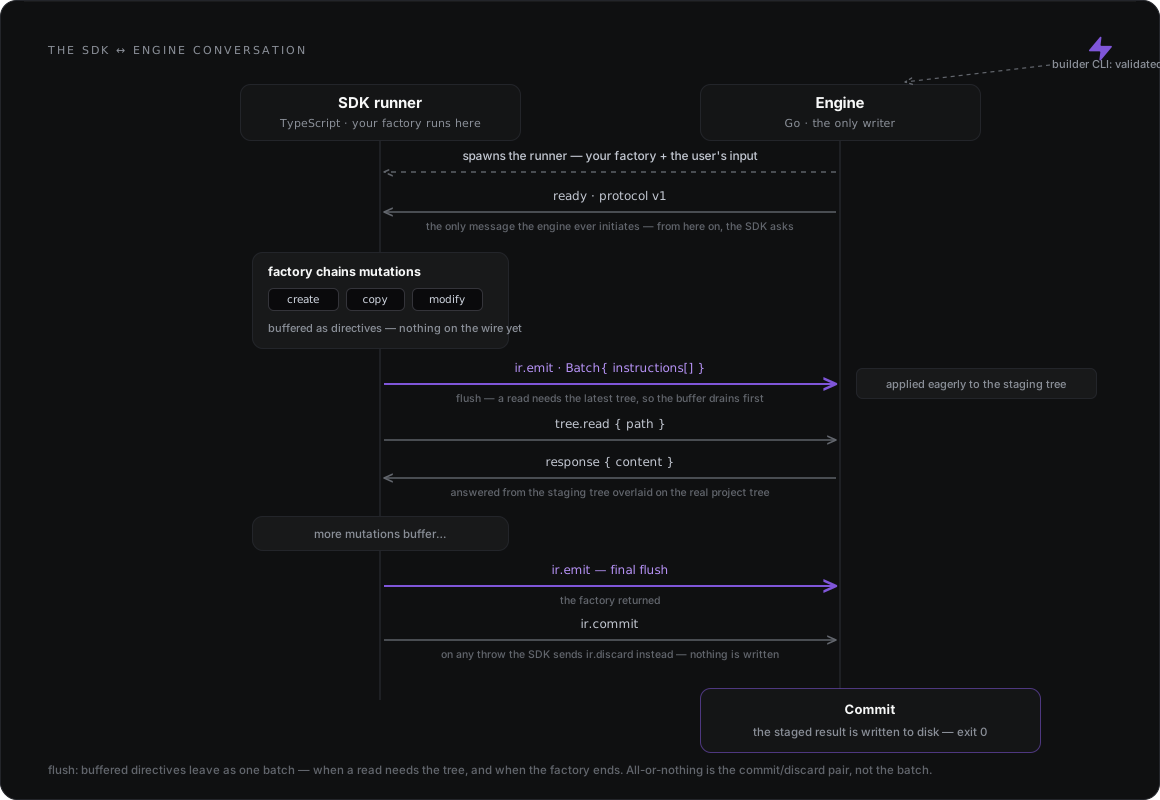
The SDK and the engine hold a **conversation**. Directives don’t cross one by one: as your factory chains mutations they buffer inside the SDK, and the buffer **flushes** to the engine as a single batch at exactly two moments: when the factory finishes, and the moment you read a file. Flushing on read means a read always sees your own pending writes first.
### Engine — applying the records
[Section titled “Engine — applying the records”](#engine--applying-the-records)
The **engine** receives those instruction records and applies them, with several mechanisms for doing so safely: everything lands in a staging tree while your factory runs, and only after the factory returns successfully is the staged result written to disk. The engine is the only component that writes, and a failed run writes nothing.
The engine is **AST-blind and author-API-blind**. It doesn’t know what a verb or a dialect is; code edits arrive as final file content, ready to apply. Its one authoring job is rendering [`{= =}` templates](/guides/templates/) against your inputs. Because of that, the SDK surface can grow richer without the execution contract changing.
### CLI — the agent-facing surface
[Section titled “CLI — the agent-facing surface”](#cli--the-agent-facing-surface)
The **`builder` CLI** is the front door: `init`, `new`, `execute`. It validates your input, resolves the schematic, and starts the engine, which owns the run from there. The CLI is deliberately designed for AI agents to drive: output comes back as structured JSON, so an agent can run a schematic and parse the result like any other API.
The CLI works with two anchors: the **manifest root**, which every read (`project-builder.json`, collections, factories, schemas, templates) resolves against, and the **working directory**, which every write lands in. By default they are the same directory; `--manifest` separates them (see [External collections](/guides/external-collections/)).
## The AST story
[Section titled “The AST story”](#the-ast-story)
As an extreme but useful simplification, **writing software, day to day, is mutating files.** And a file is just text; the extension is what gives that text meaning.
Seen that way, most mutations are simple: create, replace, move, copy treat the file as text and never need to know what it means. The exception is `modify`. To change a file programmatically you first have to **understand** it, and a program understands a file through an **AST** (abstract syntax tree).
Every file type has its own parser library, and the ASTs they produce follow no shared convention. Left alone, every schematic author would have to pick libraries, install them, and learn each one’s tree shape.
The SDK solves this by **centralizing the ASTs**: it builds on those libraries and exposes them as ready-to-use dialects: TypeScript, React, JSON, YAML and CSS today, plus NestJS and Angular on top of TypeScript. HTML and dialects for Vue and Svelte are planned. You install nothing extra; they’re already part of the SDK. When a custom edit needs the library itself, each dialect exports it as `astLibrary` (see [AST libraries](/reference/ast-libraries/)).
The boundary stays clean: **ASTs belong to the SDK.** By the time an AST edit reaches the engine, it has already been lowered to a plain, ready-to-apply record; the engine never parses code.
## Under the hood: an engine that speaks wire, not language
[Section titled “Under the hood: an engine that speaks wire, not language”](#under-the-hood-an-engine-that-speaks-wire-not-language)
The SDK is TypeScript; the engine is Go. They talk through a deliberately thin bridge: the engine runs a **Bun sidecar** through an adapter, and that sidecar starts the SDK’s **runner**, the entry point that loads your factory and opens the conversation. From there, everything that crosses between them is **framed JSON** on the wire: `ir.emit`, `tree.read`, `ir.commit`, `ir.discard`.
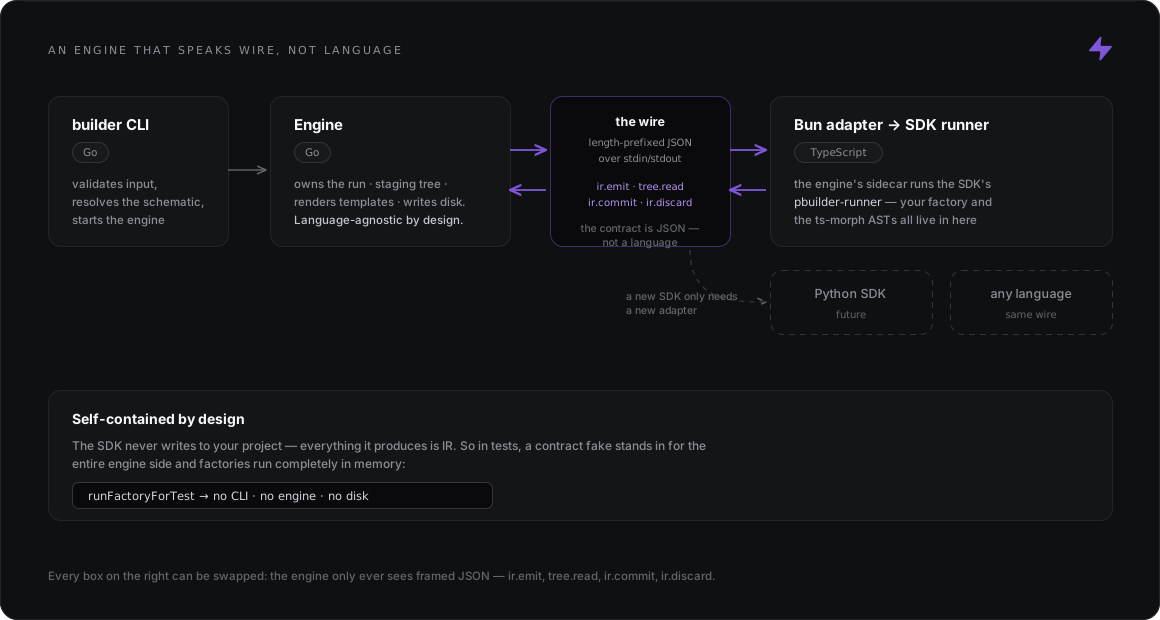
Two properties fall out of this design:
* **The engine is language-agnostic.** It speaks only the wire protocol. An SDK in Python, Rust, or any other language only needs a new adapter; the engine, the staging tree, and the safety guarantees stay exactly the same.
* **The SDK is self-contained.** Everything a factory produces is IR, so the testing harness can stand in for the entire engine side and run factories completely in memory, with no CLI, engine, or disk. That’s why schematics are testable like any other code.
### For integrators: how the runner receives input
[Section titled “For integrators: how the runner receives input”](#for-integrators-how-the-runner-receives-input)
This matters only if you build an engine or adapter that spawns the SDK runner yourself. `builder execute` handles it for you, and there is no `--input-file` flag on `builder`.
The runner takes the schematic’s input from **exactly one** of `--input ` or `--input-file `. An input file must be a **readable regular file** containing valid JSON, no larger than 10 MiB (10485760 bytes). Absolute and relative paths both work, and a symbolic link is followed when its target is a regular file, even one outside the working directory.
The runner checks the input **before** it expects the host’s greeting and before it imports the factory. When the input is rejected, the runner exits with code `1` and one line on stderr:
| Input | Diagnostic |
| -------------------------------------------------------------------------------- | ------------------------------------------------------------------------------------------ |
| A directory, named pipe or other non-regular file; a missing file; a broken link | `pbuilder-runner: --input-file could not be read — is not a readable file` |
| A file over the cap | `pbuilder-runner: --input-file exceeds the 10485760-byte cap` |
| Invalid JSON | `pbuilder-runner: --input-file is not valid JSON (line L, column C)` |
| Both `--input` and `--input-file` | `pbuilder-runner: --input and --input-file are mutually exclusive — pass exactly one` |
| Neither | `pbuilder-runner: exactly one of --input or --input-file is required` |
None of these is a factory or handshake problem: materialize the JSON into a regular file (not a pipe or a directory) and, for a link, check its target. The runner’s input handling is defined in the SDK source, [`src/transport/runner.ts`](https://github.com/Project-Builder-Schematics/project-builder-sdk/blob/main/src/transport/runner.ts). The runner is not a standalone generator: without a host speaking the protocol on stdin/stdout, it stops at the greeting.
# Installation
> Install the builder CLI with Homebrew or a tarball, add Bun as the schematics runtime, and get the SDK into your project.
Two things need to be on your machine: the **`builder` CLI** (which ships the engine) and **[Bun](https://bun.sh)**, the runtime schematics execute in. The SDK itself is added per project, usually automatically.
Run `builder --version` to check your installed CLI version.
## macOS / Linux
[Section titled “macOS / Linux”](#macos--linux)
With [Homebrew](https://brew.sh) installed, grab the CLI (the `builder` binary) from the tap:
```sh
brew install project-builder-schematics/tap/pbuilder
```
Linux / WSL2
This needs a recent Homebrew. The cask install is verified on Homebrew 6.x; older versions refuse casks on Linux.
No Homebrew at all? Download the per-platform tarball from the [tap’s releases](https://github.com/Project-Builder-Schematics/homebrew-tap/releases) (`pbuilder__linux_amd64.tar.gz` and friends) and put `builder` on your `PATH`.
Schematics execute through a [Bun](https://bun.sh) sidecar, so Bun must be installed too:
```sh
brew install oven-sh/bun/bun # or: curl -fsSL https://bun.sh/install | bash
```
Note
Bun is only the schematics’ runtime. Your project itself keeps whatever package manager and tooling it already uses (npm, pnpm, yarn, …).
## Windows
[Section titled “Windows”](#windows)
Not yet supported
Windows builds of the CLI are on the roadmap; in the meantime the supported path on Windows is WSL2 (Ubuntu), using the Linux instructions above.
## The SDK itself
[Section titled “The SDK itself”](#the-sdk-itself)
You normally don’t install it by hand: `builder init` adds `@pbuilder/sdk` to your project’s `devDependencies` automatically. To add it manually, use whichever package manager your project already uses:
```sh
npm install -D @pbuilder/sdk # or: pnpm add -D / yarn add -D / bun add -d
```
Just trying Project Builder out? You can run it without declaring the SDK in `package.json`. See [Evaluate without adopting the SDK](/guides/evaluate-without-sdk/).
With the CLI and Bun in place, you’re ready for [your first schematic](/getting-started/your-first-schematic/).
# What is Project Builder?
> Deterministic code generation designed to complement AI, for consistent software, saved time, and patterns that grow with your team.
Project Builder gives developers, and the AI agents working alongside them, deterministic code generation. A prompt produces something different every run; a **schematic**, a typed and testable file-mutation program, produces the same files, byte for byte, every time. You (or your agent) encode the change once, and from then on you run that program instead of reviewing generated output.
## Built to complement AI
[Section titled “Built to complement AI”](#built-to-complement-ai)
As software craftsmen we want to build quality software, and quality starts with code that is predictable and repeatable. AI is a capable collaborator, but its output is *variable*: the same request produces different code every run. Project Builder is designed to complement that variability. Let the AI decide **what** to build, and let a schematic make the **how** deterministic.
That determinism keeps generated code consistent and saves time and money:
* Every service, component, or module generated by a schematic follows the same structure and conventions, so what the AI produces on Friday does not drift from what it produced on Monday.
* A change encoded once runs in milliseconds on every run. You spend no tokens regenerating it and no review cycles re-validating output that should never have changed.
Schematics also grow with your codebase and your team. Every pattern you encode becomes a reusable, versioned building block that new teammates, human or agent, can run on day one.
## What is a schematic?
[Section titled “What is a schematic?”](#what-is-a-schematic)
A schematic is a small package that lives in your repository. It has three files:
* `schema.json`: the schematic’s typed inputs, the contract with whoever runs it.
* `schema.generated.ts`: an `Input` type generated from the schema, so your code is typed against the contract rather than a hand-written shape.
* `factory.ts`: your authoring logic, a function that receives the typed input and schedules file mutations such as creating files, editing content, and scaffolding whole folders of templates.
Once registered, you run it with `builder execute :`, passing inputs as CLI flags. Because a factory is just a typed function, it can also be executed entirely in memory by the testing harness, without the CLI or the disk. That is what makes schematics testable like any other code. See [Your first schematic](/getting-started/your-first-schematic/) for the end-to-end walkthrough.
The golden rule: never improvise a schematic
A schematic is an **automation of code that already works**. Have the code running and tested first, *then* encode it as a schematic. Premature automation spends time and resources on something you may only ever run once: extract a schematic when a pattern has proven itself, never before.
The machinery (the SDK–engine conversation, instruction records, and the AST story) has [a page of its own](/getting-started/how-it-works/).
## Design principles you’ll feel as a user
[Section titled “Design principles you’ll feel as a user”](#design-principles-youll-feel-as-a-user)
* **Idempotency.** Factories re-run against already-generated projects, so mutations are written to be safe on repeat: read the tree first, then create or update, and skip the edit when your marker, import, or entry is already present.
* **Fail-closed.** Verbs that write to a new path (`create`, `rename`, `move`, `copy`, `copyIn`, `scaffold`) reject on a collision with an existing path; overwriting is always a deliberate opt-in via `force: true`.
* **All-or-nothing runs.** Nothing touches disk while your factory runs. If it throws before it returns, nothing is written at all, and your tree is left exactly as it was.
## Where next
[Section titled “Where next”](#where-next)
How it works
The SDK–engine conversation, flush, and the language-agnostic bridge: [How it works](/getting-started/how-it-works/).
Install it
Get the `builder` CLI and Bun set up in a couple of commands: [Installation](/getting-started/installation/).
Build your first schematic
From `builder init` to a running, idempotent generator: [Your first schematic](/getting-started/your-first-schematic/).
Evaluating Project Builder in an existing repository? You can try it without adding the SDK to `package.json`. See [Evaluate without adopting the SDK](/guides/evaluate-without-sdk/).
# Testing schematics
> Run a factory in memory with the SDK's testing harness and assert on the files it writes, with no CLI, engine, or disk.
Testing utilities, not a test runner
`@pbuilder/sdk/testing` provides utilities for testing schematics with your test runner. Bun is not required for the in-memory factory example below: it runs on Node with Vitest, Jest, or Rstest.
Run your factory through `runFactoryForTest`, then assert on the resulting tree. This needs no CLI or engine process, and no generated files land on disk.
## A first test
[Section titled “A first test”](#a-first-test)
Start in a separate directory so this example does not change your application’s test configuration. Use Node **26.8.1** and npm **11.19.0**, the versions used to verify it. Create this `package.json`, then install the SDK and Vitest:
package.json
```json
{
"private": true,
"type": "module"
}
```
```sh
npm install --save-dev --save-exact @pbuilder/sdk@0.2.4 vitest@5.0.0
```
Use a JavaScript ESM factory to keep the example independent of TypeScript transforms:
factory.js
```js
import { create } from '@pbuilder/sdk/commons';
export function greetingFactory(input) {
create('src/greeting.txt', {
template: `Hello, ${input.name}!\n`,
options: {},
});
}
```
Create a `tests` directory and add:
tests/vitest.test.js
```js
import process from 'node:process';
import { expect, test } from 'vitest';
import { runFactoryForTest } from '@pbuilder/sdk/testing';
import { greetingFactory } from '../factory.js';
test('commits a greeting through the SDK harness on Node without Bun', async () => {
expect(process.versions.node).toBeDefined();
expect(process.versions.bun).toBeUndefined();
const result = await runFactoryForTest(greetingFactory, { name: 'Ada' });
expect(result.error).toBeUndefined();
expect(result.tree.get('src/greeting.txt')).toBe('Hello, Ada!\n');
});
```
vitest.config.js
```js
import { defineConfig } from 'vitest/config';
export default defineConfig({
test: { environment: 'node', include: ['tests/vitest.test.js'] },
});
```
```sh
node node_modules/vitest/vitest.mjs run
```
Expected result: **one passing test**. The greeting exists in the committed in-memory tree, not as `src/greeting.txt` on disk. JavaScript interpolation produces the text; this test does not exercise SDK template rendering.
## Use Jest or Rstest instead
[Section titled “Use Jest or Rstest instead”](#use-jest-or-rstest-instead)
Keep the same `package.json` and `factory.js`. Copy the test above to the path for your chosen runner and replace **only** its `expect, test` import; keep the other imports and assertions unchanged. Install only the runner you choose. Each configuration selects its own test file, so the three examples can also coexist.
### Jest
[Section titled “Jest”](#jest)
```sh
npm install --save-dev --save-exact @pbuilder/sdk@0.2.4 jest@30.5.1
```
In `tests/jest.test.js`, replace the Vitest import with:
```js
import { expect, test } from '@jest/globals';
```
jest.config.js
```js
export default {
testEnvironment: 'node',
testMatch: ['/tests/jest.test.js'],
transform: {},
};
```
```sh
node --experimental-vm-modules node_modules/jest/bin/jest.js --runInBand
```
Expected result: **one passing test**. This uses Jest’s native ESM mode with transforms disabled; Node emits an experimental VM Modules warning.
### Rstest
[Section titled “Rstest”](#rstest)
```sh
npm install --save-dev --save-exact @pbuilder/sdk@0.2.4 @rstest/core@0.11.12
```
In `tests/rstest.test.js`, replace the Vitest import with:
```js
import { expect, test } from '@rstest/core';
```
rstest.config.js
```js
import { defineConfig } from '@rstest/core';
export default defineConfig({
testEnvironment: 'node',
include: ['tests/rstest.test.js'],
});
```
```sh
node node_modules/@rstest/core/bin/rstest.js run
```
Expected result: **one passing test**, using the same factory and assertions.
### Scope of the verified example
[Section titled “Scope of the verified example”](#scope-of-the-verified-example)
These versions passed the inline `create` case on Node 26.8.1 on macOS ARM64. The SDK declares Node `>=25.9.0` and Bun `1.3.14` in its engines; this result does not change those requirements or establish official Node-only support for every SDK feature. Schema validation, filesystem scaffolding, template rendering, and TypeScript type checking are not covered by this example.
Runner references: [Vitest configuration](https://vitest.dev/config/), [Jest ESM](https://jestjs.io/docs/30.0/ecmascript-modules), and [Rstest configuration](https://rstest.rs/guide/basic/configure-rstest).
## Read the result tree
[Section titled “Read the result tree”](#read-the-result-tree)
`result.tree` is typed as `ReadonlyMap` and is a `Map` at runtime, not a plain object. Use `.get(path)` to read content (`undefined` when absent), `.has(path)` to check membership, `[...result.tree.keys()]` to list paths, and `.size` to count entries. Do not use `result.tree[path]` to read files.
## Seed files and idempotence
[Section titled “Seed files and idempotence”](#seed-files-and-idempotence)
The `seed` option is a plain object (`Record`); the returned `result.tree` is a Map containing **committed writes only**, not a full workspace snapshot. Seed files are readable by the factory, but untouched seed paths are absent from the returned Map. A write to a seeded path appears when committed:
```ts
import { test, expect } from "vitest";
import { runFactoryForTest } from "@pbuilder/sdk/testing";
import { find, replaceContent } from "@pbuilder/sdk/commons";
test("a seeded file is readable; only the write is committed", async () => {
const run = async (input: { name: string }) => {
const existing = await find("services.txt").read();
replaceContent("services.txt", `${existing}\n${input.name}`);
};
const seed = { "services.txt": "payments", "untouched.txt": "keep" };
const result = await runFactoryForTest(run, { name: "orders" }, { seed });
expect(result.error).toBeUndefined();
expect(result.tree.get("services.txt")).toEqual("payments\norders");
expect(result.tree.has("untouched.txt")).toBe(false);
});
```
## `packageDir` — anchoring package-local verbs
[Section titled “packageDir — anchoring package-local verbs”](#packagedir--anchoring-package-local-verbs)
The options bag’s other field, `packageDir` (the schematic package’s absolute directory), anchors the package-local verbs (`scaffold`, `copyIn`, `create({ templateFile })`) and opts the run into schema-derived input validation against the adjacent `schema.json`. Without it those verbs have nothing to resolve against. (When the CLI runs your schematic, it passes the package location automatically, so this is only a testing concern. See [Scaffolding](/guides/scaffolding/) for the verbs themselves.)
## What the harness does — and doesn’t — fake
[Section titled “What the harness does — and doesn’t — fake”](#what-the-harness-does--and-doesnt--fake)
Templates are stored **verbatim** in the test tree. Rendering happens in the engine at `builder execute` time, and the harness doesn’t fake it. So asserting on a templated `create` means asserting on the raw `{= .name =}` text, not rendered output.
Caution
`@pbuilder/sdk/testing` ships `0.x`, semver-exempt, until real use validates the result shape.
## Bun as an alternative
[Section titled “Bun as an alternative”](#bun-as-an-alternative)
You can also use Bun’s test runner with the harness. Import `test` and `expect` from `bun:test` in your Bun tests and run `bun test` with their path. The Node runtime assertions above are specific to the Node smoke test; omit them when running on Bun.
### Editor errors on `bun:test`?
[Section titled “Editor errors on bun:test?”](#editor-errors-on-buntest)
`bun test` strips types rather than checking them, so it runs fine either way, but your editor needs a few tsconfig settings to resolve the imports. Add `typescript` and `@types/bun` as dev dependencies, then make sure your `tsconfig.json` has:
* `moduleResolution: "NodeNext"` (or `"bundler"`): TypeScript’s default legacy resolution cannot read a package’s `exports` map, which is the only route to `@pbuilder/sdk`’s subpaths (`./testing`, `./commons`, and friends). Without this, your editor reports `Cannot find module '@pbuilder/sdk/commons'` even though the import is correct.
* `allowImportingTsExtensions: true`: factories import the generated types with an explicit `.ts` extension (`./schema.generated.ts`), which TypeScript rejects by default.
* If you restrict ambient types with `types`, include `"bun"` alongside any existing entries so the editor can resolve `bun:test` from `@types/bun`.
# Your first schematic
> Go from an empty workspace to a running, idempotent code generator in six commands.
Every step below is runnable exactly as written. You’ll initialise a workspace, scaffold a schematic, declare its typed inputs, write the factory, and execute it twice to see idempotency at work. [Install the CLI and Bun](/getting-started/installation/) first if you haven’t.
1. **Initialise a workspace** (inside any project, new or existing):
```sh
builder init
```
This creates `project-builder.json` (the workspace config), a `schematics/` folder, and an AI skill under `.claude/skills/pbuilder/`: a command reference your coding agent picks up automatically. It also installs `@pbuilder/sdk` as a dev dependency, creating a `package.json` first if the folder doesn’t have one.
2. **Scaffold a schematic:**
```sh
builder new schematic hello
```
You get a registered, ready-to-edit package:
```txt
schematics/hello/
├── schema.json # typed inputs — the contract with the user
├── schema.generated.ts # generated from schema.json — never edit
└── factory.ts # your authoring logic
```
`project-builder.json` now lists it under `collections.default.hello`.
3. **Declare the inputs.** Replace the generated `schema.json`’s contents with the following; every property needs a `label` (codegen fails without it):
schematics/hello/schema.json
```json
{
"properties": {
"name": { "type": "string", "label": "Service name", "required": true }
}
}
```
Property types are `string`, `number`, `boolean`, and `enum`; `default` and `description` are optional. An `enum` currently needs its values under **both** `choices` (read by codegen and the SDK) and `enum` (read by `builder execute`), with the same values:
```json
{ "type": "enum", "label": "Size", "choices": ["sm", "md"], "enum": ["sm", "md"] }
```
4. **Regenerate the input types:**
```sh
bunx pbuilder-codegen schematics/hello
```
This rewrites `schema.generated.ts` with an `Input` type derived from your schema, so your factory is typed against the schema, never against a hand-written shape. To regenerate every registered schematic at once, run `bunx pbuilder-codegen` with no arguments (see [Type generation](/guides/type-generation/)).
5. **Write the factory:**
schematics/hello/factory.ts
```ts
import { create, find, replaceContent } from "@pbuilder/sdk/commons";
import type { Input } from "./schema.generated.ts";
export default async (input: Input) => {
// create a new file
create(`src/services/${input.name}.ts`, {
template: `export const serviceName = "${input.name}";`,
options: {},
});
// content-aware edit: read the tree, then create or update
const existing = await find("services.txt").read();
if (existing === undefined) {
create("services.txt", { template: input.name, options: {} });
} else {
replaceContent("services.txt", `${existing}\n${input.name}`);
}
};
```
The engine invokes the module’s **default export**, which is the factory. This one builds its output strings in TypeScript; the [template language](/guides/templates/) is the declarative alternative.
6. **Execute it.** `default:hello` is `:` as registered in `project-builder.json`; inputs are passed as CLI flags:
```sh
builder execute default:hello --name=payments
```
```txt
~ services.txt
~ src/services/payments.ts
✓ done — 2 modified
```
(`~` marks a path the run wrote.)
## Run it again
[Section titled “Run it again”](#run-it-again)
Now run it again **with a different input**:
```sh
builder execute default:hello --name=orders
```
`services.txt` grows by one line instead of being clobbered, because of the read-back loop from step 5. Re-running with the **same** name, on the other hand, rejects with `path-collision`: `create` is fail-closed on an existing path (pass `force: true` to overwrite deliberately), and since a failed run writes nothing, your tree is left exactly as it was.
Tip
Make mutations idempotent. Factories re-run against already-generated projects, so check whether your marker, import, or entry is already present before inserting it. The factory above shows the read-back mechanics; a production factory would also skip the append when the name is already listed.
Note
If your editor flags the `.ts`-extension import or `bun:test`, the cause is missing tsconfig settings (see [Testing schematics](/getting-started/testing/)); Bun itself runs fine without them.
## Two rules that save debugging time
[Section titled “Two rules that save debugging time”](#two-rules-that-save-debugging-time)
* **Always pass `options: {}` to `create`**, even when the template has no tokens. The type requires it, and in untyped call sites (plain JS, `any`) omitting it puts `undefined` in the directive batch, rejecting the write as unrepresentable.
* **`find().read()` is a trichotomy**: `undefined` means the file is absent, `""` means it exists and is empty. Branch on `=== undefined`, never `if (!content)`, which conflates the two.
## Next steps
[Section titled “Next steps”](#next-steps)
* **Test it** without the CLI or a running engine: [Testing schematics](/getting-started/testing/).
* [Mutation verbs](/guides/mutation-verbs/): everything a factory can do to the tree.
* [Templates](/guides/templates/): the declarative template language inside `create()`.
* [Scaffolding](/guides/scaffolding/): mirror a whole folder of templates instead of writing one `create()` per file.
* [Pending directives](/guides/pending-directives/): preview a factory’s planned changes before anything commits.
* [Error handling](/guides/error-handling/): the structured `AuthoringError` contract of a rejected run.
# Angular dialect
> Add component imports, root providers, routes, NgModule entries, signals and injections in an Angular project with @pbuilder/sdk/angular, on top of every TypeScript dialect op.
`@pbuilder/sdk/angular` edits the `.ts` files of an Angular project. Its handle has every op of `@pbuilder/sdk/typescript` plus ops for standalone components, the application’s root providers, routes, `@NgModule` metadata, and class members such as signals and injected dependencies. All ops chain on one handle and the file is written once; see [Modify](/guides/modify/#how-a-dialect-handle-works) for how a handle works.
Each op finds its target from the code in the file, whatever the file is named, so the ops work with both the `app.ts` and the `app.component.ts` naming styles.
```ts
import * as angular from "@pbuilder/sdk/angular";
export const run = async () => {
await angular
.find("src/app/app.config.ts")
.addRootProvider({ expression: "provideHttpClient(withFetch())" }, [
{ name: "provideHttpClient", from: "@angular/common/http" },
{ name: "withFetch", from: "@angular/common/http" },
]);
};
```
```ts
// before
import { ApplicationConfig } from "@angular/core";
import { provideRouter } from "@angular/router";
import { routes } from "./app.routes";
export const appConfig: ApplicationConfig = {
providers: [provideRouter(routes)],
};
// after
import { ApplicationConfig } from "@angular/core";
import { provideRouter } from "@angular/router";
import { routes } from "./app.routes";
import { provideHttpClient, withFetch } from "@angular/common/http";
export const appConfig: ApplicationConfig = {
providers: [provideRouter(routes), provideHttpClient(withFetch())],
};
```
## Inherited TypeScript ops
[Section titled “Inherited TypeScript ops”](#inherited-typescript-ops)
The handle carries every [TypeScript dialect](/guides/modify/) op: `addImport`, `addDefaultImport`, `addNamespaceImport`, `addTypeImport`, `addSideEffectImport`, `addReExport`, `addExportAll`, `addFunction`, `addVariable`, `addClass`, `removeImport`, `removeExport`, `removeExportAll`, `addArrayElement`, `addClassProperty` and `sortImports`. An op the TypeScript dialect gains later is available here too.
## Code and its imports
[Section titled “Code and its imports”](#code-and-its-imports)
The component, root-provider and NgModule ops take `(element, imports?)`.
* `element` is an identifier such as `"RouterOutlet"`, or `{ expression }` for code such as `{ expression: "provideHttpClient(withFetch())" }`. An expression must parse as exactly one expression. Beyond that, the op writes it as given.
* `imports` lists the `{ name, from }` named imports the element needs. Each one is added with the same rules as the TypeScript `addImport`: an existing import of `name` from `from` is reused, and a `name` already bound some other way in the file rejects.
If the list already has the element, the op leaves it as it is. Elements are compared token by token, so spacing and comments do not count.
## Component ops
[Section titled “Component ops”](#component-ops)
| Op | Appends to |
| ----------------------------------------- | ------------------------------------------- |
| `addComponentImport(element, imports?)` | `imports` of the file’s only `@Component` |
| `addComponentProvider(element, imports?)` | `providers` of the file’s only `@Component` |
Both ops create the metadata object or the array when it is missing.
```ts
await angular
.find("src/app/app.ts")
.addComponentImport("RouterOutlet", [{ name: "RouterOutlet", from: "@angular/router" }]);
```
```ts
// before
import { Component } from "@angular/core";
@Component({
selector: "app-root",
imports: [],
templateUrl: "./app.html",
})
export class App {}
// after
import { Component } from "@angular/core";
import { RouterOutlet } from "@angular/router";
@Component({
selector: "app-root",
imports: [RouterOutlet],
templateUrl: "./app.html",
})
export class App {}
```
## Root providers
[Section titled “Root providers”](#root-providers)
`addRootProvider(element, imports?)` appends to the application’s root `providers`. It looks for them in this order:
1. The `providers` of the file’s only top-level variable typed `ApplicationConfig`, by annotation (`const appConfig: ApplicationConfig = …`) or `satisfies`, whatever its name.
2. The `providers` of the config object passed to the file’s only `bootstrapApplication(...)` call. When the call has no config yet, the op creates one.
```ts
// src/main.ts before
import { bootstrapApplication } from "@angular/platform-browser";
import { App } from "./app/app";
bootstrapApplication(App);
// after addRootProvider({ expression: "provideHttpClient()" }, [...])
import { bootstrapApplication } from "@angular/platform-browser";
import { App } from "./app/app";
import { provideHttpClient } from "@angular/common/http";
bootstrapApplication(App, { providers: [provideHttpClient()] });
```
When `bootstrapApplication` receives a config by name, such as an `appConfig` imported from `./app/app.config`, the op rejects and its message names that module. Run the op on that file instead.
## Routes
[Section titled “Routes”](#routes)
| Op | Adds |
| ---------------------------------------------------------------- | ------------------------------------------------------------------------------------------------------------------------------------------------------------------------------------------------------------------- |
| `addRoute({ path, component, from })` | An eager route. It imports `component` from `from`. |
| `addLazyRoute({ path, loadComponent \| loadChildren, export? })` | A lazy route that loads the module named by `loadComponent` or `loadChildren` (exactly one of them). With `export`, the route reads that named export; without it, the module’s default export. No import is added. |
Both ops add to the file’s only top-level variable typed `Routes` or `Route[]`, by annotation or `satisfies`. Angular uses the first route that matches, so a new route goes before a top-level `{ path: "**" }` route when there is one, and at the end otherwise.
```ts
await angular
.find("src/app/app.routes.ts")
.addRoute({ path: "about", component: "About", from: "./about/about" })
.addLazyRoute({ path: "settings", loadComponent: "./settings/settings", export: "Settings" })
.addLazyRoute({ path: "admin", loadChildren: "./admin/admin.routes" });
```
```ts
// before
import { Routes } from "@angular/router";
import { Home } from "./home/home";
export const routes: Routes = [
{ path: "", component: Home },
{ path: "**", redirectTo: "" },
];
// after
import { Routes } from "@angular/router";
import { Home } from "./home/home";
import { About } from "./about/about";
export const routes: Routes = [
{ path: "", component: Home },
{ path: "about", component: About },
{ path: "settings", loadComponent: () => import("./settings/settings").then((m) => m.Settings) },
{ path: "admin", loadChildren: () => import("./admin/admin.routes") },
{ path: "**", redirectTo: "" },
];
```
An equal route is left as it is. A different route with the same `path` rejects, so a schematic run twice with other inputs never adds a second one.
### Routes in an NgModule app
[Section titled “Routes in an NgModule app”](#routes-in-an-ngmodule-app)
In an NgModule routing file with no `Routes` variable, the ops add to the routes of the only `RouterModule.forRoot(...)` or `RouterModule.forChild(...)` call: its inline array, or a variable in the same file that it names.
```ts
await angular
.find("src/app/app-routing.module.ts")
.addRoute({ path: "about", component: "About", from: "./about/about" });
```
```ts
// before
import { NgModule } from "@angular/core";
import { RouterModule, Routes } from "@angular/router";
import { Home } from "./home/home";
const routes = [
{ path: "", component: Home },
{ path: "**", redirectTo: "" },
];
@NgModule({
imports: [RouterModule.forRoot(routes)],
exports: [RouterModule],
})
export class AppRoutingModule {}
// after
import { NgModule } from "@angular/core";
import { RouterModule, Routes } from "@angular/router";
import { Home } from "./home/home";
import { About } from "./about/about";
const routes = [
{ path: "", component: Home },
{ path: "about", component: About },
{ path: "**", redirectTo: "" },
];
@NgModule({
imports: [RouterModule.forRoot(routes)],
exports: [RouterModule],
})
export class AppRoutingModule {}
```
The ops match `RouterModule` by that name. An aliased import (`RouterModule as RM`) is not found, and the op rejects.
### Known limitation: route comparison
[Section titled “Known limitation: route comparison”](#known-limitation-route-comparison)
Routes are compared token by token, and the ops write double quotes. A route written as `{ path: 'about', component: About }` is a different route from the one `addRoute` writes, so adding that route again rejects because the `path` is taken.
## NgModule
[Section titled “NgModule”](#ngmodule)
Angular recommends standalone components for new code. These ops maintain applications still built with `@NgModule`. Each takes `(element, imports?)`, like the component ops, and appends to one array of the file’s only `@NgModule`, creating the metadata object or the array when missing.
| Op | Appends to |
| ---------------------------------------- | -------------------------------------------------------------------------------------------------- |
| `addNgModuleImport(element, imports?)` | `imports`, such as other NgModules or `StoreModule.forRoot({})` |
| `addDeclaration(element, imports?)` | `declarations`. Angular requires those components, directives and pipes to be `standalone: false`. |
| `addNgModuleProvider(element, imports?)` | `providers` |
| `addNgModuleExport(element, imports?)` | `exports` |
| `addBootstrap(element, imports?)` | `bootstrap` |
The names avoid `addImport`, `addProvider` and `addExport` because `addImport` is already the inherited TypeScript op that adds an `import` statement.
```ts
await angular
.find("src/app/app.module.ts")
.addDeclaration("UserCard", [{ name: "UserCard", from: "./user-card" }]);
```
```ts
// before
import { NgModule } from "@angular/core";
import { BrowserModule } from "@angular/platform-browser";
import { App } from "./app";
@NgModule({ declarations: [App], imports: [BrowserModule], bootstrap: [App] })
export class AppModule {}
// after
import { NgModule } from "@angular/core";
import { BrowserModule } from "@angular/platform-browser";
import { App } from "./app";
import { UserCard } from "./user-card";
@NgModule({ declarations: [App, UserCard], imports: [BrowserModule], bootstrap: [App] })
export class AppModule {}
```
## Signals and injection
[Section titled “Signals and injection”](#signals-and-injection)
These ops add a class property through the TypeScript `addClassProperty` and import the Angular function it calls from `@angular/core`. The property goes after the class’s last property, which keeps inputs, outputs and injected dependencies above the constructor and the methods, as the Angular style guide asks. The ops find the class by its decorator, so they take no class name. If the class already has the same property, the op does nothing. Another member with the same name rejects.
| Op | Adds | Class |
| ----------------------------------------- | ------------------------------------------------------------------------------------------ | ---------------------------------------------------------------- |
| `addInjection(name, token, options?)` | `private readonly name = inject(token);` | `@Component`, `@Directive`, `@Pipe`, `@Injectable` or `@Service` |
| `addInput(name, options?)` | `readonly name = input(initial);`, or `input.required()` with `required: true` | `@Component` or `@Directive` |
| `addModel(name, options?)` | `readonly name = model(initial);`, for a two-way binding | `@Component` or `@Directive` |
| `addOutput(name, options?)` | `readonly name = output();` | `@Component` or `@Directive` |
| `addSignal(name, initial, options?)` | `protected readonly name = signal(initial);` | `@Component` or `@Directive` |
| `addComputed(name, expression, options?)` | `protected readonly name = computed(() => expression);` | `@Component` or `@Directive` |
The modifiers follow the Angular style guide: `input`, `model` and `output` properties are `readonly`, and `signal` and `computed` properties are `protected readonly` because the template reads them. The file must have exactly one class the op can target.
The options:
* `type` is the generic argument and must parse as exactly one type.
* `initial` is the value and must parse as exactly one expression. `addInput` and `addModel` reject `required: true` together with `initial`.
* `scope` replaces `private` in `addInjection` and `protected` in `addSignal` and `addComputed`.
* `imports` lists the `{ name, from }` imports those need, as in [Code and its imports](#code-and-its-imports).
* In `addInjection`, `token` is an identifier or `{ expression }`.
* In `addComputed`, an object literal expression is wrapped in parentheses so the arrow function returns it.
```ts
await angular
.find("src/app/user-card.ts")
.addInput("user", { type: "User", required: true, imports: [{ name: "User", from: "./user" }] })
.addInput("size", { type: '"sm" | "lg"', initial: '"sm"' })
.addModel("expanded", { type: "boolean", initial: "false" })
.addOutput("selected", { type: "User" });
```
```ts
// before
import { Component } from "@angular/core";
@Component({ selector: "app-user-card", template: "" })
export class UserCard {}
// after
import { Component, input, model, output } from "@angular/core";
import { User } from "./user";
@Component({ selector: "app-user-card", template: "" })
export class UserCard {
readonly user = input.required();
readonly size = input<"sm" | "lg">("sm");
readonly expanded = model(false);
readonly selected = output();
}
```
```ts
await angular
.find("src/app/counter.ts")
.addSignal("count", "0")
.addComputed("double", "this.count() * 2");
// -> protected readonly count = signal(0);
// -> protected readonly double = computed(() => this.count() * 2);
```
```ts
await angular
.find("src/app/users.ts")
.addInjection("http", "HttpClient", { imports: [{ name: "HttpClient", from: "@angular/common/http" }] });
```
```ts
// before
import { Injectable } from "@angular/core";
@Injectable({ providedIn: "root" })
export class Users {
constructor() {}
}
// after
import { Injectable, inject } from "@angular/core";
import { HttpClient } from "@angular/common/http";
@Injectable({ providedIn: "root" })
export class Users {
private readonly http = inject(HttpClient);
constructor() {}
}
```
## Format preservation
[Section titled “Format preservation”](#format-preservation)
A new entry follows the layout of the list it joins. A one-line list stays on one line, a multi-line list gets a new line at the indentation of its last entry, and a trailing comma stays trailing. Everything outside the inserted text is byte-identical.
## Rejections
[Section titled “Rejections”](#rejections)
An op rejects, and the file is left unchanged, when:
* the file has no `@Component`, `@NgModule`, decorated class, `ApplicationConfig` variable, `bootstrapApplication` call, or routes for the op, or more than one;
* the class already has a different member with the property’s name;
* the metadata, config, or route list is not a literal (for example `providers: PROVIDERS`);
* `bootstrapApplication` receives its config by name;
* a route `path` starts with `/`, or a different route already uses the `path`;
* an `element`, an import `name`, a `component`, an `export`, a `type`, or an `initial` is not valid, or `required` comes with `initial`.
Like the TypeScript dialect, `find(path)` accepts any `.ts` path. A file without the target fails only when one of these ops runs.
## Custom edits with `.modify()`
[Section titled “Custom edits with .modify()”](#custom-edits-with-modify)
Use `.modify(fn)` for edits these ops do not cover, such as a child route or `viewProviders`, and for files the ops reject. The callback receives the live ts-morph `SourceFile`, and the module’s `astLibrary` export is ts-morph itself:
```ts
import * as angular from "@pbuilder/sdk/angular";
await angular
.find("src/app/user-card.ts")
.addImport("CardState", "./card-state")
.modify((ast) => {
const viewProviders = ast
.getClassOrThrow("UserCard")
.getDecoratorOrThrow("Component")
.getArguments()[0]!
.asKindOrThrow(angular.astLibrary.SyntaxKind.ObjectLiteralExpression)
.getPropertyOrThrow("viewProviders")
.asKindOrThrow(angular.astLibrary.SyntaxKind.PropertyAssignment)
.getInitializerIfKindOrThrow(angular.astLibrary.SyntaxKind.ArrayLiteralExpression);
viewProviders.addElement("CardState");
});
```
## Next steps
[Section titled “Next steps”](#next-steps)
* [Modify](/guides/modify/): the TypeScript and React dialects and how a handle works.
* [NestJS dialect](/guides/nestjs-dialect/): the same approach for a NestJS `@Module`.
* [AST libraries](/reference/ast-libraries/): which library and version back each dialect.
# CSS dialect
> Set and remove declarations in .css files with @pbuilder/sdk/css, for example to sync design tokens into a Tailwind 4 file, plus the getDeclaration query and the .modify() escape hatch.
`@pbuilder/sdk/css` sets and removes declarations in `.css` files. It is meant for files that mix generated values with hand-written CSS, such as a design-token file synced from a JSON export (Figma variables, for example). Each op edits only the declaration it addresses, and every other byte of the file stays as it was. The handle works like every other dialect handle: ops chained on it coalesce into one write, and `await` follows the rules in [How a dialect handle works](/guides/modify/#how-a-dialect-handle-works).
## Syncing tokens into a Tailwind 4 file
[Section titled “Syncing tokens into a Tailwind 4 file”](#syncing-tokens-into-a-tailwind-4-file)
tokens.css (before)
```css
@import "tailwindcss";
@custom-variant dark (&:where(.dark, .dark *));
@theme {
--color-primary: #0b254d;
--radius: 4px;
}
```
factory.ts
```ts
import * as css from "@pbuilder/sdk/css";
export default async () => {
await css
.find("tokens.css")
.setDeclaration({ atRule: "theme" }, "--color-primary", "#1974f9")
.setDeclaration({ selector: "html[data-theme='nylon']" }, "--color-primary", "#0b254d");
};
```
tokens.css (after)
```css
@import "tailwindcss";
@custom-variant dark (&:where(.dark, .dark *));
@theme {
--color-primary: #1974f9;
--radius: 4px;
}
html[data-theme='nylon'] {
--color-primary: #0b254d;
}
```
The `@theme` value is updated where it is. The `nylon` mode block did not exist, so the op created it at the end of the file. The dialect takes resolved strings: turning token JSON into property names and values (aliases, modes) is your schematic’s job.
`find(path)` accepts only `.css` files; `.scss` is not supported. Any other extension throws synchronously. The snippets in the rest of this page leave out the factory wrapper.
## Targets
[Section titled “Targets”](#targets)
A target names one top-level block:
| Target | Block |
| -------------------------------------------------------------------------------- | ------------------------------------- |
| `{ selector: ":root" }` | the top-level rule `:root { }` |
| `{ atRule: "theme" }` | the body of `@theme { }` |
| `{ atRule: "theme", params: "inline" }` | the body of `@theme inline { }` |
| `{ atRule: "media", params: "(prefers-color-scheme: dark)", selector: ":root" }` | the `:root` rule inside that `@media` |
* The selector and params match as written, after trimming whitespace. `html[data-theme='nylon']` and `html[data-theme="nylon"]` are different targets, and setting a value on the second one creates a new block next to the first.
* The at-rule name is written without `@` and matches case-insensitively.
* Leaving out `params` matches only an at-rule with no params. `{ atRule: "theme" }` does not match `@theme inline { }`: on a file that has only `@theme inline`, it creates a new `@theme { }` block at the end of the file. Use `{ atRule: "theme", params: "inline" }`.
* An at-rule statement with no body, such as `@layer base;` or `@import`, is never a target.
* A target that matches more than one block rejects.
## Placement
[Section titled “Placement”](#placement)
* A missing block is created at the end of the file. It always lands after `@import`, which must come before every other rule, and after any hand-written header. A rule inside an at-rule, such as `:root` inside `@media`, is created at the end of that at-rule.
* A new block uses the file’s line ending (`\n` or `\r\n`) and the indentation of its first top-level declaration. With no declaration to copy, it indents with two spaces.
* A new declaration goes last in its block, or next to an existing one with `{ before }` or `{ after }`.
* An existing declaration is updated in place and the anchor is ignored, so a second run never reorders the block.
```ts
css.find("tokens.css").setDeclaration({ atRule: "theme" }, "--color-accent", "#ff0", { after: "--color-primary" });
// -> @theme {
// -> --color-primary: #0b254d;
// -> --color-accent: #ff0;
// -> --radius: 4px;
// -> }
```
A target with an at-rule and a selector creates both when they are missing:
```ts
css.find("tokens.css").setDeclaration(
{ atRule: "media", params: "(prefers-color-scheme: dark)", selector: ":root" },
"--color-primary",
"#9ec5ff",
);
// appended to the file:
// -> @media (prefers-color-scheme: dark) {
// -> :root {
// -> --color-primary: #9ec5ff;
// -> }
// -> }
```
## Property names and values
[Section titled “Property names and values”](#property-names-and-values)
* Regular property names compare case-insensitively, so `COLOR` updates `color`. Custom properties compare case-sensitively, as in CSS: `--Brand` and `--brand` are two declarations.
* A value is raw CSS, such as `#1974f9`, `var(--blue-500)`, or `calc(1rem + 2px)`, and must be exactly one declaration value. `;` and `}` are allowed inside strings, as in `content: ";"`.
* `!important` goes in the `important` option, never in the value. `{ important: true }` writes it, and leaving the option out removes it from an existing declaration.
* The dialect does not reason about shorthands. Setting `margin-top` on a block that has `margin: 8px` adds `margin-top` and leaves `margin` alone.
## Ops
[Section titled “Ops”](#ops)
### `setDeclaration(target, property, value, options?)`
[Section titled “setDeclaration(target, property, value, options?)”](#setdeclarationtarget-property-value-options)
Sets `property` to `value` in the target block. An existing declaration is updated in place. A new one goes last in the block, or next to `options.before` or `options.after`. A missing block is created at the end of the file. `options.important: true` writes `!important`. Setting the value a declaration already has writes nothing.
```ts
// :root before: color-scheme: light !important;
css.find("tokens.css").setDeclaration({ selector: ":root" }, "color-scheme", "light");
// -> :root {
// -> color-scheme: light;
// -> }
```
### `removeDeclaration(target, property)`
[Section titled “removeDeclaration(target, property)”](#removedeclarationtarget-property)
Removes `property` from the target block. A missing block or declaration is a no-op, so a sync can remove tokens that may already be gone. The block stays, even when it ends up empty.
```ts
css
.find("tokens.css")
.removeDeclaration({ atRule: "theme" }, "--radius")
.removeDeclaration({ selector: ".missing" }, "--x");
// -> @theme {
// -> --color-primary: #0b254d;
// -> }
```
## Rejections
[Section titled “Rejections”](#rejections)
Every rejection throws before the file changes. The message starts with `dialect operation failed: `and names the op and the target:
```text
dialect operation failed: setDeclaration(@theme) — `red; color: blue` is not a single declaration value.
```
A rejected op leaves the file unchanged, and so do the ops chained before it on the same handle. The ops reject:
* a property name that is not a CSS identifier or a `--` custom property;
* a value that would close the declaration or add another one (`red; color: blue`, `red}`), a value that carries `!important`, an empty value, and a value that carries a comment;
* a target that is not `{ selector }`, `{ atRule, params? }`, or both, an at-rule name written with `@`, and a selector or params that would add another block;
* a target that matches more than one block;
* a property declared more than once in the block, such as the fallback `display: -webkit-box; display: flex;` (edit those with [`.modify()`](#custom-edits-with-modify));
* an anchor that is not declared in the block, and passing both `before` and `after`.
## Custom edits with `.modify()`
[Section titled “Custom edits with .modify()”](#custom-edits-with-modify)
`.modify(fn)` hands `fn` the live PostCSS `Root`. The module exports the `postcss` package as `astLibrary`, so you do not need to add `postcss` to your own dependencies. PostCSS keeps every whitespace, comment, and BOM byte, so a file no op touched prints byte-identical.
```ts
await css.find("app.css").modify((root) => {
root.walkRules(".legacy", (rule) => rule.remove());
});
```
### Reading a value with `getDeclaration`
[Section titled “Reading a value with getDeclaration”](#reading-a-value-with-getdeclaration)
On the handle, `getDeclaration(target, property)` is a [query](/guides/modify/#queries). It ends the chain and resolves to `{ value, important }`, or `undefined` when the block or declaration is missing. It sees every op chained before it, and those ops still commit:
```ts
const primary = await css
.find("tokens.css")
.setDeclaration({ atRule: "theme" }, "--color-primary", "#1974f9")
.getDeclaration({ atRule: "theme" }, "--color-primary");
// primary: { value: "#1974f9", important: false }
```
The module also exports `getDeclaration(root, target, property)` as a plain function. It takes a parsed `Root` and returns `{ value, important }`, or `undefined` when the block or declaration is missing. It follows the same target, name, ambiguity, and duplicate rules as the ops, and throws the same errors. Call it inside `.modify(fn)` to decide what to change. This factory updates `--color-primary` in `@theme` only when it still has the old value:
factory.ts
```ts
import * as css from "@pbuilder/sdk/css";
export default async () => {
await css.find("tokens.css").modify((root) => {
if (css.getDeclaration(root, { atRule: "theme" }, "--color-primary")?.value === "#0b254d") {
// A bare root.walkDecls would also rewrite the html[data-theme='nylon'] block.
root.walkAtRules("theme", (theme) =>
theme.walkDecls("--color-primary", (decl) => {
decl.value = "#1974f9";
}),
);
}
});
};
```
tokens.css (after)
```css
@import "tailwindcss";
@custom-variant dark (&:where(.dark, .dark *));
@theme {
--color-primary: #1974f9;
--radius: 4px;
}
html[data-theme='nylon'] {
--color-primary: #0b254d;
}
```
`getDeclaration` also works on a `Root` you parse yourself with `astLibrary.parse`:
```ts
const root = css.astLibrary.parse((await css.find("tokens.css").read()) ?? "");
css.getDeclaration(root, { selector: ":root" }, "--radius"); // { value: "4px", important: false }
```
Edits made in `.modify()` skip the ops’ checks. The general [rules for custom edits](/guides/modify/#rules-for-custom-edits) apply here too.
## Going further
[Section titled “Going further”](#going-further)
* [AST libraries](/reference/ast-libraries/): which library and version back each dialect.
* The SDK’s [CSS dialect guide](https://github.com/Project-Builder-Schematics/project-builder-sdk/blob/main/docs/css-dialect.md).
# Error handling
> The AuthoringError contract that every rejected verb throws. Its verb, path, and reason fields, the fail-closed guarantee behind it, and how to write factories that fail well.
An authoring verb that gets rejected, either by the engine or by the SDK itself before any round-trip, throws `AuthoringError`. It carries everything you need to recover, in author vocabulary.
## Fail-closed by design
[Section titled “Fail-closed by design”](#fail-closed-by-design)
A failed run writes **nothing**. Verbs only schedule directives against the engine’s staging tree; disk writes happen at Commit, after your factory returns. A thrown `AuthoringError` (or any error) before return therefore leaves the target project exactly as it was. There is no partial-write state to clean up, which is why the verbs themselves are strict: `create` rejects an existing path, `replaceContent` rejects a missing one, and overwrites require an explicit `{ force: true }`. See [Mutation verbs](/guides/mutation-verbs/) for each verb’s exact semantics.
## How errors surface
[Section titled “How errors surface”](#how-errors-surface)
Calling the runner directly throws; `runFactoryForTest` captures the same `AuthoringError` on `result.error`:
```ts
import { runFactoryForTest } from "@pbuilder/sdk/testing";
import { AuthoringError } from "@pbuilder/sdk/commons";
const result = await runFactoryForTest(run, input);
if (result.error instanceof AuthoringError) {
switch (result.error.reason) {
case "path-collision":
console.error(`${result.error.verb} collided at ${result.error.path}`);
break;
default:
console.error(result.error.message);
}
}
```
The [testing guide](/getting-started/testing/) covers the harness itself.
## When a factory throws a plain `Error`
[Section titled “When a factory throws a plain Error”](#when-a-factory-throws-a-plain-error)
Not every failure is an `AuthoringError`. When your factory throws an ordinary `Error` (`throw new Error(...)`, or an error from a library it calls), the runner prints its message on stderr as `pbuilder-runner: `, cut off at 2,000 characters. Before printing, it rewrites the absolute paths in the message so they don’t reveal where things live on your machine:
| Path in your message | Shown as |
| --------------------------------- | -------------------------------------------------------------------------------------- |
| Under the project root | `/...`, for example `open '/src/a.ts'` |
| Under the `@pbuilder/sdk` package | `/...` |
| A Windows, UNC or WSL path | `` |
| Any other POSIX absolute path | a `../`-relative path from the project root |
| A URL | left as it is, except that a `file://` URL keeps `file://` while its path is rewritten |
So a factory that fails with
```text
ENOENT: no such file or directory, open '/home/ana/acme/src/a.ts'
```
shows up as
```text
pbuilder-runner: ENOENT: no such file or directory, open '/src/a.ts'
```
The runner inserts `` and `` on purpose. Seeing one in an error doesn’t mean your factory or a template is broken.
Caution
The rewrite is best-effort and only covers path shapes. Anything else you interpolate into a message, such as an environment variable’s value or a token, is printed as is. Keep secrets out of error messages.
## Fields
[Section titled “Fields”](#fields)
* **`verb`**: the author-facing verb whose call was rejected: `"create"`, `"modify"`, `"remove"`, `"rename"`, `"move"`, `"copy"`, or `"copyIn"`. `undefined` for batch-level rejections that have no single offending call.
* **`path`**: the author-declared, source-side path for the failing call. `undefined` when `verb` is `undefined`.
* **`reason`**: the closed cause of the rejection (see below).
* **`origin`**: derived from `reason`: `"write-rejected"` (the engine refused a write) or `"authoring-rejected"` (the SDK caught a misuse before any engine round-trip).
* **`appliedCount`**: how many directives applied within the failing run before the offender. It is a diagnostic only. A rejected run discards everything, so this count never promises partial persistence.
Note
**The `"modify"` label quirk.** `"modify"` labels the underlying wire mutation, and is shared by both `.replaceContent()` calls (the commons/dialect wholesale replace) and a dialect handle’s `.modify(fn)` AST escape hatch. The two calls lower to the same wire directive, so a rejection on either surfaces as `verb: "modify"`. This is deliberate, not a stale name left over from a rename. Assert against `"modify"`, never `"replaceContent"`.
## `reason` values
[Section titled “reason values”](#reason-values)
`reason` is a closed union. Exhaustive `switch` blocks are expected, and they get a compile error if a value is missed:
| `reason` | Meaning |
| ------------------------- | --------------------------------------------------------------------------------------- |
| `path-collision` | The target path already exists and `{ force: true }` was not passed. |
| `path-not-found` | The target path does not exist. |
| `unrepresentable-content` | The content could not be represented in the engine’s format. |
| `changes-too-large` | The run’s total change size exceeds the engine’s cap. |
| `outside-session` | An authoring verb was called outside an active session. |
| `unknown` | The rejection could not be classified. |
| `invalid-input` | The SDK rejected a call’s arguments before any engine round-trip. |
| `reserved-name` | The call used a name reserved by the SDK or engine. |
| `source-not-found` | A package-local source (`scaffold`/`copyIn`/`create({ templateFile })`) does not exist. |
| `source-not-regular-file` | A package-local source is not a regular file. |
| `source-unreadable` | A package-local source exists but could not be read. |
Caution
`source-outside-package` was removed from `@pbuilder/sdk`. The SDK no longer re-derives a containment ceiling for package-local sources. Migration: drop the `case "source-outside-package":` arm from any exhaustive `switch (err.reason)`. TypeScript will point at it.
## Catching and recovering
[Section titled “Catching and recovering”](#catching-and-recovering)
This is the same shape as above, now exhaustive, with a case for every `reason` value:
```ts
switch (err.reason) {
case "path-collision":
console.error(`${err.verb} collided at ${err.path}`);
break;
case "path-not-found":
case "unrepresentable-content":
case "changes-too-large":
case "outside-session":
case "unknown":
case "invalid-input":
case "reserved-name":
case "source-not-found":
case "source-not-regular-file":
case "source-unreadable":
console.error(err.message);
break;
}
```
## Writing good failure paths
[Section titled “Writing good failure paths”](#writing-good-failure-paths)
Write factories that treat rejection as an expected outcome:
* Prevent `path-collision` by reading first. The most common rejection is a re-run hitting a file the previous run created. Branch on [`find().read()`’s trichotomy](/guides/mutation-verbs/#reading-files-findpathread) (create when absent, update when present) instead of reaching for `{ force: true }`, which turns every re-run into a silent overwrite.
* Pass `force: true` only when overwriting is the intent. Fail-closed collisions are the SDK protecting earlier output; forcing them away removes that protection for this run and every future one.
* Let unexpected states fail loud. A rejected run discards everything and leaves the tree untouched, so throwing is always safe. A factory that detects a state it doesn’t understand should throw rather than guess.
* Switch exhaustively on `reason`. The closed union means the compiler tells you when a new SDK version adds (or removes) a rejection cause, as the `source-outside-package` removal above shows.
* In tests, assert on the structured fields. `result.error.verb`, `.path`, and `.reason` pin down *which* directive failed and *why*, which makes them far more mutation-resistant than matching on `message` text. Remember the `"modify"` label quirk when the failing call is a `replaceContent`.
## Next steps
[Section titled “Next steps”](#next-steps)
* [Mutation verbs](/guides/mutation-verbs/): the seven authoring verbs and the read-trichotomy rule.
* [Pending directives](/guides/pending-directives/): preview a factory’s planned changes before anything commits.
# Evaluate without adopting the SDK
> Try Project Builder in an existing repository without declaring @pbuilder/sdk in package.json, and see what init still changes, how to keep the trial local, and how to clean up or adopt.
You want to try Project Builder in a repository you already have, without adding `@pbuilder/sdk` to its `package.json` and without restoring that file after every run. `builder init --no-sdk-dependency` gives you that: the CLI skips the SDK declaration and its install, and `builder execute` runs against an SDK that is already present in `node_modules`.
This is not an “untouched repository” mode
`--no-sdk-dependency` only keeps `package.json` out of it. `init` still:
* creates or merges `project-builder.json`,
* creates `schematics/.gitkeep`,
* writes `.claude/skills/pbuilder/` (`SKILL.md`, `use.md`, `choose.md`, `create.md`),
* adds or updates a marker block in `AGENTS.md` or `CLAUDE.md`, so **a tracked agent file can change** while `package.json` stays untouched.
Schematics you run write their own files. If `init` fails part-way, the outputs written before the failure stay on disk.
## Before you start
[Section titled “Before you start”](#before-you-start)
* The `builder` CLI and Bun are installed. See [Installation](/getting-started/installation/).
* You know what is already modified, so you can tell trial changes apart later:
```sh
git status --short
```
## Run the trial
[Section titled “Run the trial”](#run-the-trial)
1. **Preview what `init` will do.** Nothing is written or installed:
```sh
builder init . --no-sdk-dependency --dry-run --non-interactive
```
With `--no-sdk-dependency` alone, the plan contains no `package.json` step at all. The skill and marker lines are a plan, not an exact prediction of what happens to files that already exist.
2. **Initialise the workspace:**
```sh
builder init . --no-sdk-dependency --non-interactive
```
`init` adds no SDK entry, no `generate:types` script and runs no install. It also **removes nothing**: an SDK version or script already in `package.json` stays, and an SDK already installed stays usable. The warning it prints lists the ways to provide an SDK; the next step is one of them.
To get the `generate:types` script anyway, add `--skip-types-script=false`. The full flag matrix is in the [`builder init` reference](/reference/cli-commands/#package-setup-flags).
3. **Put an SDK in `node_modules` without declaring it.** `execute` needs a complete SDK at `node_modules/@pbuilder/sdk`. With npm or Bun you can install one without touching `package.json` or the lockfile:
```sh
npm install --no-save @pbuilder/sdk
# or
bun add --no-save @pbuilder/sdk
```
pnpm and Yarn have no equivalent option: their add commands always record the dependency. A later install or prune by your package manager can remove an unsaved package; if that happens, run the command again.
Skip this step if the repository already has an SDK installed.
**Alternative: use a global SDK.** Instead of installing into `node_modules`, point [`sdk.root`](/reference/cli-commands/#external-sdk-root-sdkroot) in `project-builder.json` at a global install, for example the directory `bun add -g @pbuilder/sdk` creates:
project-builder.json
```json
{
"sdk": {
"root": "/Users/me/.bun/install/global/node_modules/@pbuilder/sdk"
}
}
```
The first committing `builder execute` then creates a single symbolic link, `node_modules/@pbuilder/sdk`, pointing at that root. To regenerate types by hand in this setup, see [Type generation with `sdk.root`](/guides/type-generation/#when-the-sdk-comes-from-sdkroot).
To leave `project-builder.json` untouched as well, name the same directory per run with `--sdk-root` (before `:`) or once with the `BUILDER_SDK_ROOT` environment variable instead. Both override `sdk.root`. See [SDK source](/reference/cli-commands/#sdk-source).
4. **Create and run a schematic:**
```sh
builder new schematic hello
builder execute default:hello
```
`new schematic` writes `schematics/hello/` and registers it in `project-builder.json`. The generated factory is an empty stub, so this first run reports no changes. From here on, follow [Your first schematic](/getting-started/your-first-schematic/) to give it real logic.
Schematic runs write to your working tree
`builder execute` has no preview for native schematics: `--dry-run` is rejected, not simulated. Put CLI flags **before** `:`. After it, `--dry-run` is just a schematic input and does not stop any write. Review `git diff` after every run.
## Choose the SDK version
[Section titled “Choose the SDK version”](#choose-the-sdk-version)
With no declaration anywhere, `execute` requires SDK **0.2.4** or newer, the oldest version the CLI is tested against. To require a specific floor without adding a dependency, set it in `project-builder.json`:
```json
{
"sdk": {
"version": "0.2.4"
}
}
```
A declaration in `package.json` still takes priority over `sdk.version`, and an invalid value fails instead of falling back. The full selection order is in the [SDK requirement](/reference/cli-commands/#sdk-requirement) reference; each failure reason and its repair is in [SDK diagnostics](/reference/cli-output-and-errors/#sdk-diagnostics).
## Keep trial files out of Git
[Section titled “Keep trial files out of Git”](#keep-trial-files-out-of-git)
The CLI never edits Git’s exclude files, so do it yourself if you want `git status` to stay quiet during the trial. Resolve the right file first; in a worktree, `.git` is not a directory:
```sh
git rev-parse --git-path info/exclude
```
Then add the entries that apply, and **only** for paths that are currently untracked:
```text
/project-builder.json
/.claude/skills/pbuilder/
/schematics/
```
Local excludes affect untracked files only. They do not hide changes to tracked files: an agent-file marker, a manifest, a lockfile or generated code still show up in `git diff`, and you still need to review them. Do not use `git update-index --skip-worktree` or `--assume-unchanged` to hide those instead. Never exclude a `schematics/` directory that already existed in the repository.
## Clean up
[Section titled “Clean up”](#clean-up)
Work from what the trial actually changed:
1. Run `git status --short` and `git diff`, and compare with the status you noted before the trial.
2. Remove only files the trial created: `project-builder.json`, `schematics/` and `.claude/skills/pbuilder/`, when they did not exist before.
3. Undo only trial changes in tracked files, such as the marker block added to `AGENTS.md` or `CLAUDE.md`. Keep any edits of your own.
4. Remove the trial SDK from `node_modules` if you installed one. If you used an external root, remove the link it left behind (`test -L node_modules/@pbuilder/sdk && rm node_modules/@pbuilder/sdk`) after removing the `sdk.root` key or unsetting `BUILDER_SDK_ROOT`. `--sdk-root` leaves nothing else to undo. Also remove the lines you added to the exclude file.
Do not reach for `git clean` or `git reset --hard`: they also destroy work that has nothing to do with the trial.
## Adopt Project Builder
[Section titled “Adopt Project Builder”](#adopt-project-builder)
When the trial convinces you:
1. Remove the exclude lines you added, and decide which of `project-builder.json`, `schematics/` and `.claude/skills/pbuilder/` to commit.
2. Declare the SDK with **one** package-manager command, pinning a version if you need reproducible installs:
| Package manager | Command |
| --------------- | -------------------------------------- |
| npm | `npm install --save-dev @pbuilder/sdk` |
| pnpm | `pnpm add -D @pbuilder/sdk` |
| Yarn | `yarn add --dev @pbuilder/sdk` |
| Bun | `bun add -D @pbuilder/sdk` |
This changes `package.json` and may change the lockfile.
3. Optionally let `init` add the missing `generate:types` script. `--force` also merges `project-builder.json` and regenerates the skill files and marker, so preview first and review the full diff afterwards:
```sh
builder init . --force --dry-run --non-interactive
builder init . --force --non-interactive
```
## Related
[Section titled “Related”](#related)
* [`builder init`](/reference/cli-commands/#builder-init): outputs, flags and the `package.json` edit contract.
* [`builder execute`](/reference/cli-commands/#builder-execute): running schematics and the SDK requirement.
* [CLI output and errors](/reference/cli-output-and-errors/): every error code and its remedy.
# External collections
> Run schematics that live outside the working directory, for example from a git worktree, with --manifest or BUILDER_MANIFEST, while generated files still land where you run the command.
By default, `builder execute` reads `project-builder.json`, and every collection, factory and schema it registers, from the working directory. `--manifest` points those reads somewhere else on the same machine, while generated files still land in the working directory.
The motivating case is git worktrees: your schematics are not committed to the application repository, so a worktree created next to the main checkout does not have them. With `--manifest`, every checkout runs the same schematics from one place.
## Two roots
[Section titled “Two roots”](#two-roots)
| Root | What it is | What it is used for |
| ----------------- | ----------------------------------------------------------------------------------- | ----------------------------------------------------------------------------------------------------------------------------------------------------------- |
| **Manifest root** | The directory named by `--manifest` (or the working directory when it is not given) | All reads: `project-builder.json`, `collection.json`, factories, `schema.json`, templates. Paths registered in the manifest resolve against this directory. |
| **Workspace** | The working directory | All writes: generated files, and the `@pbuilder/sdk` the run uses |
Without `--manifest` both roots are the working directory, which is why you normally never notice the difference.
Local directories only
`--manifest` and `BUILDER_MANIFEST` accept only a path on this machine. Any value that starts with a URL scheme (`https://`, `git://`, `ssh://`, `file://`) or a drive letter is rejected. Nothing is fetched, cloned or cached.
## Set up a shared collections directory
[Section titled “Set up a shared collections directory”](#set-up-a-shared-collections-directory)
Keep the schematics in a directory of their own, outside the application checkouts, with **no `node_modules` in it or above it**:
```text
~/work/
├── app-schematics/ ← manifest root
│ ├── project-builder.json
│ └── schematics/
│ └── hello/
│ ├── factory.ts
│ ├── schema.json
│ └── schema.generated.ts
├── app/ ← main checkout
└── app-feature-x/ ← git worktree of app
```
app-schematics/project-builder.json
```json
{
"collections": {
"default": { "hello": { "path": "./schematics/hello" } }
}
}
```
The manifest root must not carry its own SDK
A factory resolves `@pbuilder/sdk` from its own location first. If the manifest root, or any directory above it, has a `node_modules/@pbuilder/sdk`, the factory loads that copy while the run uses the workspace’s copy. Two copies are never mixed: the run fails with `engine_native_developer_fault` and a note about a *split module graph*, even when both copies are the same version.
This is why schematics kept inside the main checkout, which has its own `node_modules`, cannot be run from a worktree with `--manifest`. Move them to a directory of their own.
1. **Install the SDK once, outside the checkouts.**
```sh
bun add -g @pbuilder/sdk
```
The package directory this creates, `~/.bun/install/global/node_modules/@pbuilder/sdk`, is the **SDK root**. For other global installs, see [what the root must be](/reference/cli-commands/#external-sdk-root-sdkroot).
2. **Run the schematic, naming both roots.** `--manifest` and `--sdk-root` go **before** `:`:
```sh
cd ~/work/app-feature-x
builder execute --manifest=../app-schematics \
--sdk-root=$HOME/.bun/install/global/node_modules/@pbuilder/sdk \
default:hello --name=payments
```
The factory and its schema are read from `~/work/app-schematics`; the generated file is written to `~/work/app-feature-x/src/services/payments.ts`. The checkout needs no `node_modules` of its own: the only other entry the run writes is `node_modules/@pbuilder/sdk`, a link to the SDK root.
3. **Inspect the collection the same way:**
```sh
builder info --manifest=../app-schematics default
```
The same command works from the main checkout. Every checkout, worktree or not, uses the shared directory and the shared SDK.
A checkout with its own SDK
The order in which `execute` picks an SDK is in [SDK source](/reference/cli-commands/#sdk-source). Two cases to watch:
* A checkout that already has a real `node_modules/@pbuilder/sdk` fails with `execute_sdk_link_path_conflict` when you name a different root. Either remove that install, or run that checkout without `--sdk-root` and with `BUILDER_SDK_ROOT` unset, so the run uses it.
* A `node_modules` that is a symlink to another checkout is rejected as escaping the workspace, with or without `--sdk-root`.
## How the value is read
[Section titled “How the value is read”](#how-the-value-is-read)
* **A directory or the file itself.** `--manifest=../app-schematics` and `--manifest=../app-schematics/project-builder.json` are equivalent.
* **Relative or absolute.** A relative value resolves against the working directory. The path is canonicalised once, following symbolic links.
* **Naming the working directory** is the same as not passing the flag.
* **Placement.** For `execute`, `--manifest` must come before `:`. After it, it is rejected with `invalid_input` instead of being passed to the schematic. `info` accepts it before or after its argument.
## Set it once with environment variables
[Section titled “Set it once with environment variables”](#set-it-once-with-environment-variables)
Tools that spawn `builder` inside a checkout (scripts, editors, agents) can set `BUILDER_MANIFEST` and `BUILDER_SDK_ROOT` instead of passing the flags. Set once, they let every checkout run the shared schematics with plain commands:
```sh
export BUILDER_MANIFEST=~/work/app-schematics
export BUILDER_SDK_ROOT=~/.bun/install/global/node_modules/@pbuilder/sdk
builder execute default:hello --name=orders
```
* Each flag always wins over its variable. A flag that names an unusable directory fails on its own; it never falls back to the variable.
* When `BUILDER_MANIFEST` points somewhere other than the working directory, every run prints the `warn_manifest_root_ambient` warning with the resolved path, so an ambient setting never goes unnoticed. A root from `BUILDER_SDK_ROOT` prints `warn_sdk_root_ambient`, which names the variable but **not** the path, so check the variable itself to see which SDK ran.
* The shell expands `~` in the `export` lines above. A settings file for an editor or agent does not, so write full paths there.
* Stopped using `BUILDER_SDK_ROOT`? The link it left in each checkout makes the next run fail with `execute_manifest_path_escape`. See [`--sdk-root` and `BUILDER_SDK_ROOT`](/reference/cli-commands/#--sdk-root-and-builder_sdk_root).
## Trust rules
[Section titled “Trust rules”](#trust-rules)
The manifest root decides which code runs, so the CLI only accepts one that nobody else can modify. It refuses:
* a root that is writable by its group or by other users;
* a root with a directory above it that is **group**-writable, or world-writable without the sticky bit;
* a root, or a directory above it, owned by a user other than you or root;
* the filesystem root, and your home directory itself (a directory inside your home is fine).
Note
On macOS and many Linux systems `/tmp` is writable by its group, so a manifest root under `/tmp` is refused. Use a directory inside your home directory.
## What stays in the workspace
[Section titled “What stays in the workspace”](#what-stays-in-the-workspace)
* **`builder new schematic`** always writes to the working directory. If `--manifest` or `BUILDER_MANIFEST` names a different directory, it refuses with `manifest_scoped_authoring_refused` before writing anything. To author in the shared directory, `cd` into it and run `builder new schematic` there. The shared directory has no SDK, and `new schematic` does not read `BUILDER_SDK_ROOT`, so the scaffold skips `schema.generated.ts` with a warning. Regenerate types with the SDK root’s own script. Codegen writes inside the project you name:
```sh
node $BUILDER_SDK_ROOT/dist/bin/pbuilder-codegen.js --project ~/work/app-schematics
```
* **SDK settings in the external manifest are ignored.** An `sdk.root` or `sdk.version` in the external `project-builder.json` is not used. `--sdk-root`, `BUILDER_SDK_ROOT` or the workspace’s own installed SDK supply the SDK, and the workspace’s own `package.json` sets the version requirement. When the external manifest declares an `sdk.root`, the run warns with `warn_manifest_sdk_root_ignored`.
* **Other commands** do not accept `--manifest`: passing it to `init`, for example, fails with `manifest_root_unsupported_command`.
## Paths inside the manifest
[Section titled “Paths inside the manifest”](#paths-inside-the-manifest)
Every path the external manifest registers must be **relative** to the manifest root and stay inside it:
* An absolute `path` fails with `collection_absolute_path`.
* A path that resolves outside the manifest root, for example `../app/schematics/hello`, fails as escaping the named manifest root.
## Related
[Section titled “Related”](#related)
* [`builder execute`](/reference/cli-commands/#builder-execute) and [`builder info`](/reference/cli-commands/#builder-info): flag reference.
* [CLI output and errors](/reference/cli-output-and-errors/#manifest-root): every `--manifest` error and warning.
* [Evaluate without adopting the SDK](/guides/evaluate-without-sdk/): use an SDK in a checkout without editing `package.json`.
# JSON dialect
> Edit .json and .jsonc files by path with @pbuilder/sdk/json, using fifteen named ops that change only the bytes they must, plus the .modify() escape hatch.
`@pbuilder/sdk/json` edits `.json` and `.jsonc` files structurally. Instead of reading `package.json`, parsing it, and writing the whole file back with `replaceContent`, you address a value by its **path** and call a named op. Each op changes only the bytes it must: comments, key order, blank lines, indentation, line endings, a UTF-8 BOM, and the trailing newline all survive.
The handle works like every other dialect handle: ops chained on it coalesce into one write, and `await` follows the rules in [How a dialect handle works](/guides/modify/#how-a-dialect-handle-works).
## Opening a file
[Section titled “Opening a file”](#opening-a-file)
package.json (before)
```json
{
"name": "app"
}
```
factory.ts
```ts
import * as json from "@pbuilder/sdk/json";
export default async () => {
await json
.find("package.json")
.setValue(["scripts", "build"], "tsc")
.appendItem(["files"], "dist", { unique: true });
};
```
package.json (after)
```json
{
"name": "app",
"scripts": {
"build": "tsc"
},
"files": [
"dist"
]
}
```
`find(path)` accepts a file name that ends in `.json` or `.jsonc` and has a name before the extension. Any other path, such as `config.yaml`, `README`, or a bare `.json`, throws synchronously. A file that is not valid JSON fails with `could not parse ""`; comments and trailing commas are allowed. An empty file is a document with no value, and `setValue` creates its root.
The snippets in the rest of this page leave out the factory wrapper.
## Paths and values
[Section titled “Paths and values”](#paths-and-values)
A path is an array of segments. A `string` segment names an object key, a `number` segment indexes an array, and `[]` is the document root:
```ts
["scripts", "build"] // the "build" key inside "scripts"
["plugins", 0] // the first item of "plugins"
[] // the whole document
```
Keys that contain dots or slashes need no escaping, because a path is never a joined string. Number segments must be non-negative integers.
Values are typed `JsonValue`: `null`, booleans, finite numbers, strings, arrays, and plain objects. Both `JsonValue` and `JsonPath` are exported as types from `@pbuilder/sdk/json`.
An `as never` cast or an untyped JavaScript factory can still pass any value past the type, so every value is also validated at runtime, before the document changes. These values reject, and the error names the path inside the value:
* `undefined`, functions, symbols, and `bigint`
* `NaN` and `Infinity`
* class instances such as `Date` and `Map`
* cyclic values
```ts
await json.find("config.json").setValue(["when"], new Date() as never);
// rejects: value at [] is a Date instance, which JSON cannot represent.
```
## Rejections
[Section titled “Rejections”](#rejections)
Every rejection is an error whose message starts with `dialect operation failed: `and names the op and path, for example:
```text
dialect operation failed: addKey(["a"]) — the key already exists with a different value.
```
A rejected op emits no directive.
A path that does not fit the document also rejects: a segment that crosses a scalar, a `number` segment on an object, or a `string` segment on an array. Only `setValue`, `merge`, `appendItem`, `updateValue`, and the destinations of `moveValue` and `copyValue` create missing parents, and they only create objects. A path whose missing parent would have to be an array rejects.
## Keys
[Section titled “Keys”](#keys)
### `setValue(path, value, options?)`
[Section titled “setValue(path, value, options?)”](#setvaluepath-value-options)
Upserts the value at `path`, creating missing parent objects. `setValue([], value)` replaces the whole document. Setting a value deep-equal to the current one leaves the bytes unchanged.
```ts
// package.json before:
// {
// "name": "app"
// }
await json.find("package.json").setValue(["scripts", "build"], "tsc");
// -> {
// -> "name": "app",
// -> "scripts": {
// -> "build": "tsc"
// -> }
// -> }
```
`options` is `{ before?: string; after?: string }`. It places a newly created key next to an existing sibling, with the same rules as `addKey`, and needs a path that ends in an object key.
### `addKey(path, value, options?)`
[Section titled “addKey(path, value, options?)”](#addkeypath-value-options)
Adds an object key that does not exist yet. When the key exists with a deep-equal value, the op is a no-op, so it is safe to re-run. When it exists with a different value, the op rejects. The parent object must exist.
`{ before }` or `{ after }` places the new key next to a sibling. An absent sibling, or both options at once, reject. The option has no effect when the key already exists.
```ts
// package.json before:
// {
// "name": "app",
// "version": "1.0.0"
// }
await json.find("package.json").addKey(["private"], true, { after: "name" });
// -> {
// -> "name": "app",
// -> "private": true,
// -> "version": "1.0.0"
// -> }
```
### `removeKey(path)`
[Section titled “removeKey(path)”](#removekeypath)
Removes the member and its separator comma. An absent key is a no-op.
```ts
// config.json before: { "a": 1, "b": 2 }
await json.find("config.json").removeKey(["b"]);
// -> { "a": 1 }
```
### `renameKey(path, newKey)`
[Section titled “renameKey(path, newKey)”](#renamekeypath-newkey)
Renames a key in place, keeping its value, position, and comments. When the old key is absent and `newKey` already exists, the key was already renamed and the op is a no-op. When both keys exist, or neither does, the op rejects.
```ts
// config.json before: { "a": 1, "b": 2, "c": 3 }
await json.find("config.json").renameKey(["b"], "beta");
// -> { "a": 1, "beta": 2, "c": 3 }
```
## Arrays
[Section titled “Arrays”](#arrays)
Every array op rejects when the value at `path` exists and is not an array.
### `insertItem(path, index, value)`
[Section titled “insertItem(path, index, value)”](#insertitempath-index-value)
Inserts `value` before the item at `index`. `index` equal to the array length appends. An index outside `0..length` rejects.
```ts
// config.json before: { "x": [1, 3] }
await json.find("config.json").insertItem(["x"], 1, 2);
// -> { "x": [1, 2, 3] }
```
### `appendItem(path, value, options?)`
[Section titled “appendItem(path, value, options?)”](#appenditempath-value-options)
Appends `value` at the end, creating the array when it is absent. With `{ unique: true }`, the op skips the append when a deep-equal item already exists, which makes it safe to re-run.
```ts
// config.json before: { "plugins": ["a"] }
await json.find("config.json").appendItem(["plugins"], "b", { unique: true });
// -> { "plugins": ["a", "b"] }
```
### `removeItem(path, index)`
[Section titled “removeItem(path, index)”](#removeitempath-index)
Removes the item at `index` and its separator. An out-of-range index rejects.
```ts
// config.json before: { "x": [1, 2] }
await json.find("config.json").removeItem(["x"], 0);
// -> { "x": [2] }
```
### `removeValue(path, value)`
[Section titled “removeValue(path, value)”](#removevaluepath-value)
Removes every item deep-equal to `value`. No match, or nothing at `path`, is a no-op. A value at `path` that is not an array rejects.
```ts
// config.json before: { "x": ["a", "b", "a"] }
await json.find("config.json").removeValue(["x"], "a");
// -> { "x": ["b"] }
```
### `replaceItem(path, index, value)`
[Section titled “replaceItem(path, index, value)”](#replaceitempath-index-value)
Replaces the item at `index` in place. An out-of-range index rejects. A deep-equal value is a no-op.
```ts
// config.json before: { "x": [1, 2] }
await json.find("config.json").replaceItem(["x"], 1, 9);
// -> { "x": [1, 9] }
```
### `moveItem(path, from, to)`
[Section titled “moveItem(path, from, to)”](#moveitempath-from-to)
Moves the item at index `from` so it sits at index `to`. The other items keep their relative order. Out-of-range indices reject.
```ts
// config.json before: { "x": [1, 2, 3] }
await json.find("config.json").moveItem(["x"], 0, 2);
// -> { "x": [2, 3, 1] }
```
## Values
[Section titled “Values”](#values)
### `merge(path, value)`
[Section titled “merge(path, value)”](#mergepath-value)
Deep-merges a plain object into the object at `path`, creating it when absent. Two plain objects merge recursively. Any other pair, arrays included, is replaced by the incoming value. Keys that exist only in the document are kept, and members the merge does not change keep their bytes. Merging the same value again is a no-op. A target or `value` that is not a plain object rejects.
```ts
// config.json before: { "a": { "x": 1, "y": [1] }, "b": true }
await json.find("config.json").merge([], { a: { y: [2], z: 3 } });
// -> { "a": { "x": 1, "y": [2], "z": 3 }, "b": true }
```
### `updateValue(path, fn)`
[Section titled “updateValue(path, fn)”](#updatevaluepath-fn)
Calls `fn` with the current value, or `undefined` when it is absent, and sets what `fn` returns. The returned value is validated like any other value.
```ts
// package.json before: { "version": 1 }
await json
.find("package.json")
.updateValue(["version"], (v) => (typeof v === "number" ? v + 1 : 1));
// -> { "version": 2 }
```
### `moveValue(from, to)`
[Section titled “moveValue(from, to)”](#movevaluefrom-to)
Moves a value, like the RFC 6902 `move` operation: removes it at `from` and writes it at `to`, replacing any value already there. A `number` last segment in `to` inserts into that array at that index; in `from`, it removes that item.
When `from` is absent and `to` exists, the value was already moved and the op is a no-op. The op rejects when both are absent, when `to` lies inside `from`, or when `from` is the document root.
```ts
// config.json before:
// {
// "a": {
// "x": 1
// },
// "b": {
// "y": 2
// }
// }
await json.find("config.json").moveValue(["a", "x"], ["b", "x"]);
// -> {
// -> "a": {},
// -> "b": {
// -> "y": 2,
// -> "x": 1
// -> }
// -> }
```
### `copyValue(from, to)`
[Section titled “copyValue(from, to)”](#copyvaluefrom-to)
Copies a value with `setValue`’s rules, like the RFC 6902 `copy` operation. A deep-equal value already at `to` is a no-op. An absent `from` rejects.
```ts
// config.json before: { "a": [1] }
await json.find("config.json").copyValue(["a"], ["b"]);
// -> { "a": [1], "b": [1] }
```
### `sortKeys(path, options?)`
[Section titled “sortKeys(path, options?)”](#sortkeyspath-options)
Orders the object’s members by key, in code-point order. Each member keeps the comments and indentation that precede it. `{ recursive: true }` also sorts every nested object, including objects inside arrays. An already sorted object is a no-op. A value that is not an object, or no value at all, rejects.
```ts
// config.json before: { "b": 1, "a": 2 }
await json.find("config.json").sortKeys([]);
// -> { "a": 2, "b": 1 }
```
## Comments and formatting
[Section titled “Comments and formatting”](#comments-and-formatting)
JSONC comments (`//` and `/* */`) are preserved. In an object or array where each member ends its own line, a member owns the comment lines above it and the trailing comment on its last line. Removing the member drops them, sorting moves them with it, and inserting next to it never separates them from it:
```ts
// tsconfig.json before:
// {
// // second
// "b": 1, // trailing b
// "a": 2
// }
await json.find("tsconfig.json").sortKeys([]);
// -> {
// -> "a": 2,
// -> // second
// -> "b": 1 // trailing b
// -> }
```
There is no op to add, change, or remove a comment. Comment edits go through [`.modify()`](#custom-edits-with-modify).
New content uses the indentation detected from the document (tabs, or the width of the first indented line, falling back to two spaces) and the document’s own line ending. Inside a one-line container, edits stay on that line: `{ "a": 1 }` gains `, "b": 2` instead of being reformatted.
## Custom edits with `.modify()`
[Section titled “Custom edits with .modify()”](#custom-edits-with-modify)
For comments, or any edit the named ops do not cover, `.modify(fn)` hands `fn` the live `JsonDocument`. It has one property, `text`: the current source, without the BOM, which is added back when the file is printed. `jsonc-parser` edits text rather than a mutable tree, so you compute edits with it and assign the result back to `doc.text`. Named ops chained after `.modify()` see the new text.
The dialect exports the complete `jsonc-parser` module as `astLibrary`, from the same entry point as `find`. You do not need to add `jsonc-parser` to your own dependencies.
### Example: enable a compiler option with a comment
[Section titled “Example: enable a compiler option with a comment”](#example-enable-a-compiler-option-with-a-comment)
This factory sets `compilerOptions.strict` with `modify` and `applyEdits`, then adds a comment above it. A re-run finds the comment and writes nothing new:
tsconfig.json (before)
```json
{
// Shared compiler settings.
"compilerOptions": {
"target": "es2022"
}
}
```
factory.ts
```ts
import { find, astLibrary } from "@pbuilder/sdk/json";
const COMMENT = "// Required by the build pipeline.";
export default async () => {
await find("tsconfig.json").modify((doc) => {
const path = ["compilerOptions", "strict"];
const edits = astLibrary.modify(doc.text, path, true, {
formattingOptions: { insertSpaces: true, tabSize: 2 },
});
doc.text = astLibrary.applyEdits(doc.text, edits);
if (doc.text.includes(COMMENT)) return;
const property = astLibrary.findNodeAtLocation(astLibrary.parseTree(doc.text)!, path)!.parent!;
const lineStart = doc.text.lastIndexOf("\n", property.offset) + 1;
const indent = doc.text.slice(lineStart, property.offset);
doc.text = astLibrary.applyEdits(doc.text, [
{ offset: lineStart, length: 0, content: `${indent}${COMMENT}\n` },
]);
});
};
```
tsconfig.json (after)
```json
{
// Shared compiler settings.
"compilerOptions": {
"target": "es2022",
// Required by the build pipeline.
"strict": true
}
}
```
You own the edits
Edits made in `.modify()` skip the named ops’ checks. `jsonc-parser` does not validate values or detect the document’s indentation for you: pass `formattingOptions` that match the file, and keep the text valid JSON. The [rules for custom edits](/guides/modify/#rules-for-custom-edits) apply here too.
# Modify
> Make AST-aware edits to TypeScript and TSX files with the built-in dialects, including idempotent imports, named ops, and the .modify() escape hatch.
When string-level mutation isn’t enough (“add an import to this module”, “set a prop on this JSX element”), **dialects** provide structured, AST-aware operations for one file type. A dialect never edits text by search-and-replace: it parses the file into an AST, mutates the tree, and prints the result back. Each file type gets the AST library that fits it best. The `@pbuilder/sdk/typescript` and `@pbuilder/sdk/react` dialects covered on this page are both built on TypeScript’s own AST (surfaced through ts-morph), because TS and TSX share a grammar. JSON and YAML files have dialects of their own: see [JSON dialect](/guides/json-dialect/) and [YAML dialect](/guides/yaml-dialect/), and CSS files use the [CSS dialect](/guides/css-dialect/). The React dialect, the [NestJS dialect](/guides/nestjs-dialect/) and the [Angular dialect](/guides/angular-dialect/) add framework ops on top of the TypeScript ones.
## How a dialect handle works
[Section titled “How a dialect handle works”](#how-a-dialect-handle-works)
A dialect’s entry point is its own `find(path)`: it opens a **coalescing, awaitable handle**. Every op you chain mutates the same live AST, and the handle serializes to exactly **one** `replaceContent`-style directive when it flushes.
```ts
import * as ts from "@pbuilder/sdk/typescript";
await ts.find("src/index.ts")
.addImport("readFileSync", "node:fs")
.addFunction("hi", "(): void {}", { export: true });
```
A read (`.read()` on the handle, or any read on any path) drains the open directive first; a chain with one mid-chain read produces exactly two cumulative directives, and no edit is lost.
The handle is a **thenable**, the one async departure from the SDK’s otherwise synchronous verbs. `await` is not required for correctness: the run boundary drains every outstanding handle before the run flushes, so a forgotten `await` still commits its edit, and a chain that throws still surfaces its error contained at the run boundary instead of as an unhandled rejection. `await` the chain yourself when you need to sequence a read after your own write, or to observe a failure locally in your own `try`/`catch`.
### Queries
[Section titled “Queries”](#queries)
Most ops write and return the handle, so they chain. A dialect can also declare queries, which read a value. A query ends the chain: `await` it and it resolves to the value. It sees every op chained before it on the same handle, writes nothing, and the ops before it still commit. A query that would change the file rejects and fails the run. The [CSS dialect](/guides/css-dialect/)’s `getDeclaration` is a query.
## The TypeScript dialect
[Section titled “The TypeScript dialect”](#the-typescript-dialect)
```ts
import * as ts from "@pbuilder/sdk/typescript";
await ts.find("src/index.ts")
.addImport("readFileSync", "node:fs")
.addFunction("hi", "(): void {}", { export: true });
```
| Op | What it does |
| ------------------------------------------------------- | ------------------------------------------------------------------------------------------------------------------------------------------------------------------------------------------------------------------------------------------------------------------------------- |
| `addImport(name, from, opts?)` | Adds `import { name } from "from"`, merging into an existing clause from the same module. Idempotent: calling it twice never duplicates the import. With `{ position: "sorted" }` it places the import in order instead of appending it. See [Sorted imports](#sorted-imports). |
| `addDefaultImport(name, from)` | Adds `import name from "from"`, merging into a declaration of that module with no default yet. Rejects a second default under another name. |
| `addNamespaceImport(name, from)` | Adds `import * as name from "from"`, merging into a default-only declaration. Beside named imports it opens its own declaration. |
| `addTypeImport(name, from)` | Adds `import type { name } from "from"` as its own statement, never merged into a value import. A no-op when the module already imports `name`, by value or as a type. |
| `addSideEffectImport(from)` | Adds `import "from"`. A no-op when that bare import already exists. |
| `addReExport(name, from)` | Adds `export { name } from "from"`, merging into an existing re-export of that module. Rejects a name the file already exports. |
| `addExportAll(from, { as? })` | Adds `export * from "from"`, or `export * as ns from "from"` with `{ as: "ns" }`. |
| `removeImport(name, from)` | Removes the named binding; deletes the whole statement when it was the last one. Idempotent on an absent binding. |
| `removeExport(name, from)` | Removes a named re-export; deletes the statement when it was the last one. Idempotent on an absent one. |
| `removeExportAll(from, { as? })` | Removes `export * from "from"` (or the `as` form). Idempotent on an absent one. |
| `sortImports()` | Sorts the file’s import declarations by module, and the names inside each one’s braces. Only reorders. A no-op on a sorted file. See [Sorted imports](#sorted-imports). |
| `addFunction(name, source, opts?)` | Appends a top-level function. `source` **includes** the braces (`"(): void {}"`). |
| `addVariable(name, initializer, opts?)` | Appends a top-level variable (`kind` defaults to `const`). |
| `addClass(name, source, opts?)` | Appends a top-level class. `source` **excludes** the braces, and the op adds them. |
| `addArrayElement(locator, element)` | Appends `element` to the array literal that `locator` points at, keeping the list’s layout. A no-op when the element is already there. See [Nested arrays](#nested-arrays-addarrayelement). |
| `addClassProperty(className, name, initializer, opts?)` | Adds `name = initializer;` after the last property of the only class named `className`. A no-op when the same property exists. |
| `.modify(fn)` | The universal escape hatch: direct [ts-morph](https://ts-morph.com) access to the file’s AST for anything the named ops don’t cover. |
Note the deliberate contrast between the two `source` conventions:
```ts
// addFunction: source INCLUDES braces
await ts.find("src/index.ts").addFunction("hi", "(): void {}", { export: true });
// -> export function hi(): void {}
// addClass: source EXCLUDES braces (the op adds them)
await ts.find("src/index.ts").addClass("Point", " x = 0;");
// -> class Point {\n x = 0;\n}
```
`addVariable` emits `{export }{kind} {name} = {initializer};`. `kind` accepts `"const"` (default), `"let"`, or `"var"`, and rejects any other value:
```ts
await ts.find("src/index.ts").addVariable("counter", "0", { export: true, kind: "let" });
// -> export let counter = 0;
```
### Import forms and barrel files
[Section titled “Import forms and barrel files”](#import-forms-and-barrel-files)
Each import form has its own op. Running one twice changes the file once:
```ts
await ts
.find("src/main.ts")
.addDefaultImport("express", "express")
.addTypeImport("Request", "express")
.addSideEffectImport("reflect-metadata");
// -> import express from "express";
// -> import type { Request } from "express";
// -> import "reflect-metadata";
```
The re-export ops build barrel files. Generate a file, then export it from `index.ts`:
```ts
import { create } from "@pbuilder/sdk/commons";
import * as ts from "@pbuilder/sdk/typescript";
create("src/user.service.ts", { template: "export class UserService {}", options: {} });
await ts
.find("src/index.ts")
.addReExport("UserService", "./user.service")
.addExportAll("./dto");
// -> export { UserService } from "./user.service";
// -> export * from "./dto";
```
`addReExport` and `addExportAll` reject a name the file already exports by any route (another re-export, an `export * as`, or an exported declaration), because two exports sharing a name are invalid TypeScript. `addReExport` and `removeExport` match by source name, so `export { name as Y }` already counts. `removeExport` never touches a local `export { x }` or an `export *`, and each `export *` form only removes itself.
**Name validation.** Every op checks `name` before it touches the file. It must be a plain ASCII JavaScript identifier (`^[A-Za-z_$][A-Za-z0-9_$]*$`), not a reserved or strict-mode-restricted word (`class`, `await`, `eval`, `arguments`, …), and not `__proto__`, `constructor`, or `prototype`. A rejected name leaves the file unchanged, and `removeImport` rejects it even when there was nothing to remove.
**Collision rules.** The `add*` ops fail loud on a name collision with an existing value declaration or import binding, because two value declarations sharing a name is invalid TypeScript. An import binding is any import form: named, default (`import X from "m"`) and namespace (`import * as X from "m"`), type-only ones included. A `type`/`interface` sharing the name does **not** collide (TypeScript legally permits a value and a type to share an identifier).
Verbatim source strings
`source`/`initializer` strings are inserted **verbatim**, never validated or sanitized, so the author owns their syntax, and anything derived from untrusted input (schema options, CLI answers, network data) is the author’s responsibility to sanitize.
### Sorted imports
[Section titled “Sorted imports”](#sorted-imports)
`addImport` appends by default. Pass `{ position: "sorted" }` to keep a file’s imports in order: the name goes into its alphabetical place inside the braces, and a new declaration goes next to its folder siblings, before the first of them that sorts after it.
```ts
// import { BookOpen, Users } from "lucide-react";
// import { authorHandlers } from "./domains/authors.mock";
// import { config } from "./config";
await ts.find("src/mocks/handlers.ts")
.addImport("LayoutDashboard", "lucide-react", { position: "sorted" })
.addImport("bookHandlers", "./domains/books.mock", { position: "sorted" });
// import { BookOpen, LayoutDashboard, Users } from "lucide-react";
// import { authorHandlers } from "./domains/authors.mock";
// import { bookHandlers } from "./domains/books.mock";
// import { config } from "./config";
```
`sortImports()` sorts the whole file instead: its import declarations by module, and the names inside each declaration’s braces, in the same order. A multi-line brace layout is kept.
Both follow the same rules:
* Sorting is case-insensitive, and package specifiers (`react`, `node:fs`, `@/lib`) sort ahead of relative ones.
* A module’s folder siblings are the existing imports that share the most leading path segments with `from`. In a file with no imports, the declaration goes where the unsorted form puts it.
* Sorted `addImport` never moves existing imports, so a file that was out of order stays out of order around the new line. A new declaration goes above a comment attached to the import it precedes.
* Without the option, `addImport` behaves as before. Any other `position` value rejects and leaves the file unchanged.
* Inserted imports match the file’s quotes and semicolons, like every insertion.
* `sortImports` only reorders. It never combines two declarations of one module, removes an unused import, or reformats one, and on a sorted file it writes nothing.
* Declarations move only within a run of consecutive imports. A blank line, a comment, a side-effect import (`import "./polyfills";`, whose position changes behaviour), or a declaration with a comment attached ends the run, and nothing crosses it. Braces that contain a comment keep their order.
### Nested arrays: `addArrayElement`
[Section titled “Nested arrays: addArrayElement”](#nested-arrays-addarrayelement)
Most generators create a file and then register it somewhere: a provider in `appConfig`, a guard on a route, a module in `@NgModule`. `addArrayElement(locator, element)` makes that edit. The `locator` names a root and then a `path` from that root to the array:
| Root | Starts at |
| ----------------------------------------------------- | -------------------------------------------------------- |
| `{ variable: "appConfig", path }` | The initializer of that top-level variable |
| `{ call: "bootstrapApplication", argument: 1, path }` | That argument of the only call to `bootstrapApplication` |
| `{ decorator: "NgModule", path }` | The argument of the only `@NgModule(...)` |
Each `path` segment is an object key (`"providers"`) or a match such as `{ path: "admin" }`, which selects the only array element whose `path` property is `"admin"`. There are no numeric indices, because an index points at the wrong element once someone reorders the array. At each step the op looks through `as`, `satisfies`, `` assertions, `!` and parentheses.
```ts
await ts
.find("src/app/app.config.ts")
.addImport("provideHttpClient", "@angular/common/http")
.addArrayElement({ variable: "appConfig", path: ["providers"] }, { expression: "provideHttpClient()" });
// before: providers: [provideRouter(routes)],
// after: providers: [provideRouter(routes), provideHttpClient()],
```
A match walks into one entry of a list. Here the `admin` route has no `providers` key yet, so the op creates it:
```ts
await ts
.find("src/app/app.routes.ts")
.addImport("AdminGuard", "./admin/admin.guard")
.addArrayElement({ variable: "routes", path: [{ path: "admin" }, "providers"] }, "AdminGuard");
```
```ts
// before
export const routes: Routes = [
{ path: "", component: HomeComponent },
{
path: "admin",
component: AdminComponent,
},
];
// after
export const routes: Routes = [
{ path: "", component: HomeComponent },
{
path: "admin",
component: AdminComponent,
providers: [AdminGuard],
},
];
```
The op creates a missing key (`{}` becomes `{ providers: [X] }`) and the next missing argument of a call or decorator (`bootstrapApplication(App)` becomes `bootstrapApplication(App, { providers: [X] })`). It rejects, and leaves the file unchanged, when:
* the root does not exist, or a match selects nothing;
* the root or a match selects more than one node;
* the argument is past the next one, such as `argument: 2` on `bootstrapApplication(App)`;
* the missing key could already come from a spread (`{ ...base }`), a computed key, or a getter or setter, since a new key might shadow it.
`element` is an identifier, or `{ expression: "..." }` for code. The expression must parse as exactly one expression, so it cannot close the array or add a statement. The op inserts it verbatim otherwise, so never build it from consumer input. An element that is already in the array is a no-op: elements are compared token by token, and spacing, comments and trailing commas don’t count. The new element follows the list’s layout. A one-line list stays on one line, a multi-line list gets a new line at the last entry’s indentation, and a trailing comma stays. The op adds no import, so pair it with `addImport`.
### Class properties: `addClassProperty`
[Section titled “Class properties: addClassProperty”](#class-properties-addclassproperty)
`addClassProperty(className, name, initializer, options?)` writes `{scope }{readonly }name = initializer;` into an existing class. `options` is `{ scope?: "public" | "protected" | "private"; readonly?: boolean }`, and an omitted option writes nothing.
```ts
await ts
.find("src/app/user.service.ts")
.addImport("inject", "@angular/core")
.addClassProperty("UserService", "http", "inject(HttpClient)", { scope: "private", readonly: true });
```
```ts
// before
export class UserService {
private readonly cache = new Map();
load(id: string) {
return this.cache.get(id);
}
}
// after
export class UserService {
private readonly cache = new Map();
private readonly http = inject(HttpClient);
load(id: string) {
return this.cache.get(id);
}
}
```
The property goes after the class’s last property, which keeps properties above the constructor and methods. A class without properties gets it as its first member. The file must have exactly one class named `className`. A property with the same declaration is a no-op, and any other member named `name`, a method included, rejects. `initializer` must parse as one expression and is inserted verbatim, like `{ expression }`. The op adds no import.
## The React dialect
[Section titled “The React dialect”](#the-react-dialect)
`@pbuilder/sdk/react` mutates `.tsx` and `.jsx` files, and `find()` requires one of those two extensions on the path. An extensionless path is rejected, never normalized, and any other extension rejects with `.tsx and .jsx are the only extensions the React dialect supports`; a `.ts` path points you to `@pbuilder/sdk/typescript`. The handle carries every [TypeScript dialect](#the-typescript-dialect) op (`addImport`, `addDefaultImport`, `sortImports` and the rest) plus JSX and component ops, with `.modify(fn)` as the escape hatch for everything else:
```ts
import * as react from "@pbuilder/sdk/react";
// src/Button.tsx before: const el = ;
await react
.find("src/Button.tsx")
.addImport("handleClick", "./handlers")
.setJsxProp("Button", "onClick", "{handleClick}");
// -> import { handleClick } from "./handlers";
// -> const el = ;
```
| Op | What it does |
| ------------------------------------------------ | ------------------------------------------------------------------------------------------------------------------------------------------------------------------------------------ |
| `setJsxProp(target, prop, value?)` | Sets a prop on **the one** element `target` names. `value` takes three forms: `'"hi"'` (string), `'{count}'` (expression), or omitted (boolean shorthand). |
| `removeJsxProp(target, prop)` | Removes a prop from **the one** element `target` names. An absent prop is a no-op, and a `{...spread}` is never touched, even when it may carry the prop. |
| `addJsxChild(target, jsx)` | Appends `jsx`, one JSX element or fragment, as the last child of **the one** element `target` names. A child with the same text already there is a no-op. |
| `wrapJsxElement(target, wrapper)` | Wraps **the one** element `target` names in `wrapper`, a self-closing JSX element whose props are kept. A no-op when the target is already directly inside that tag. |
| `renameJsxElement(target, tag)` | Renames **the one** element `target` names, opening and closing tag together. Imports are not touched. |
| `addHookCall(component, statement)` | Inserts one statement into the body of the component named `component`, after its leading hook calls. An identical statement already there is a no-op. |
| `addComponentProp(component, name, type, opts?)` | Adds `name: type` (`name?:` with `{ optional: true }`) to the component’s props type and to its destructured parameter. The same name and type is a no-op; a different type rejects. |
The import ops are the TypeScript dialect’s own, with the same rules, so `addImport("React", "react")` prints `import { React } from "react"`. For `import React from "react"`, use `addDefaultImport("React", "react")`.
### Picking the element
[Section titled “Picking the element”](#picking-the-element)
Every JSX op edits exactly one element, and rejects when zero or several elements match. `target` is a tag name (`"Button"`), or an object that adds props to narrow the match. A string prop value must equal the attribute’s initializer text as written in the source, quotes included; `true` matches the prop with any value, shorthand included:
```ts
// src/App.tsx before:
//
// } />
// } />
//
await react
.find("src/App.tsx")
.setJsxProp({ tag: "Route", props: { path: '"/users"' } }, "caseSensitive");
// -> } caseSensitive />
```
A reject message names the tag and the prop names, never the prop values.
### Children, wrappers and renames
[Section titled “Children, wrappers and renames”](#children-wrappers-and-renames)
`addJsxChild` puts the child on its own line at the siblings’ indentation, or inline when the element’s content is inline. A self-closing target becomes an open/close pair. `jsx` must be exactly one JSX element or fragment; anything else rejects without echoing it.
```ts
// src/App.tsx before:
//
// } />
//
await react
.find("src/App.tsx")
.addImport("Users", "./pages/Users")
.addJsxChild("Routes", '} />');
// ->
// -> } />
// -> } />
// ->
```
`wrapJsxElement` takes a self-closing wrapper and puts the target inside it:
```ts
// src/main.tsx before: root.render();
await react.find("src/main.tsx").wrapJsxElement("App", "");
// -> root.render();
```
`renameJsxElement` changes the opening and closing tag together. Nested elements with the same tag are left alone, and renaming to the same tag is a no-op:
```ts
// src/Toolbar.tsx before:
await react
.find("src/Toolbar.tsx")
.addImport("PrimaryButton", "./ui")
.renameJsxElement("Button", "PrimaryButton");
// -> Save
```
None of these ops adds an import, so pair them with `addImport`.
### Component ops
[Section titled “Component ops”](#component-ops)
`addHookCall` and `addComponentProp` take a `component` name. The op looks for it among the file’s top-level `function Name` declarations, exported or not, and top-level `const Name =` arrow functions or function expressions. A wrapped component (`memo(...)`, `forwardRef(...)`) is not found, and zero or several matches reject.
`addHookCall(component, statement)` inserts `statement` after the component’s leading hook calls (statements that call `useX(...)` or `React.useX(...)`), or first when there are none, at the body’s indentation. `statement` must be exactly one statement. An identical statement already in the body is a no-op, and an expression-bodied arrow (`() => `) rejects because it has no statements to add to:
```ts
// src/Form.tsx before:
// export function Form() {
// const [name, setName] = useState("");
// return ;
// }
await react.find("src/Form.tsx").addHookCall("Form", "const t = useTranslation();");
// -> export function Form() {
// -> const [name, setName] = useState("");
// -> const t = useTranslation();
// -> return ;
// -> }
```
`addComponentProp(component, name, type, options?)` adds `name: type`, or `name?: type` with `{ optional: true }`, to the component’s props type. When the props parameter is destructured, it also adds `name` to the destructuring, before a `...rest` element. The props type is the first parameter’s inline type literal, or an `interface` or `type` literal declared in the same file and referenced by name. An imported or untyped props type rejects. A component without parameters gets `({ name }: { name: type })`. The same name with the same type text is a no-op, and a different type rejects. `type` must be exactly one type:
```ts
// src/Card.tsx before:
// interface CardProps {
// title: string;
// }
// export function Card({ title }: CardProps) { ... }
await react.find("src/Card.tsx").addComponentProp("Card", "subtitle", "string", { optional: true });
// -> interface CardProps {
// -> title: string;
// -> subtitle?: string;
// -> }
// -> export function Card({ title, subtitle }: CardProps) { ... }
```
Two React-specific subtleties:
* **Spread precedence.** An inserted prop lands after a trailing `{...spread}`, so it **wins** at runtime under React’s later-position precedence: `` plus `setJsxProp("Button", "onClick", "{safe}")` prints ``, and `safe` wins even if `rest` also supplies an `onClick`.
* **Collision rejects.** `addImport` follows the TypeScript [collision rules](#import-forms-and-barrel-files): a `name` already bound some other way in the file rejects with `a value or import binding named "X" already exists`. There is no alias argument to route around it; renaming the existing binding or choosing a different `name` is on you.
The trust boundary
`setJsxProp`’s `value`, `addJsxChild`’s `jsx`, `wrapJsxElement`’s `wrapper`, `addHookCall`’s `statement` and `addComponentProp`’s `type` are emitted verbatim into executable code, with the same trust boundary as the TypeScript `source` strings. The SDK checks that each is one JSX node, one statement or one type, and rejects it without echoing it when it is not. It does no escaping or sanitisation. By contrast, component, tag and prop names are validated name arguments and are not a trusted-code channel.
### `.jsx` files
[Section titled “.jsx files”](#jsx-files)
A `.jsx` file gets the same handle as a `.tsx` one. The SDK parses it as JavaScript with JSX, so the JSX, hook and import ops behave as they do on `.tsx`:
```ts
// src/App.jsx before:
// export default function App() {
// return (
//
// } />
//
// );
// }
await react
.find("src/App.jsx")
.addImport("Users", "./Users")
.addHookCall("App", "const t = useTranslation();")
.addJsxChild("Routes", '} />');
```
A `.jsx` file cannot hold TypeScript syntax, so three ops reject on it at call time and leave the file unchanged: `addTypeImport`, `addComponentProp`, and `addClassProperty` when you pass `scope` or `readonly`. Without those two options, `addClassProperty` works on `.jsx` too. The error names the op and says the edit needs `.modify()`, for example `addComponentProp is not available for .jsx files`.
## Idempotency: safe to re-run
[Section titled “Idempotency: safe to re-run”](#idempotency-safe-to-re-run)
Factories re-run against already-generated projects, and the import ops are built for that: `addImport` called twice with the same name and module never duplicates the import line, and `removeImport` on an absent binding is a no-op (zero directives emitted), so you don’t need your own “is it already there?” check.
## Custom edits with `.modify()`
[Section titled “Custom edits with .modify()”](#custom-edits-with-modify)
Named ops cover the common edits. When the change you need is not in that vocabulary, use `.modify(fn)`, which every dialect handle has. Pick the tool by the edit:
| You need to… | Use |
| ---------------------------------------------------------------------------------------------------------------------------------------------------------------------------------------------------------- | ------------------------------------------------------------------------------------------------------- |
| Add, remove or sort imports, add a top-level declaration, append to an array, add a class property, edit one JSX element’s props, children, wrapper or tag, add a hook call or a prop to a React component | The dialect’s [named ops](#the-typescript-dialect) |
| Make any other structural change to a `.ts`, `.tsx` or `.jsx` file | `.modify(fn)` on the dialect handle |
| Register a provider, controller, module import or export in a NestJS `@Module` | The [NestJS dialect](/guides/nestjs-dialect/) |
| Register a component, provider or route, or add a signal or `inject()` member in Angular | The [Angular dialect](/guides/angular-dialect/) |
| Edit a JSON, YAML or CSS file | The [JSON](/guides/json-dialect/), [YAML](/guides/yaml-dialect/) or [CSS](/guides/css-dialect/) dialect |
| Edit a file type no dialect covers, such as Markdown | [`find` from `@pbuilder/sdk/commons`](#files-without-a-dialect) |
The callback receives **only the AST**: a ts-morph `SourceFile` for both dialects on this page, the same live instance the named ops mutate. There is no second argument. Named ops and `.modify()` calls chained on one handle still flush as a **single** write, in chain order.
### The dialect’s AST library: `astLibrary`
[Section titled “The dialect’s AST library: astLibrary”](#the-dialects-ast-library-astlibrary)
Custom edits usually need more than the methods on the AST: enum constants such as `SyntaxKind`, type guards such as `Node.isStringLiteral`, and type names for your own annotations. Each dialect exports its complete AST library as `astLibrary`, from the same entry point as `find`:
```ts
import { find, astLibrary } from "@pbuilder/sdk/typescript";
astLibrary.SyntaxKind.ArrayLiteralExpression; // runtime constant
astLibrary.Node.isStringLiteral(node); // runtime helper
type Routes = astLibrary.ArrayLiteralExpression; // type-only access
```
Use the `astLibrary` of the dialect whose handle you are editing: `@pbuilder/sdk/typescript` for `.ts`, `@pbuilder/sdk/react` for `.tsx` and `.jsx`. You do not need to add ts-morph to your own dependencies to work with the AST. Each dialect owns its library and version; which library backs each dialect is listed in [AST libraries](/reference/ast-libraries/).
### Example: register a route (TypeScript)
[Section titled “Example: register a route (TypeScript)”](#example-register-a-route-typescript)
[`addArrayElement`](#nested-arrays-addarrayelement) takes only code you wrote yourself. When the element comes from consumer input, build it in `.modify()` so you control the quoting. This factory adds a path from its input to an exported `routes` array, and does nothing when the path is already there:
src/routes.ts (before)
```ts
export const routes = [
"/",
"/about",
];
```
factory.ts
```ts
import { find, astLibrary } from "@pbuilder/sdk/typescript";
type ArrayLiteral = astLibrary.ArrayLiteralExpression;
export default async (input: { path: string }) => {
await find("src/routes.ts").modify((ast) => {
const routes: ArrayLiteral = ast
.getVariableDeclarationOrThrow("routes")
.getInitializerIfKindOrThrow(astLibrary.SyntaxKind.ArrayLiteralExpression);
const alreadyRegistered = routes
.getElements()
.some((el) => astLibrary.Node.isStringLiteral(el) && el.getLiteralValue() === input.path);
if (!alreadyRegistered) {
routes.addElement(JSON.stringify(input.path));
}
});
};
```
src/routes.ts (after, with --path=/pricing)
```ts
export const routes = [
"/",
"/about",
"/pricing"
];
```
Running it again with the same input leaves the file unchanged.
### Example: add a `` (React)
[Section titled “Example: add a \ (React)”](#example-add-a-route-react)
`addJsxChild` skips a child only when the same text is already there. This factory uses `.modify()` to skip the `` when any route already has that `path`, whatever its `element`, and imports the page in the same write:
src/App.tsx (before)
```tsx
import { Routes, Route } from "react-router-dom";
import { Home } from "./pages/Home";
export function App() {
return (
} />
);
}
```
factory.ts
```ts
import { find, astLibrary } from "@pbuilder/sdk/react";
export default async (input: { path: string; component: string }) => {
await find("src/App.tsx")
.addImport(input.component, `./pages/${input.component}`)
.modify((ast) => {
const routes = ast
.getDescendantsOfKind(astLibrary.SyntaxKind.JsxElement)
.find((el) => el.getOpeningElement().getTagNameNode().getText() === "Routes");
if (routes === undefined) {
throw new Error("src/App.tsx has no element");
}
const exists = routes
.getDescendantsOfKind(astLibrary.SyntaxKind.JsxSelfClosingElement)
.some((el) => {
const attr = el.getAttribute("path");
return (
astLibrary.Node.isJsxAttribute(attr) &&
attr.getInitializer()?.getText() === JSON.stringify(input.path)
);
});
if (exists) return;
const children = routes.getJsxChildren().map((child) => child.getText()).join("").trim();
routes.setBodyText(`${children}\n} />`);
});
};
```
src/App.tsx (after, with --path=/pricing --component=Pricing)
```tsx
import { Routes, Route } from "react-router-dom";
import { Home } from "./pages/Home";
import { Pricing } from "./pages/Pricing";
export function App() {
return (
} />
} />
);
}
```
Both examples check before they edit, so a re-run writes nothing, the same [idempotency](#idempotency-safe-to-re-run) the named ops give you.
### Rules for custom edits
[Section titled “Rules for custom edits”](#rules-for-custom-edits)
* **Operate only on the `ast` the callback hands you**, with the `astLibrary` of the same dialect. If your project also installs ts-morph directly, that copy is a separate realm: a `Node` or `SourceFile` created from it is not interchangeable with the callback’s AST, even at the same version. Do not pass objects across that boundary, and do not assume AST objects from different dialects are interchangeable.
* **`.modify()` runs with full process privilege and is not a sandbox.** Your own callbacks are your own trust; treat third-party dialects or op-packs built on it accordingly.
* **Strings you insert are code.** Text passed to `addElement`, `setBodyText` and similar methods is inserted verbatim, so sanitize anything derived from user input.
Mixing AST ops with replaceContent
A dialect handle’s `.replaceContent(content)` rejects while an AST op (named or `.modify()`) is still pending on the same handle, because the wholesale overwrite would silently lose the buffered edit. The documented escape is `.read()`, which drains the pending edit first:
```ts
const handle = ts.find("src/index.ts").addImport("readFileSync", "node:fs");
await handle.read(); // drains the pending addImport edit
handle.replaceContent("new content"); // succeeds — a legitimate sequential edit
```
## Files without a dialect
[Section titled “Files without a dialect”](#files-without-a-dialect)
Dialects exist for `.ts`, `.tsx`, `.jsx`, `.json`, `.jsonc`, `.yaml`, `.yml` and `.css` today. Any other file (a Markdown index, an `.scss` stylesheet, an `.env` file) is still editable with `find` from `@pbuilder/sdk/commons`: it returns a handle for **any** path, with `read()` plus the text-level verbs (`replaceContent`, `rename`, `move`, `copy`, `remove`). There is no AST: read the content, transform it with whatever parser fits the format, and write the result back.
The example below uses a JSON file because the round trip is short. In a real factory, edit JSON with the [JSON dialect](/guides/json-dialect/), which keeps the file’s formatting and comments.
config/features.json (before)
```json
{
"enabled": ["search"]
}
```
factory.ts
```ts
import { find, replaceContent } from "@pbuilder/sdk/commons";
export default async (input: { flag: string }) => {
const content = await find("config/features.json").read();
if (content === undefined) {
throw new Error("config/features.json not found");
}
const config = JSON.parse(content) as { enabled: string[] };
if (config.enabled.includes(input.flag)) return;
config.enabled.push(input.flag);
replaceContent("config/features.json", `${JSON.stringify(config, null, 2)}\n`);
};
```
config/features.json (after, with --flag=billing)
```json
{
"enabled": [
"search",
"billing"
]
}
```
Two differences from a dialect edit:
* **You own the formatting.** Re-serializing rewrites the whole file. Here, `JSON.stringify` reflows the array. Use a format-preserving parser when layout matters.
* **Handle the three read states.** `read()` resolves `undefined` for a missing file and `""` for an empty one; branch with strict comparisons, as described in [Reading files](/guides/mutation-verbs/#reading-files-findpathread).
## Going further
[Section titled “Going further”](#going-further)
* [JSON dialect](/guides/json-dialect/) and [YAML dialect](/guides/yaml-dialect/): named ops for JSON, JSONC and YAML files that keep comments and formatting.
* [CSS dialect](/guides/css-dialect/): set and remove declarations in a `.css` file, such as design tokens in a Tailwind `@theme` block.
* [NestJS dialect](/guides/nestjs-dialect/): register classes in a NestJS `@Module`.
* [Angular dialect](/guides/angular-dialect/): register components, providers and routes, and add signal and `inject()` members.
* [AST libraries](/reference/ast-libraries/): which library and version back each dialect, and how `astLibrary` exposes them.
* Building a dialect of your own is a contributor-level surface. Every dialect must export its complete library as `astLibrary`, and its conformance fixture must pass the actual module and a library exercise. See the SDK’s [dialect authoring guide](https://github.com/Project-Builder-Schematics/project-builder-sdk/blob/main/docs/authoring-a-dialect.md#mandatory-module-export-and-fixture-migration).
Support for more file types such as HTML (each backed by its own parser/AST library), and framework-aware dialects for Vue and Svelte, are planned. Until then, edit those files with `find` from `@pbuilder/sdk/commons`.
# Mutation verbs
> The seven authoring verbs a factory mutates the tree with, plus the find().read() read-back, with signatures, examples, and the idempotency rules that keep factories safe to re-run.
Every author verb lives on `@pbuilder/sdk/commons`, the same entry every schematic imports from. Each verb **schedules** a directive; nothing touches disk until the run flushes (on the next `read()`, or at run end). Disk writes happen only at the engine’s Commit, after your factory returns. A thrown error before return means nothing is written at all.
The seven verbs share one closed `AuthoringVerb` label union: `create`, `replaceContent`, `remove`, `rename`, `move`, `copy`, and `copyIn`. The last is a by-reference sibling of `copy` that copies straight from the package rather than rendering a template. (`scaffold` is an eighth, separately shipped mutation that fans out into `create`/`copyIn` directives per entry; it has [its own guide](/guides/scaffolding/).)
## At a glance
[Section titled “At a glance”](#at-a-glance)
| Verb | What it schedules | Returns | On an existing target |
| -------------------------------------------- | ---------------------------------------------------------- | ---------------- | --------------------------------------------------- |
| [`create`](#create) | A new file, rendered from a template | `WritableHandle` | Rejects (`path-collision`) unless `{ force: true }` |
| [`replaceContent`](#replacecontent) | Wholesale content replacement of an **existing** file | `WritableHandle` | Target **must** exist; `path-not-found` otherwise |
| [`remove`](#remove) | A file deletion | `void` | Idempotent; never rejects |
| [`rename`](#rename) | A basename-only rename | `WritableHandle` | Rejects (`path-collision`) unless `{ force: true }` |
| [`move`](#move) | A move to a different directory | `WritableHandle` | Rejects (`path-collision`) unless `{ force: true }` |
| [`copy`](#copy) | A tree-to-tree copy | `WritableHandle` | Rejects (`path-collision`) unless `{ force: true }` |
| [`copyIn`](#copyin) | A package-local file copied into the tree **verbatim** | `void` | Rejects (`path-collision`) unless `{ force: true }` |
| [`modify`](#modify--the-structural-mutation) | A structural, AST-aware edit, reached **through dialects** | dialect handle | Target must exist and parse |
The verbs that write to a new path are fail-closed on collision and accept `{ force: true }` for a deliberate overwrite: `create` inside its options object, the rest as a trailing argument. Rejections surface as a structured `AuthoringError`; see the [error handling guide](/guides/error-handling/).
## `create`
[Section titled “create”](#create)
```ts
function create(
path: string,
opts: { template: string; options: { [K in keyof S]: S[K] }; force?: boolean }
): WritableHandle;
function create(path: string, opts: { template: string; options: JsonValue; force?: boolean }): WritableHandle;
function create(
path: string,
opts: { templateFile: string; options: JsonValue; force?: boolean }
): WritableHandle;
```
Schedules a file-creation directive and returns a `WritableHandle` for chaining. `path` and `template` are both **template strings**, rendered independently against the same `options`; the full template mini-language (delimiters, the 7 pipes, loops, conditionals) lives in [the templates guide](/guides/templates/). This page only covers the call itself. The generic `S` overload narrows `options` to a schema’s keys at the type level only; the runtime behavior is identical to the plain overload.
```ts
import { create } from "@pbuilder/sdk/commons";
create("src/index.ts", {
template: "export const version = '{= .version =}';",
options: { version: "1.0.0" },
});
```
The third overload swaps the inline `template` string for `templateFile`, a package-local path (resolved against the run’s `packageDir`), read at emission time; its content becomes the same `template` field the engine renders:
```ts
// templateFile overload — reads the template from disk instead of inlining it
create("src/index.ts", {
templateFile: "index.ts.template",
options: { version: "1.0.0" },
});
```
Tip
**Always pass `options: {}`**, even when the template has no tokens. The type requires it, and in untyped call sites (plain JS, `any`) omitting it puts `undefined` in the directive batch, rejecting the write as unrepresentable.
**Edge and error semantics:**
* An existing target path rejects unless `{ force: true }` is passed (fail-closed on overwrite): `AuthoringError` with `verb: "create"`, `reason: "path-collision"`.
* `templateFile` is only usable inside a run started with `packageDir`; there is no resolution anchor otherwise (`reason: "invalid-input"`, never a silent cwd fallback). The CLI passes `packageDir` automatically; in tests you pass it yourself (see [Testing](/getting-started/testing/)).
* A `templateFile` that is binary (a null byte or invalid UTF-8 anywhere in the file) or larger than the 4 MiB inline-render limit fails loud with `reason: "invalid-input"`; it never silently falls back to a by-reference copy.
* A `templateFile` that is missing, is not a regular file, or can’t be read surfaces `reason: "source-not-found" | "source-not-regular-file" | "source-unreadable"`, the same three reasons `copyIn` and `scaffold` share for their own package-local reads. A literal `../` segment or an absolute `templateFile` path rejects `reason: "invalid-input"` instead, before any read (see the [package-local rule](#package-local-sources) below).
## `replaceContent`
[Section titled “replaceContent”](#replacecontent)
```ts
function replaceContent(path: string, content: string): WritableHandle;
```
Schedules an in-place, wholesale content replacement for an **existing** file. `content` is a raw string, not a template. A rejected run (the target does not exist, `reason: "path-not-found"`) throws `AuthoringError`.
```ts
import { replaceContent } from "@pbuilder/sdk/commons";
replaceContent("src/config.json", '{ "version": "2.0.0" }');
```
Note
A rejected `.replaceContent()` reports `verb: "modify"` on its `AuthoringError`, not `"replaceContent"`, because it lowers to the same wire mutation as a dialect handle’s `.modify(fn)` escape hatch (see [the Modify guide](/guides/modify/)). This is deliberate, not a stale rename; details are in the [error handling guide](/guides/error-handling/).
## `remove`
[Section titled “remove”](#remove)
```ts
function remove(path: string): void;
```
Schedules a file deletion. Idempotent: removing an absent file is not an error, so in practice `remove` never rejects.
```ts
import { remove } from "@pbuilder/sdk/commons";
remove("src/legacy.ts");
```
## `rename`
[Section titled “rename”](#rename)
```ts
function rename(path: string, newName: string, opts?: { force?: boolean }): WritableHandle;
```
Schedules a basename-only rename, returning a handle for the new path (the directory is unchanged; only the last path segment is replaced). Renaming onto an existing path is rejected unless `{ force: true }` is passed (`reason: "path-collision"`).
```ts
import { rename } from "@pbuilder/sdk/commons";
rename("src/foo.ts", "bar.ts");
```
## `move`
[Section titled “move”](#move)
```ts
function move(path: string, toDir: string, opts?: { force?: boolean }): WritableHandle;
```
Schedules a move to a different directory, returning a handle for the new location. Moving onto an existing destination is rejected unless `{ force: true }` (`reason: "path-collision"`); a move whose destination equals its source is a no-op, never a collision.
```ts
import { move } from "@pbuilder/sdk/commons";
move("src/utils/helper.ts", "src/shared");
```
## `copy`
[Section titled “copy”](#copy)
```ts
function copy(from: string, to: string, opts?: { force?: boolean }): WritableHandle;
```
Schedules a tree-to-tree copy, returning a handle you can chain further edits onto. The fake test harness stages its content, so a chained `.read()` on the returned handle sees it. Copying onto an existing destination is rejected unless `{ force: true }` (`reason: "path-collision"`).
```ts
import { copy } from "@pbuilder/sdk/commons";
copy("src/template.ts", "src/generated/output.ts");
```
## `copyIn`
[Section titled “copyIn”](#copyin)
```ts
function copyIn(from: string, to: string, opts?: { force?: boolean }): void;
```
Copies exactly one package-local file (`from`, resolved against the run’s `packageDir`) into the tree, always by-reference. It is never classified or rendered, even when the source is plain text containing template-like sequences. This is `copy`’s sibling for package-local sources; contrast with `create({ templateFile })`, which explicitly **renders** a package-local source instead.
```ts
import { copyIn } from "@pbuilder/sdk/commons";
copyIn("assets/logo.svg", "src/generated/logo.svg");
```
Note
Unlike `copy`, `copyIn` returns `void`, not a `WritableHandle`: a by-reference destination’s bytes exist only after the engine applies the directive. The fake test harness never materializes them, so a handle chaining over tree content would lie about content that was never staged. This asymmetry with `copy` (which *does* stage tree-to-tree content the fake can chain over) is deliberate.
**Edge and error semantics:**
* `from`/`to` are mandatory; a missing one rejects `reason: "invalid-input"` before any emission.
* Only usable inside a run started with `packageDir`; otherwise `reason: "invalid-input"`, never a cwd fallback.
* The source is screened lexically (`../`/absolute rejects `reason: "invalid-input"` pre-read), then validated for existence and regular-file-ness, surfacing `reason: "source-not-found" | "source-not-regular-file" | "source-unreadable"`, the same three reasons `create({ templateFile })` and `scaffold` share.
* A destination collision without `{ force: true }` rejects `reason: "path-collision"`, `verb: "copyIn"`. The author never called `copy`, but the label still names the actual offending call.
## `modify` — the structural mutation
[Section titled “modify — the structural mutation”](#modify--the-structural-mutation)
The eighth mutation is the one that doesn’t come from `@pbuilder/sdk/commons`, by design. Every verb above treats a file as text; `modify` is a structural edit, and to edit a file structurally you first have to understand it, which means parsing it into an AST. That understanding lives in the [dialects](/guides/modify/):
```ts
import * as ts from "@pbuilder/sdk/typescript";
await ts.find("src/index.ts")
.addImport("readFileSync", "node:fs") // named structural op
.modify((ast) => { // escape hatch for anything else
/* full ts-morph surface */
});
```
Whichever way you author it (a named op like `addImport` or the `.modify()` escape hatch), the whole chain coalesces and reaches the engine as **one `modify` instruction carrying the final file content**. The engine never sees the AST. `replaceContent` lowers to the same wire mutation, which is why its errors report `verb: "modify"`.
See [Modify](/guides/modify/) for the full authoring surface.
## Package-local sources
[Section titled “Package-local sources”](#package-local-sources)
`create({ templateFile })`, `copyIn`, and `scaffold` each read a source that lives on the package’s own disk, resolved against the run’s `packageDir`. The author rule:
> the SDK rejects lexical `../` or absolute source paths, always; everything a schematic reads lives inside its package.
The SDK screens the *literal* path shape (no `..` segment, no absolute form) before touching disk. Symlinks are followed without target verification. This is a deliberate, documented residual risk covered in the SDK’s `SECURITY.md`.
## Reading files: `find(path).read()`
[Section titled “Reading files: find(path).read()”](#reading-files-findpathread)
`find(path)` locates an existing file and returns a handle for reading or removing it. `read()` resolves to exactly one of three states; never test it with a truthiness check:
* **`absent`**: the path does not exist. `read()` resolves `undefined`.
* **`empty`**: the file exists but its content is the exact empty string `""`.
* **`present`**: any other string, including falsy-looking ones like `"0"` or `"false"`.
```ts
import { find, create, replaceContent } from "@pbuilder/sdk/commons";
const content = await find("src/config.ts").read();
if (content === undefined) {
create("src/config.ts", { template, options });
} else if (content === "") {
replaceContent("src/config.ts", seedContent);
} else {
replaceContent("src/config.ts", patch(content));
}
```
Caution
Branch on the three outcomes with strict `=== undefined` / `=== ""` comparisons, never `if (!content)`, which silently merges `undefined`, `""`, `"0"`, and `"false"`.
`classifyContent()` (also exported from `@pbuilder/sdk/commons`) names the trichotomy directly, for an exhaustive `switch` instead of manual comparisons:
```ts
import { classifyContent } from "@pbuilder/sdk/commons";
switch (classifyContent(content)) {
case "absent":
// ...
break;
case "empty":
// ...
break;
case "present":
// ...
break;
}
```
Reads come back from the engine’s **staging tree**, not from disk, so reading a path you created earlier in the same run sees the staged content. That read-back lets a schematic make idempotent, content-aware edits instead of blind overwrites.
## Check before mutating
[Section titled “Check before mutating”](#check-before-mutating)
Factories re-run against already-generated projects, so mutations must be **idempotent**: check whether your marker, import, or entry is already present before inserting it. The verbs are built for this:
* `create` is fail-closed on an existing path (`path-collision`): a re-run never silently clobbers earlier output. Reach for `{ force: true }` only when overwriting is the intent.
* `find().read()` tells you exactly what state the tree is in, so you can branch: create when absent, seed when empty, patch when present. The trichotomy example above is the canonical shape.
* `remove` is already idempotent; a re-run that removes an already-removed file is a no-op.
A production factory appending to a list, for example, would also skip the append when the entry is already listed: read the content, check for the entry, and only then `replaceContent`. The [testing guide](/getting-started/testing/) shows how to assert idempotence with seeded trees.
## Next steps
[Section titled “Next steps”](#next-steps)
* [Templates](/guides/templates/): the `{= =}` mini-language `create` renders with.
* [Scaffolding](/guides/scaffolding/): mirror a whole folder of templates with `scaffold`.
* [Pending directives](/guides/pending-directives/): preview a factory’s planned changes before anything commits.
* [Error handling](/guides/error-handling/): what `AuthoringError` looks like and how to assert against it.
# NestJS dialect
> Register providers, controllers, module imports and exports in a NestJS @Module with @pbuilder/sdk/nestjs, on top of every TypeScript dialect op.
`@pbuilder/sdk/nestjs` edits the `.ts` files of a NestJS project. Its handle has every op of `@pbuilder/sdk/typescript` plus four ops that import a class and register it in the file’s `@Module` decorator. All ops chain on one handle and the file is written once; see [Modify](/guides/modify/#how-a-dialect-handle-works) for how a handle works.
```ts
import * as nestjs from "@pbuilder/sdk/nestjs";
export const run = async () => {
await nestjs
.find("src/app.module.ts")
.addModuleImport("UsersModule", "./users/users.module")
.addProvider("UsersService", "./users/users.service");
};
```
```ts
// before
@Module({ providers: [AppService] })
export class AppModule {}
// after
import { UsersModule } from "./users/users.module";
import { UsersService } from "./users/users.service";
@Module({ providers: [AppService, UsersService], imports: [UsersModule] })
export class AppModule {}
```
## Inherited TypeScript ops
[Section titled “Inherited TypeScript ops”](#inherited-typescript-ops)
The handle carries every [TypeScript dialect](/guides/modify/) op: `addImport`, `addDefaultImport`, `addNamespaceImport`, `addTypeImport`, `addSideEffectImport`, `addReExport`, `addExportAll`, `addFunction`, `addVariable`, `addClass`, `addArrayElement`, `addClassProperty`, `removeImport`, `removeExport`, `removeExportAll` and `sortImports`. An op the TypeScript dialect gains later is available here too.
## `@Module` ops
[Section titled “@Module ops”](#module-ops)
Each op takes `(name, from)` and does two things:
1. It adds `import { name } from "from"` with the same rules as the TypeScript `addImport`. An existing import of `name` from `from` is reused, and a `name` already bound some other way in the file rejects.
2. It appends `name` to one array of the file’s `@Module` metadata. If `@Module()` has no argument, or the metadata has no such array, the op creates it. If the array already has an entry named `name`, the op leaves it as it is.
| Op | Appends to |
| ----------------------------- | ----------------------------------------------------- |
| `addProvider(name, from)` | `providers` |
| `addController(name, from)` | `controllers` |
| `addModuleImport(name, from)` | `imports`, the other Nest modules this module imports |
| `addExport(name, from)` | `exports` |
`addModuleImport` has that name because `addImport` is already the inherited TypeScript op, which adds an `import` statement.
## Format preservation
[Section titled “Format preservation”](#format-preservation)
A new entry follows the layout of the list it joins. A one-line list stays on one line, a multi-line list gets a new line at the indentation of its last entry, and a trailing comma stays trailing. A comma inside a comment after the last entry (`[A /* x, y */]`) is not taken for a trailing comma. Everything outside the inserted text is byte-identical.
## Rejections
[Section titled “Rejections”](#rejections)
An op rejects, and the file is left unchanged, when:
* the file has no class decorated with `@Module`, or more than one;
* the `@Module` argument is not an object literal (for example `@Module(METADATA)`);
* the target property is not an array literal (for example `providers: PROVIDERS`);
* `name` is not a valid identifier, or is already bound in the file some other way.
Like the TypeScript dialect, `find(path)` accepts any `.ts` path. A file without `@Module` fails only when one of these ops runs.
## Entries that are not a class name
[Section titled “Entries that are not a class name”](#entries-that-are-not-a-class-name)
The `@Module` ops take a class name. For an entry such as `ConfigModule.forRoot()` or `{ provide: TOKEN, useValue: 1 }`, use the inherited [`addArrayElement`](/guides/modify/#nested-arrays-addarrayelement) with a `decorator` root, and add the import yourself:
```ts
await nestjs
.find("src/app.module.ts")
.addImport("ConfigModule", "@nestjs/config")
.addArrayElement({ decorator: "Module", path: ["imports"] }, { expression: "ConfigModule.forRoot()" });
// before: @Module({ imports: [] })
// after: @Module({ imports: [ConfigModule.forRoot()] })
```
## Custom edits with `.modify()`
[Section titled “Custom edits with .modify()”](#custom-edits-with-modify)
Use `.modify(fn)` for files the ops reject and for edits no op covers. The callback receives the live ts-morph `SourceFile`, and the module’s `astLibrary` export is ts-morph itself. This example makes the same edit as the `addArrayElement` call above, by hand:
```ts
import * as nestjs from "@pbuilder/sdk/nestjs";
await nestjs
.find("src/app.module.ts")
.addImport("ConfigModule", "@nestjs/config")
.modify((ast) => {
const imports = ast
.getClassOrThrow("AppModule")
.getDecoratorOrThrow("Module")
.getArguments()[0]!
.asKindOrThrow(nestjs.astLibrary.SyntaxKind.ObjectLiteralExpression)
.getPropertyOrThrow("imports")
.asKindOrThrow(nestjs.astLibrary.SyntaxKind.PropertyAssignment)
.getInitializerIfKindOrThrow(nestjs.astLibrary.SyntaxKind.ArrayLiteralExpression);
imports.addElement("ConfigModule.forRoot()");
});
```
## Next steps
[Section titled “Next steps”](#next-steps)
* [Modify](/guides/modify/): the TypeScript and React dialects and how a handle works.
* [AST libraries](/reference/ast-libraries/): which library and version back each dialect.
# Pending directives
> Preview the directives a factory's session will still send, verb by verb and path by path, before any of them is staged.
`pendingDirectives()` lists the directives a factory’s session will still send, before the engine stages any of them. It is a plain function on `@pbuilder/sdk/commons`, and you import it the same way as every other author verb. It has no subpath of its own.
```ts
import { pendingDirectives } from "@pbuilder/sdk/commons";
```
## What it returns
[Section titled “What it returns”](#what-it-returns)
`pendingDirectives()` returns `PendingDirective[]`: the directives still pending in the active session’s buffer, rendered in author vocabulary. Each entry carries a `verb` and a `path`, plus an optional `kind` (`"rendered" | "copied"`). That field is present only on the package-local-read verbs whose transport is classified: `create` (`kind: "rendered"`) and `copyIn` (`kind: "copied"`).
```ts
import { runFactoryForTest } from "@pbuilder/sdk/testing";
import { create, find, pendingDirectives } from "@pbuilder/sdk/commons";
const run = () => {
create("src/index.ts", { template: "export const version = '1.0.0';", options: {} });
find("src/legacy.ts").remove();
for (const entry of pendingDirectives()) {
console.log(entry.verb, entry.path); // "create src/index.ts", then "remove src/legacy.ts"
}
};
await runFactoryForTest(run, undefined, { seed: { "src/legacy.ts": "" } });
```
Note
`verb` reuses the wire mutation label `"modify"` for both `.replaceContent()` and a dialect’s `.modify(fn)` calls. The two calls lower to the same directive, so `pendingDirectives()` cannot (and does not need to) distinguish them. The shared label is deliberate, and the same label appears on [`AuthoringError`](/guides/error-handling/).
## Call it before any read
[Section titled “Call it before any read”](#call-it-before-any-read)
The result holds only what is still **pending**: what the session will still send, without what it has already sent. A `read()` (or any flush) empties the pending buffer, so directives already sent drop out of `pendingDirectives()`’s result.
Caution
Call `pendingDirectives()` before any `read()` or dialect `find()` opens, if you want it to see everything the session has scheduled so far.
`pendingDirectives()` can only be called inside an active session (a running factory). Calling it outside one throws the same “authoring verbs can only be used while a schematic is running” error every other `@pbuilder/sdk/commons` verb throws.
## Next steps
[Section titled “Next steps”](#next-steps)
* [Mutation verbs](/guides/mutation-verbs/): the seven authoring verbs and the read-trichotomy rule.
* [Error handling](/guides/error-handling/): what `AuthoringError` looks like and how to assert against it.
# Scaffolding
> Mirror an entire folder of template files into the tree with scaffold(), with dynamic file names, suffix stripping, rename tables, and glob filtering.
For more than a couple of files, keep a folder of template files inside your schematic package and mirror it with `scaffold` instead of writing one `create()` per file. Most multi-file generators are built on `scaffold`.
## Mirroring a template folder
[Section titled “Mirroring a template folder”](#mirroring-a-template-folder)
```plaintext
schematics/service/
├── schema.json
├── schema.generated.ts
├── factory.ts
└── files/ # your template folder
├── __name@dasherize__.service.ts.template
├── __name@dasherize__.spec.ts.template
└── config/
└── settings.json
```
schematics/service/factory.ts
```ts
import { scaffold } from "@pbuilder/sdk/commons";
import type { Input } from "./schema.generated.ts";
export default (input: Input) => {
scaffold({
from: "files",
to: "src/services/__name@dasherize__",
options: { name: input.name },
});
};
```
With `name: "userProfile"` this emits `src/services/user-profile/user-profile.service.ts`, `…/user-profile.spec.ts`, and `…/config/settings.json`, with contents rendered against the same `options`, using the [template language](/guides/templates/).
`from` is package-local: it resolves relative to your schematic’s folder, like `copyIn` and `create({ templateFile })`. The CLI passes the package location automatically; in tests you pass `packageDir` yourself (typically `import.meta.dir`).
## Dynamic file names
[Section titled “Dynamic file names”](#dynamic-file-names)
File and folder names carry dynamic values through filename tokens:
* `__name__` becomes `{= .name =}`, the `name` option rendered into the path.
* `__name@pipe__` becomes `{= .name | pipe =}`. The same 7 pipes as templates apply, so `__name@dasherize__.service.ts` with `name: "userProfile"` lands as `user-profile.service.ts`.
* The `to` destination is translated the same way. That’s how one `scaffold` call fans out into a per-option directory (`to: "src/services/__name@dasherize__"` above).
`scaffold` only rewrites the marker syntax; the rendering itself happens in the engine, exactly as for `create` templates.
## Per-entry controls
[Section titled “Per-entry controls”](#per-entry-controls)
Three more controls shape each entry’s destination, applied in a pinned order: `rename` first, token translation second, `.template` strip last.
### The `.template` suffix
[Section titled “The .template suffix”](#the-template-suffix)
A trailing `.template` is stripped from the destination name. Use it to keep template files from looking like real source to your editor and tooling: `user.service.ts.template` → `user.service.ts`.
### `rename` tables
[Section titled “rename tables”](#rename-tables)
`rename` is a static remap table matched against the *original* source-relative path. Use it for the odd file whose destination doesn’t follow the pattern. Because it runs first in the pinned order, the remapped name still goes through token translation and `.template` stripping afterwards.
### `include` / `exclude` glob filters
[Section titled “include / exclude glob filters”](#include--exclude-glob-filters)
`include` and `exclude` are glob filters over the original paths: `*` matches within a path segment, `**` matches across segments, and `exclude` wins when both match a file.
Caution
Filters that eliminate **every** entry reject loudly, but an **empty `from` folder is a silent no-op**. npm packaging also commonly drops empty directories, so if a folder’s presence matters, ship a placeholder file in it.
## How each file travels
[Section titled “How each file travels”](#how-each-file-travels)
Each surviving file is classified automatically: valid, in-budget text renders as a template; binary or over-budget files travel verbatim (as `copyIn`).
## Collisions and `force`
[Section titled “Collisions and force”](#collisions-and-force)
Like every verb that writes to a new path, `scaffold` is **fail-closed on collision**: if a destination file already exists, the run rejects and nothing is written. Pass `force: true` inside the args object for a deliberate overwrite.
## Edge cases
[Section titled “Edge cases”](#edge-cases)
* Nested symlinked directories inside `from` are skipped silently; a symlinked `from` root rejects outright.
* A single `scaffold` call caps at 10,000 entries.
## Next steps
[Section titled “Next steps”](#next-steps)
Preview what a `scaffold` call is about to emit with [`pendingDirectives()`](/guides/pending-directives/), and see [mutation verbs](/guides/mutation-verbs/) for the full edge-and-error semantics of `scaffold` and its siblings.
# Templates
> The template language behind create() and scaffold(). It uses Go text/template syntax with {= =} delimiters, seven string pipes, and operator-first conditionals.
`create()`’s `path` and `template` are both **template strings**, rendered against the same single `options` object. This page covers the language you write inside them.
This is not JavaScript
The syntax comes from Go’s `text/template`, **not** JavaScript template literals. `{= .name =}` is not `${name}`; loops are `range`, not `.map()`; comparisons are written operator-first (`eq a b`), not infix (`a === b`). JavaScript’s `===`, `&&`, `||`, `!`, `<`, `>` **do not exist** in a template. The sections below map each JS pattern to its template form.
## Where rendering happens
[Section titled “Where rendering happens”](#where-rendering-happens)
Rendering happens in the engine at `builder execute` time, never in the SDK. Your factory ships the template and options verbatim, so template errors (a typo’d option name, a type mismatch) surface at run time, and the test harness stores the raw `{= .name =}` text, not rendered output.
schematics/hello/factory.ts
```ts
import { create } from "@pbuilder/sdk/commons";
create("src/{= .name | dasherize =}.ts", {
template: "export const {= .name | classify =} = 1;\n",
options: { name: "myThing" },
});
```
renders to path `src/my-thing.ts` with content:
```ts
export const MyThing = 1;
```
The call takes three parts:
| You pass | What it does |
| ----------------------- | ------------------------------------------------------------------ |
| `path` (first argument) | A template string, rendered to produce the output file path. |
| `template` | A template string, rendered to produce the file’s byte content. |
| `options` | The data context: the single set of values shared by both renders. |
The `templateFile` overload, `create(path, { templateFile, options })`, reads a package-local file instead of an inline `template` string; everything on this page applies to it unchanged.
## Variables and nested access
[Section titled “Variables and nested access”](#variables-and-nested-access)
Templates use the delimiters `{=` and `=}`, **not** the more familiar `{{ }}`. Inside the delimiters you reference your options through a leading dot:
| You write | It means |
| -------------------------- | --------------------------------------------------------- |
| `{= .name =}` | the `name` option |
| `{= .user.address.city =}` | walk nested objects: `user` → `address` → `city` |
| `{= . =}` | the current context itself (useful inside `range`/`with`) |
Array- and object-valued options pass as plain native values; you never hand-encode them.
Two small details:
* **Emit a literal `{=`.** There is no backslash escape. To print the delimiter itself, wrap it in a quoted string action: `{= "{=" =}` renders the literal text `{=`.
* **Comments.** `{= /* a note to yourself */ =}` never produces output.
Note
A key that is **present but `null`** does not render as blank. It fails with a typed error. This is deliberate: a null in your output is almost always a mistake, so the engine stops rather than writing ``.
## The seven pipes
[Section titled “The seven pipes”](#the-seven-pipes)
Pipes transform a **string** value. You apply one with `|`:
| Pipe | `"userProfile"` becomes | Rule |
| ------------ | ----------------------- | ------------------------------------------ |
| `upper` | `USERPROFILE` | uppercase every letter |
| `lower` | `userprofile` | lowercase every letter |
| `capitalize` | `UserProfile` | uppercase the first letter only |
| `dasherize` | `user-profile` | split into words, lowercase, join with `-` |
| `underscore` | `user_profile` | split into words, lowercase, join with `_` |
| `camelize` | `userProfile` | PascalCase, first word lowercased |
| `classify` | `UserProfile` | PascalCase including the first word |
**Chain pipes left to right.** Order is observable:
```plaintext
{= .name | underscore | upper =}
```
`"MyComponent"` → `my_component` → `MY_COMPONENT`.
Three rules to remember:
* **Pipes are a closed set.** There are these 7 and no others; an unknown pipe name is an error that lists the valid names.
* **Pipes take strings only.** Applying a pipe to a number (or any non-string) is an error naming the pipe and the offending kind; the engine never silently stringifies a value.
* **`classify` does not singularize.** Unlike the `classify` in Rails or Angular, a plural stays plural: `users` becomes `Users`, not `User`. If you need the singular, pass the singular in your options. There is no `pluralize` pipe either.
## Loops: `range`, not `for` or `.map()`
[Section titled “Loops: range, not for or .map()”](#loops-range-not-for-or-map)
Blocks are opened by a keyword and closed by `{= end =}`; there are no braces `{}`. There is no `for`, no `.map()`, no `.forEach()`, no arrow function:
```js
// JavaScript
methods.map(m => ` ${m.name}() {}\n`).join("")
```
```plaintext
{= range .methods =} {= .name =}() {}
{= end =}
```
with `methods: [{ "name": "load" }, { "name": "save" }]` this emits one line per element. Array order is preserved exactly; the engine never reorders your list.
**Inside the block, the dot `.` *becomes* the current element.** There is no parameter name unless you ask for one: `.` is the item, and `.name` reads the `name` field of the current item:
```plaintext
{= range .items =}[{= . =}]{= end =}
```
over `["x", "y"]` → `[x][y]`.
To get the index and the value, declare them with `$` variables and `:=`:
```plaintext
{= range $i, $v := .items =}{= $i =}:{= $v =} {= end =}
```
over `["a", "b"]` → `0:a 1:b `.
| JavaScript | Template |
| ---------------------------------------- | ------------------------------------------------ |
| `for (const m of methods) { … }` | `{= range .methods =} … {= end =}` (item is `.`) |
| `items.map(x => …)` | `{= range .items =} … {= end =}` |
| `items.forEach((v, i) => …)` | `{= range $i, $v := .items =} … {= end =}` |
| `Object.entries(obj).map(([k, v]) => …)` | `{= range $k, $v := .obj =} … {= end =}` |
Ranging over an **object** iterates its keys in **sorted order** (deterministic); ranging over an **array** keeps the array’s own order.
Putting it together, one `options` object drives both the path and a loop in the content:
```ts
create("src/{= .name | dasherize =}/{= .name | dasherize =}.component.ts", {
template:
"export class {= .name | classify =}Component {\n" +
"{= range .methods =} {= .name =}() {}\n{= end =}}\n",
options: {
name: "userProfile",
methods: [{ name: "load" }, { name: "save" }],
},
});
```
Path: `src/user-profile/user-profile.component.ts`
```ts
export class UserProfileComponent {
load() {}
save() {}
}
```
## Conditionals: `if`, but the operators come first
[Section titled “Conditionals: if, but the operators come first”](#conditionals-if-but-the-operators-come-first)
A comparison is a **function call with the operator name first**, then its operands, the opposite of JavaScript’s infix style:
| JavaScript | Template |
| ---------- | --------- |
| `a === b` | `eq a b` |
| `a !== b` | `ne a b` |
| `a < b` | `lt a b` |
| `a > b` | `gt a b` |
| `a && b` | `and a b` |
| `a \|\| b` | `or a b` |
| `!a` | `not a` |
So an equality check is:
```js
if (kind === "primary") { … } // JavaScript
```
```plaintext
{= if eq .kind "primary" =}…{= end =} // template — "eq" first, then the two operands
```
**Combine conditions by nesting the calls in parentheses.** There is no `&&` / `||`:
```js
if (a > 1 && b < 5) { … } // JavaScript
```
```plaintext
{= if and (gt .a 1.0) (lt .b 5.0) =}…{= end =} // template
```
**`else` and `else if`:**
```plaintext
{= if eq .kind "primary" =}main
{= else if eq .kind "secondary" =}alt
{= else =}other
{= end =}
```
Two data helpers round out the operator set. Both are written operator-first as function calls, never piped:
| Operator | Meaning | JS equivalent |
| -------- | ------------------------------------ | ---------------------------------- |
| `len` | length of a string, array, or object | `.length` / `Object.keys().length` |
| `index` | element or key lookup | `arr[0]` / `obj["k"]` |
```plaintext
{= if gt (len .items) 0 =}has items{= end =}
{= index .items 0 =}
```
The **guaranteed core** is `eq`, `ne`, `lt`, `gt`, `and`, `or`, `not`, `len`, `index`. Build every condition from these and it will keep working across engine versions. (`le` and `ge` work today but are outside the guaranteed core; for a stable guarantee, invert with `not (gt …)` / `not (lt …)`.)
Note
Pipes and operators are different tools: `dasherize` is a **pipe** (`.name | dasherize`); `eq` is an **operator** (`eq .kind "primary"`). Operators are never piped.
### Truthiness — almost JS-falsy, with one trap
[Section titled “Truthiness — almost JS-falsy, with one trap”](#truthiness--almost-js-falsy-with-one-trap)
`{= if .x =}` with no operator tests whether `.x` is “empty”. `false`, `0`, `""`, and `null` are falsy, as in JS, but an **empty array or object is falsy here too**, where JS treats both as truthy. That’s convenient: to check “does this list have items” you write `{= if .items =}` directly, with no `.length`.
### The number-type trap
[Section titled “The number-type trap”](#the-number-type-trap)
Caution
Number literals must match the numeric type of what you compare against, or the render **errors**:
* **Option values that are JSON numbers arrive as decimals.** Compare them with a **decimal literal**: `eq .count 2.0` works; `eq .count 2` **errors**.
* **`len` returns an integer.** Compare it with a **whole-number literal**: `gt (len .items) 0` works; `gt (len .items) 0.0` **errors**.
In JavaScript `2 === 2.0` is `true` and you never think about it. Here the two literal forms are distinct types. Rule of thumb: **decimal literal for an option value, whole number for `len`.**
## `with` and variables
[Section titled “with and variables”](#with-and-variables)
`with` rebinds the dot `.` to a nested object for the block, so inside you write `.name` and `.email` instead of `.user.name` / `.user.email`:
```plaintext
{= with .user =}{= .name =} ({= .email =}){= end =}
```
`$name` declares a variable with `:=` (same as a `range` index/value). Assign a piped value once and reuse it instead of repeating the pipe:
```plaintext
{= $base := .name | dasherize =}
{= $base =}.component.ts
{= $base =}.component.spec.ts
```
Note
**Not available: sub-templates.** `define`, `template`, and `block` are blocked at parse time. A template using them fails with a typed error and writes nothing. This is a deliberate safety limit.
## Templating the output path
[Section titled “Templating the output path”](#templating-the-output-path)
The `path` argument uses the **same** language as `template`, with the same fields, pipes, and sandbox. That’s how you get a cased directory and filename from one option:
```ts
create("src/{= .name | dasherize =}/{= .name | classify =}.ts", { template, options });
```
with `name: "userProfile"` → `src/user-profile/UserProfile.ts`.
The rendered path is checked for containment: a path that tries to escape the workspace (for example via `../`) is rejected with a typed error and **zero files are written**.
## Whitespace: clean by default
[Section titled “Whitespace: clean by default”](#whitespace-clean-by-default)
A line that contains **only** a control directive (`range`, `if`, `else`, `end`, `with`, an assignment, or a comment) is removed whole (its indentation and trailing newline) before rendering. So this template:
```plaintext
{= range .methods =}
{= .name =}
{= end =}
```
produces one clean line per method, with no blank lines from the `range`/`end` lines. A genuinely empty line, with no directive on it, is always preserved, and a line holding a field or pipe expression (`{= .name =}`) is never trimmed.
## When something goes wrong
[Section titled “When something goes wrong”](#when-something-goes-wrong)
Every failure is a typed, positioned error (it names a `File:Line:Column`) and, on failure, **no files are written**: the engine fails the whole render closed rather than producing a partial file. A mistyped option name gives you the exact line and column of the reference. Because the SDK never renders, all template errors surface at run time, never at the moment `create()` is called. See [error handling](/guides/error-handling/) for the full taxonomy.
## Next steps
[Section titled “Next steps”](#next-steps)
For anything bigger than a couple of files, keep a folder of template files and mirror it with [`scaffold()`](/guides/scaffolding/) instead of writing one `create()` per file. The rest of the mutation surface lives in [mutation verbs](/guides/mutation-verbs/).
# Type generation
> Regenerate schema.generated.ts for one schematic or for every registered collection at once. Covers project discovery, supported registrations, reading the summary in CI, and output-file rules.
Every schematic keeps an `Input` type in `schema.generated.ts`, derived from its `schema.json`. `pbuilder-codegen`, a binary shipped inside `@pbuilder/sdk`, writes that file. When you change schemas across several collections, one run regenerates all of them from what `project-builder.json` registers; there is no second list of directories to keep in sync.
`pbuilder-codegen` is a Node.js script, so any package runner works: `npx`, `pnpm exec`, `yarn`, or `bunx`. The examples use `bunx`, like the rest of these docs.
## Choose a mode
[Section titled “Choose a mode”](#choose-a-mode)
| You want to regenerate… | Run | What it selects |
| ---------------------------------------------------- | --------------------------------------------- | -------------------------------------------------------------------------------------------------- |
| Every registered schematic in the project you are in | `bunx pbuilder-codegen` | The nearest `project-builder.json`, walking up from the current directory |
| Every registered schematic in a specific project | `bunx pbuilder-codegen --project ` | Exactly that directory’s `project-builder.json`, from any working directory, with no upward search |
| One schematic | `bunx pbuilder-codegen ` | Only that directory |
Use the project modes after editing several schemas, in CI, or as your `generate:types` script. Use the single-directory mode while iterating on one schematic. It is what [Your first schematic](/getting-started/your-first-schematic/) teaches, and what `builder new schematic` runs for you automatically.
Project modes process **all** collections, not only `default`.
## Worked example: two collections
[Section titled “Worked example: two collections”](#worked-example-two-collections)
A workspace registers one schematic by directory and a second collection through a manifest whose factory is a compiled module:
```text
workspace/
├── package.json
├── project-builder.json
└── schematics/
├── collection.json
├── hello/
│ ├── factory.ts
│ └── schema.json
└── dist/
├── widget.js
└── schema.json
```
project-builder.json
```json
{
"collections": {
"local": { "hello": { "path": "./schematics/hello" } },
"shared": { "path": "./schematics/collection.json" }
}
}
```
schematics/collection.json
```json
{
"schematics": {
"widget": { "factory": "./dist/widget.js#createWidget" }
}
}
```
schematics/hello/schema.json
```json
{
"properties": {
"name": { "type": "string", "label": "Service name", "required": true }
}
}
```
schematics/dist/schema.json
```json
{
"properties": {
"label": { "type": "string", "label": "Widget label", "required": true }
}
}
```
1. **Run codegen from anywhere inside the workspace.** This example runs it from a schematic’s own folder:
```sh
cd schematics/hello
bunx pbuilder-codegen
```
```text
pbuilder-codegen: generated 2, failed 0, duplicates 0
```
The exit status is `0`.
2. **Check the outputs.** Each schema gets a `schema.generated.ts` beside it. For the manifest entry, that means beside the compiled `dist/widget.js` that the pointer names:
```text
schematics/
├── dist/
│ ├── schema.generated.ts ← new
│ ├── schema.json
│ └── widget.js
└── hello/
├── factory.ts
├── schema.generated.ts ← new
└── schema.json
```
schematics/dist/schema.generated.ts
```ts
// AUTO-GENERATED by pbuilder-codegen — do not edit. Regenerate: pbuilder-codegen
// @schema-digest sha256:…
export type Input = {
/** Widget label */
label: string;
};
```
3. **Or target the project from outside it**, for example from a monorepo root or a CI script:
```sh
bunx pbuilder-codegen --project ./workspace
```
The result is the same.
## Which project is selected
[Section titled “Which project is selected”](#which-project-is-selected)
* **Without arguments**, the search walks up from the current directory, and the **first** `project-builder.json` found owns the run. If that file is malformed, unreadable, a directory, or a dangling link, the run fails. It never falls back to a valid file further up.
* **With `--project `**, exactly that directory is used. Pass a directory, not the path to the configuration file.
* A missing or malformed configuration fails before anything is generated. A configuration with no `collections`, or an empty one, succeeds with zero work.
* The selected project’s own directory is the write boundary. If `project-builder.json` is a symbolic link, its target’s directory does not gain write permission.
Where the SDK is installed does not matter for selection: the working directory and `--project` decide which project runs.
## What gets generated
[Section titled “What gets generated”](#what-gets-generated)
Two registration forms have files to generate:
| Registration | Example | Rules |
| --------------------- | ------------------------------------------------------ | -------------------------------------------------------------------------------------------------------------------------------------------------------------------------------------------------------------------------------------------------------------------------------------------------------------- |
| Schematic directory | `"hello": { "path": "./schematics/hello" }` | The directory must contain exactly one regular `factory.ts` or `factory.js`; having neither or both is an error. The schema is `schema.json` in that directory. |
| Collection definition | `"shared": { "path": "./schematics/collection.json" }` | Each factory pointer needs an explicit export: `module#export`, split at the **last** `#`, with a non-empty module and an identifier-shaped export (`default` is valid). The module path is relative to the collection definition and must be a real file. The schema is the `schema.json` beside that module. |
Both `path` values resolve against the selected project’s directory; absolute paths are accepted as long as the result stays inside the project. Factories are never imported or run; codegen only reads files. JSON files with a leading byte-order mark are accepted.
Not supported:
* **Inline registrations** (schematics embedded in `project-builder.json`, such as those created by `builder new schematic --inline`) have no file to write. Each one counts as a failure. A name registered both inline and as a directory also fails.
* Package lookup, extension inference, inheritance, URL-encoded paths, and schematics that are on disk but not registered. Codegen does not scan folders.
## Read the result
[Section titled “Read the result”](#read-the-result)
Every project run ends with one summary line on **stdout**:
```text
pbuilder-codegen: generated G, failed F, duplicates D
```
Warnings about individual entries go to **stderr**. The exit status is `1` if any entry failed, and `0` otherwise, including for a run with zero work.
A run keeps going after an entry fails. In this example, `drafts/broken` has a property without a `label`, and `legacy/broken-copy` registers the same directory again:
project-builder.json
```json
{
"collections": {
"local": { "hello": { "path": "./schematics/hello" } },
"drafts": { "broken": { "path": "./schematics/broken" } },
"legacy": { "broken-copy": { "path": "./schematics/broken" } }
}
}
```
```text
$ bunx pbuilder-codegen
pbuilder-codegen: "drafts/broken" ("/schematics/broken"): "pbuilder-codegen: /schematics/broken/schema.json: property \"title\" is missing a label"
pbuilder-codegen: generated 1, failed 1, duplicates 1
$ echo $?
1
```
How entries are counted:
* **Duplicates**: registrations that resolve to a destination already attempted in this run count once in `duplicates`, **even when the first attempt failed**; they do not add another failure. Aliases through directory symlinks are recognised as the same destination. Distinct hard-linked files are not.
* **Failures**: each unresolvable, invalid or refused registration counts on its own.
* **Not a transaction**: files generated successfully stay written when another entry fails. An entry that fails validation keeps its previous `schema.generated.ts`.
Fix the reported schema or registration and run again. Never edit `schema.generated.ts` by hand.
### In CI
[Section titled “In CI”](#in-ci)
Let the exit status fail the job. Files on disk are not proof that the whole run succeeded:
```sh
bunx pbuilder-codegen
```
If you pipe the output, keep the status, for example with `set -o pipefail` in Bash. To also catch schemas changed without regenerating, check for differences afterwards:
```sh
bunx pbuilder-codegen
git diff --exit-code -- '*schema.generated.ts'
```
## When the SDK comes from `sdk.root`
[Section titled “When the SDK comes from sdk.root”](#when-the-sdk-comes-from-sdkroot)
With [`sdk.root`](/reference/cli-commands/#external-sdk-root-sdkroot), `node_modules/@pbuilder/sdk` is a link the CLI created, not a package your package manager installed, so there is no `node_modules/.bin/pbuilder-codegen` shim. Package runners then misbehave in one of these ways:
* `bunx pbuilder-codegen` and `npx pbuilder-codegen` report the binary as missing, even though the SDK is present and `builder execute` works.
* If an SDK is also installed globally, `npx` can run **that global copy** without telling you, possibly a different version from the one `sdk.root` names.
* Recent pnpm versions run an install before `pnpm exec`. That makes the command work, but it writes a `pnpm-lock.yaml` and a shim into your project, which is the kind of change `sdk.root` exists to avoid.
The `generate:types` script that `builder init` adds calls `pbuilder-codegen` by name, so it is affected too.
Run the script directly with Node instead. It accepts the same forms: no argument, `--project `, or a schematic directory:
```sh
node node_modules/@pbuilder/sdk/dist/bin/pbuilder-codegen.js
node node_modules/@pbuilder/sdk/dist/bin/pbuilder-codegen.js schematics/hello
```
The link exists once a committing `builder execute` has run. Before that, use the configured root itself: `node /dist/bin/pbuilder-codegen.js`.
The same applies when the link was created from [`--sdk-root` or `BUILDER_SDK_ROOT`](/reference/cli-commands/#--sdk-root-and-builder_sdk_root) instead of `sdk.root`. Before the link exists, run the script from that value: `node $BUILDER_SDK_ROOT/dist/bin/pbuilder-codegen.js`.
`builder new schematic` needs none of this with `sdk.root`: it resolves the configured root on its own and regenerates the new schematic’s types. It does not read `BUILDER_SDK_ROOT`: when the variable is your only SDK source, it warns that `@pbuilder/sdk` was not found and skips `schema.generated.ts`. Run the script as above.
## Output files and write boundaries
[Section titled “Output files and write boundaries”](#output-files-and-write-boundaries)
Codegen only writes where the run is allowed to:
| Mode | Write boundary |
| ------------------------------------------- | ------------------------------------------------------------------------------------------------------------------------- |
| Project (`pbuilder-codegen`, `--project`) | The selected project’s directory |
| Single directory (`pbuilder-codegen `) | The nearest ancestor of the working directory that has a `package.json`, or the working directory itself if there is none |
After symbolic links are resolved, both the schematic directory and the output file must stay inside that boundary. A destination outside it is not written: in a project run it is reported as `refusing to write outside the selected project root` and counts as a failure. Fix the registration or run codegen from the project that owns the schematic.
### Symbolic-link outputs
[Section titled “Symbolic-link outputs”](#symbolic-link-outputs)
On Linux and macOS, `schema.generated.ts` must be either absent or a regular file. An output that is a **symbolic link is refused, even if its target is inside the project**, and so is any other non-regular entry:
```text
$ bunx pbuilder-codegen schematics/hello
pbuilder-codegen: schematics/hello/schema.generated.ts: refusing symbolic-link output
```
In a project run the same entry reports `cannot write a regular, non-symbolic-link output`. `builder new schematic` surfaces it as `new_codegen_failed`. Reinstalling the SDK does not help, because the file layout is the cause.
To migrate:
1. Confirm the entry is a link and note where it points:
```sh
ls -l schematics/hello/schema.generated.ts
```
2. Remove **only the link**. Leave its target alone:
```sh
rm schematics/hello/schema.generated.ts
```
3. Regenerate an ordinary file in place:
```sh
bunx pbuilder-codegen schematics/hello
```
Directory links are different: a schematic directory reached through a symbolic link keeps working, as long as the resolved directory and its output stay inside the write boundary. Creating a missing output and replacing an existing regular one, including with shorter content, work as always.
Platform scope
The symbolic-link and non-regular output checks apply on Linux and macOS. Other platforms keep the ordinary writer and the write-boundary check; native Windows is not verified. These checks are not a filesystem sandbox and do not protect against parent directories being swapped while a run is in progress.
## Related
[Section titled “Related”](#related)
* [Your first schematic](/getting-started/your-first-schematic/): the single-schematic flow end to end.
* [`builder new schematic`](/reference/cli-commands/#builder-new-schematic): scaffolds a schematic and runs codegen for it.
* [`builder init`](/reference/cli-commands/#packagejson-edits): the `generate:types` script it adds, which runs codegen once per `schema.json` found under `schematics/`.
# YAML dialect
> Edit .yaml and .yml files by path with @pbuilder/sdk/yaml. Covers structural ops, comments, anchors and aliases, styles, tags, multi-document files, and the .modify() escape hatch.
`@pbuilder/sdk/yaml` edits `.yaml` and `.yml` files through named ops that address a node by path. The ops change only the addressed node, so comments, key order, anchors, tags, and styles survive the edit, which they would not if you rewrote the whole file with `replaceContent`. The handle works like every other dialect handle (one live AST, one write per flush); see [Modify](/guides/modify/#how-a-dialect-handle-works) for that model.
```ts
import * as yaml from "@pbuilder/sdk/yaml";
// compose.yaml before:
// services:
// web:
// image: node
await yaml
.find("compose.yaml")
.setValue(["services", "web", "ports"], ["3000:3000"])
.setComment(["services", "web"], "Frontend");
// -> services:
// -> # Frontend
// -> web:
// -> image: node
// -> ports:
// -> - 3000:3000
```
The dialect has 25 named ops: the 15 structural ops it shares with the [JSON dialect](/guides/json-dialect/), plus ops for comments, anchors and aliases, presentation, and documents.
## Paths and values
[Section titled “Paths and values”](#paths-and-values)
* **`find(path)` accepts only `.yaml` and `.yml`.** The basename must end in one of those extensions after a non-empty name. Any other path throws synchronously, before any op runs.
* **A path is an array of segments.** A `string` names a mapping key, a `number` indexes a sequence, and `[]` is the document root: `["services", "web", "ports", 0]`. Keys with dots or slashes need no escaping. A segment that is neither a string nor a non-negative integer rejects.
* **Values are typed `YamlValue` and checked at runtime.** A value is JSON data: `null`, booleans, finite numbers, strings, arrays, and plain objects. `undefined`, functions, `NaN` and `Infinity`, class instances such as `Date`, and cyclic values reject before the file changes, and the error names the path inside the value. Dates, binary, and custom-tagged values are reachable through [`.modify()`](#custom-edits-with-modify).
* **Reads follow aliases; writes do not.** An op that would write *through* an alias rejects and names it. Edit the anchored node instead.
* **Every rejection is all-or-nothing.** The error message starts with `dialect operation failed: `, and the Session emits no directive for the file.
## Multi-document files
[Section titled “Multi-document files”](#multi-document-files)
Every op except `addDocument` and `removeDocument` takes an optional last argument `{ document?: number }` that selects one document of a `---`-separated file. It defaults to `0`, and an out-of-range index rejects.
config.yaml (before)
```yaml
a: 1 # keep spacing
---
b: 2
```
factory.ts
```ts
await yaml.find("config.yaml").setValue(["b"], 3, { document: 1 });
```
config.yaml (after)
```yaml
a: 1 # keep spacing
---
b: 3
```
An empty file is a stream with zero documents. The ops that create missing parents (`setValue`, `merge`, `appendItem`, `updateValue`) create document `0` on it; the other ops that take `{ document }` reject.
## How the file is printed
[Section titled “How the file is printed”](#how-the-file-is-printed)
* **A document that no op touched prints byte-identical** to its source, including spacing such as `a: 1` above.
* **A touched document is re-serialized by the [`yaml`](https://eemeli.org/yaml/) library.** It keeps comments, key order, anchors, aliases, tags, and scalar and collection styles. New content uses the document’s detected indentation (two spaces when none is detected), sequence indentation, and flow-collection padding.
* **The library normalizes some spelling in a touched document:**
* long folded (`>`) scalars are joined onto one line;
* number spellings such as `0x1F` print as `0x1f`;
* explicit `? key` entries become `key: value`;
* a trailing document comment gains a blank line before it.
* **A UTF-8 BOM, CRLF line endings, and a missing trailing newline round-trip.**
* **A file with a YAML syntax error, or an alias to an undefined anchor, fails to parse.**
Directives (`%YAML`, `%TAG`) and blank-line spacing have no named op. Edit them through [`.modify()`](#custom-edits-with-modify).
## Structural ops
[Section titled “Structural ops”](#structural-ops)
These are the 15 ops of the [JSON dialect](/guides/json-dialect/), with the same signatures and the same rules. Read “object” as **mapping** and “array” as **sequence**. Each one also takes the `{ document }` option as its last argument.
| Op | Call | Before | After |
| -------------------------------------------- | ---------------------------------------------------------------------- | ------------------- | --------------------------------- |
| `setValue(path, value, { before?, after? })` | `setValue(["port"], 8080)` | `port: 80` | `port: 8080` |
| `addKey(path, value, { before?, after? })` | `addKey(["pkg", "private"], true)` | `pkg: {name: app}` | `pkg: {name: app, private: true}` |
| `removeKey(path)` | `removeKey(["x", "b"])` | `x: {a: 1, b: 2}` | `x: {a: 1}` |
| `renameKey(path, newKey)` | `renameKey(["x", "b"], "beta")` | `x: {a: 1, b: 2}` | `x: {a: 1, beta: 2}` |
| `insertItem(path, index, value)` | `insertItem(["x"], 1, "b")` | `x: [a, c]` | `x: [a, b, c]` |
| `appendItem(path, value, { unique? })` | `appendItem(["plugins"], "b", { unique: true })` | `plugins: [a]` | `plugins: [a, b]` |
| `removeItem(path, index)` | `removeItem(["x"], 0)` | `x: [a, b]` | `x: [b]` |
| `removeValue(path, value)` | `removeValue(["x"], "a")` | `x: [a, b, a]` | `x: [b]` |
| `replaceItem(path, index, value)` | `replaceItem(["x"], 0, "z")` | `x: [a, b]` | `x: [z, b]` |
| `moveItem(path, from, to)` | `moveItem(["x"], 0, 2)` | `x: [1, 2, 3]` | `x: [2, 3, 1]` |
| `merge(path, object)` | `merge(["a"], { y: 2 })` | `a: {x: 1}` | `a: {x: 1, y: 2}` |
| `updateValue(path, fn)` | `updateValue(["version"], (v) => (typeof v === "number" ? v + 1 : 1))` | `version: 1` | `version: 2` |
| `moveValue(from, to)` | `moveValue(["a", "x"], ["b", "x"])` | `a: {x: 1}` `b: {}` | `a: {}` `b: {x: 1}` |
| `copyValue(from, to)` | `copyValue(["a"], ["b"])` | `a: &x hello` | `a: &x hello` `b: hello` |
| `sortKeys(path, { recursive? })` | `sortKeys(["x"])` | `x: {b: 1, a: 2}` | `x: {a: 2, b: 1}` |
What YAML adds to the shared rules:
* **Missing parents are created as mappings, never sequences.** A missing parent addressed by an index rejects.
* **A replaced node keeps its comments and anchor**, and a scalar replaced by one of the same type keeps its quoting. `replaceItem` keeps the item’s comment: `- a # first` becomes `- z # first`.
* **`removeKey` removes the comment above the key** together with the key.
* **`moveValue` carries comments, anchors, and tags with the node.** A move that would leave an alias before its anchor rejects.
* **`copyValue` copies the resolved data, not the anchor.** The copy in the table has no `&x`.
* **`sortKeys` moves each key’s comments with it.**
A longer `merge` shows how comments survive: two mappings merge recursively, anything else (sequences included) is replaced, and untouched keys keep their comments.
config.yaml (before)
```yaml
a:
x: 1 # keep x
y:
- 1
b: true
```
factory.ts
```ts
await yaml.find("config.yaml").merge([], { a: { y: [2], z: 3 } });
```
config.yaml (after)
```yaml
a:
x: 1 # keep x
y:
- 2
z: 3
b: true
```
## Comments
[Section titled “Comments”](#comments)
### `setComment(path, comment, { position? })`
[Section titled “setComment(path, comment, { position? })”](#setcommentpath-comment--position-)
`position` is `"before"` (the default: `#` lines above the node) or `"inline"` (after the node on the same line). The op replaces any comment already at that position. A multi-line `comment` writes one `#` line per line, and an identical comment changes nothing. `[]` addresses the document: `"before"` is its leading comment, and it has no inline position.
server.yaml (before)
```yaml
port: 80
```
factory.ts
```ts
await yaml.find("server.yaml").setComment(["port"], "HTTP port");
```
server.yaml (after)
```yaml
# HTTP port
port: 80
```
### `removeComment(path, { position? })`
[Section titled “removeComment(path, { position? })”](#removecommentpath--position-)
Removes the comment at that position. No comment there is a no-op.
```ts
// server.yaml before: port: 80 # http
await yaml.find("server.yaml").removeComment(["port"], { position: "inline" });
// -> port: 80
```
## Anchors and aliases
[Section titled “Anchors and aliases”](#anchors-and-aliases)
### `setAnchor(path, name)`
[Section titled “setAnchor(path, name)”](#setanchorpath-name)
Puts `&name` on the node at `path`. It rejects a name with spaces or flow indicators (`,[]{}`), a name another node already carries, and a path whose value is an alias. Setting the same anchor is a no-op; setting a different one renames the anchor and re-points its aliases.
### `setAlias(path, anchor)`
[Section titled “setAlias(path, anchor)”](#setaliaspath-anchor)
Sets the value at `path` to `*anchor`, creating missing parents like `setValue`. It rejects when no node carries `anchor`, and when the alias would come before its anchor in document order.
compose.yaml (before)
```yaml
base:
image: node
web: {}
```
factory.ts
```ts
await yaml.find("compose.yaml").setAnchor(["base"], "base").setAlias(["web"], "base");
```
compose.yaml (after)
```yaml
base: &base
image: node
web: *base
```
### `removeAnchor(path)`
[Section titled “removeAnchor(path)”](#removeanchorpath)
Removes the anchor and replaces every alias to it with a copy of the value, so the data does not change. A node without an anchor is a no-op.
compose.yaml (before)
```yaml
base: &base
image: node
web: *base
```
factory.ts
```ts
await yaml.find("compose.yaml").removeAnchor(["base"]);
```
compose.yaml (after)
```yaml
base:
image: node
web:
image: node
```
### `addMergeKey(path, anchor)`
[Section titled “addMergeKey(path, anchor)”](#addmergekeypath-anchor)
Adds `<<: *anchor` as the first entry of the mapping at `path`. It rejects when no node carries `anchor`, when the anchored node is not a mapping, and when the value at `path` is not a mapping. A merge key already present for that anchor is a no-op. A second, different merge source turns the entry into `<<: [*a, *b]`.
compose.yaml (before)
```yaml
base: &base
image: node
web:
port: 80
```
factory.ts
```ts
await yaml.find("compose.yaml").addMergeKey(["web"], "base");
```
compose.yaml (after)
```yaml
base: &base
image: node
web:
<<: *base
port: 80
```
## Presentation
[Section titled “Presentation”](#presentation)
### `setStyle(path, style)`
[Section titled “setStyle(path, style)”](#setstylepath-style)
Collections take `"block"` or `"flow"`. String scalars take `"plain"`, `"single"`, `"double"`, `"literal"`, or `"folded"`. Only the presentation changes; the parsed data stays equal. The op rejects:
* a collection style on a scalar, or a scalar style on a collection;
* a quoted or block style on a non-string;
* `"plain"` on a string that cannot be written plain, such as `'123'` or `'x: y'`;
* an alias, which has no style.
```ts
// config.yaml before: x: [1, 2]
await yaml.find("config.yaml").setStyle(["x"], "block");
// -> x:
// -> - 1
// -> - 2
```
### `setTag(path, tag)`
[Section titled “setTag(path, tag)”](#settagpath-tag)
Sets the node’s tag and keeps its value and style; `null` removes the tag. It accepts local tags (`!Ref`), core tags (`!!str`), verbatim tags (`!`), and named handles declared by a `%TAG` directive. Anything else rejects. Setting the current tag is a no-op.
template.yaml (before)
```yaml
bucket: my-bucket
```
factory.ts
```ts
await yaml.find("template.yaml").setTag(["bucket"], "!Ref");
```
template.yaml (after)
```yaml
bucket: !Ref my-bucket
```
## Documents
[Section titled “Documents”](#documents)
These two ops take no `{ document }` option; they work on the file’s list of documents.
### `addDocument(value, { index? })`
[Section titled “addDocument(value, { index? })”](#adddocumentvalue--index-)
Inserts a document holding `value` at `index`, by default at the end. `index` must be in `0..length`.
```ts
// config.yaml before: a: 1
await yaml.find("config.yaml").addDocument({ b: 2 });
// -> a: 1
// -> ---
// -> b: 2
```
### `removeDocument(index)`
[Section titled “removeDocument(index)”](#removedocumentindex)
Removes the document at `index`. An out-of-range index rejects. The documents that stay keep their bytes.
```ts
// config.yaml before: a: 1, ---, b: 2
await yaml.find("config.yaml").removeDocument(1);
// -> a: 1
```
## Custom edits with `.modify()`
[Section titled “Custom edits with .modify()”](#custom-edits-with-modify)
For anything the named ops do not cover, including directives and blank-line spacing, use `.modify(fn)`. The callback receives the live `YamlStream`: its `documents` array holds one `yaml` `Document` instance per document in the file, the same objects the named ops edit. The module exports the library as `astLibrary`, so you do not need to add `yaml` to your own dependencies. An empty file has `documents: []`.
This factory marks the file as YAML 1.2 and puts a blank line before the `port` key:
server.yaml (before)
```yaml
name: app
port: 80
```
factory.ts
```ts
import { find, astLibrary } from "@pbuilder/sdk/yaml";
export default async () => {
await find("server.yaml").modify((stream) => {
const document = stream.documents[0];
if (document === undefined || !astLibrary.isMap(document.contents)) return;
document.directives!.yaml.explicit = true;
for (const pair of document.contents.items) {
if (astLibrary.isScalar(pair.key) && pair.key.value === "port") {
pair.key.spaceBefore = true;
}
}
});
};
```
server.yaml (after)
```yaml
%YAML 1.2
---
name: app
port: 80
```
An edit made through `.modify()` counts as touching its document, so that document is re-serialized with the normalizations listed in [How the file is printed](#how-the-file-is-printed). The general rules for custom edits (operate only on the AST you are handed, `.modify()` is not a sandbox) are in [Modify](/guides/modify/#rules-for-custom-edits).
## Going further
[Section titled “Going further”](#going-further)
* [JSON dialect](/guides/json-dialect/): the full rules of the 15 structural ops.
* [AST libraries](/reference/ast-libraries/): which library and version back each dialect.
* The SDK’s [YAML dialect guide](https://github.com/Project-Builder-Schematics/project-builder-sdk/blob/main/docs/yaml-dialect.md).
# AST Libraries
> Which AST library backs each dialect, the version the SDK declares, where its documentation lives, and how to reach it from a factory.
Each [dialect](/guides/modify/) parses its file type with an AST library of its own choosing. This page is the inventory: use it to know which library’s documentation applies to the AST you receive in `.modify()`, and how to import that library’s helpers and types. For worked examples, see [Custom edits with `.modify()`](/guides/modify/#custom-edits-with-modify).
## Current dialects
[Section titled “Current dialects”](#current-dialects)
| Dialect | Import path | Backing library | Declared version | Upstream documentation | Access from a factory |
| ------------ | -------------------------- | --------------- | ----------------------------------------------- | ------------------------------------------------------------------------ | --------------------------------------------------------------------------------------------------------------------------- |
| TypeScript | `@pbuilder/sdk/typescript` | ts-morph | `28.0.0`, exact pin in the SDK’s `dependencies` | [ts-morph.com](https://ts-morph.com/) | `.modify()` receives a ts-morph `SourceFile`; the full library is exported as `astLibrary` |
| React / TSX | `@pbuilder/sdk/react` | ts-morph | `28.0.0`, exact pin in the SDK’s `dependencies` | [ts-morph.com](https://ts-morph.com/) | `.modify()` receives a ts-morph `SourceFile`; the full library is exported as `astLibrary` |
| NestJS | `@pbuilder/sdk/nestjs` | ts-morph | `28.0.0`, exact pin in the SDK’s `dependencies` | [ts-morph.com](https://ts-morph.com/) | `.modify()` receives a ts-morph `SourceFile`; the full library is exported as `astLibrary` |
| Angular | `@pbuilder/sdk/angular` | ts-morph | `28.0.0`, exact pin in the SDK’s `dependencies` | [ts-morph.com](https://ts-morph.com/) | `.modify()` receives a ts-morph `SourceFile`; the full library is exported as `astLibrary` |
| JSON / JSONC | `@pbuilder/sdk/json` | jsonc-parser | `3.3.1`, exact pin in the SDK’s `dependencies` | [jsonc-parser on GitHub](https://github.com/microsoft/node-jsonc-parser) | `.modify()` receives a `JsonDocument` (`{ text }`); the full library is exported as `astLibrary` |
| YAML | `@pbuilder/sdk/yaml` | yaml | `2.9.1`, exact pin in the SDK’s `dependencies` | [eemeli.org/yaml](https://eemeli.org/yaml/) | `.modify()` receives a `YamlStream` (`{ documents }`) of `Document` instances; the full library is exported as `astLibrary` |
| CSS | `@pbuilder/sdk/css` | postcss | `8.5.30`, exact pin in the SDK’s `dependencies` | [postcss.org](https://postcss.org/) | `.modify()` receives a postcss `Root`; the full library is exported as `astLibrary` |
The version column is the dependency the SDK’s `package.json` declares, not a runtime check of what your package manager installed. It is also unrelated to the TypeScript compiler the SDK uses for its own development.
HTML and dialects for Vue and Svelte are planned; until they ship, edit those files with [`find` from `@pbuilder/sdk/commons`](/guides/modify/#files-without-a-dialect).
## `astLibrary`
[Section titled “astLibrary”](#astlibrary)
Every dialect exports its **complete** backing library as a namespace named `astLibrary`, from the same entry point as its `find`:
```ts
import { find, astLibrary } from "@pbuilder/sdk/typescript";
astLibrary.SyntaxKind.JsxElement; // runtime constants
astLibrary.Node.isStringLiteral(node); // runtime classes and helpers
type Decl = astLibrary.VariableDeclaration; // types
```
* It is the whole library, forwarded natively. The SDK does not curate a subset.
* The `.modify()` callback still receives only the AST. `astLibrary` is imported, never passed in.
* You do not need a direct dependency on ts-morph, jsonc-parser or yaml to work with a dialect’s AST.
## Ownership and compatibility
[Section titled “Ownership and compatibility”](#ownership-and-compatibility)
* **Each dialect owns its library**, its version and where it is loaded from. The TypeScript and React dialects happen to declare the same library at the same version; that is not a rule for other dialects.
* **Use the `astLibrary` of the dialect you are editing with.** Matching library names or version strings do not make objects from different installations, or from different dialects, interchangeable.
* **A ts-morph you install yourself is a separate copy.** Nodes created from it must not be mixed with the callback’s AST.
## Keeping this page accurate
[Section titled “Keeping this page accurate”](#keeping-this-page-accurate)
This inventory mirrors the SDK. Update both locales in the same change whenever a dialect is added or removed, its backing library or declared version changes, the declaration stops being an exact pin, or the `astLibrary` surface changes. Check three places in the SDK: the `exports` map and `dependencies` in `package.json`, and each dialect’s entry point (`src/dialects//index.ts`) and AST adapter (`src/dialects//ast.ts`). If a future declaration is a version range, document the range instead of a single version.
Contributors building a dialect: the SDK’s [dialect authoring guide](https://github.com/Project-Builder-Schematics/project-builder-sdk/blob/main/docs/authoring-a-dialect.md#mandatory-module-export-and-fixture-migration) covers the mandatory `astLibrary` export and the conformance fixture.
# CLI Commands
> The complete catalog of builder CLI commands, their arguments, flags, and usage examples.
The `builder` binary is the user-facing entry point of Project Builder: it parses commands, validates input, and orchestrates schematic engines. This page catalogs every registered command. If you have not installed the CLI yet, start with the [installation guide](/getting-started/installation/).
Run `builder --help` for the top-level listing, or `builder --help` for command-specific usage. `builder --version` prints the binary version.
## Command summary
[Section titled “Command summary”](#command-summary)
| Command | Aliases | Status | Purpose |
| ------------------------------------------------------- | -------------------- | --------------- | ---------------------------------------------------------------- |
| [`builder init`](#builder-init) | — | Available | Initialise a Project Builder workspace in the current repository |
| [`builder execute`](#builder-execute) | `e`, `g`, `generate` | Available | Execute a schematic against an existing project workspace |
| [`builder new schematic`](#builder-new-schematic) | `s` | Available | Create a new schematic in the workspace |
| [`builder new collection`](#builder-new-collection) | `c` | Available | Create a new collection in the workspace |
| [`builder info`](#builder-info) | — | Available | Inspect the project’s registered collections and schematics |
| [`builder add`](#not-yet-implemented-commands) | — | Not implemented | Add a new artefact to an existing project workspace |
| [`builder remove`](#not-yet-implemented-commands) | — | Not implemented | Remove a generated artefact from the project workspace |
| [`builder sync`](#not-yet-implemented-commands) | — | Not implemented | Reconcile a project workspace against its schematic collection |
| [`builder validate`](#not-yet-implemented-commands) | — | Not implemented | Validate the project workspace against its schematic constraints |
| [`builder skill update`](#not-yet-implemented-commands) | — | Not implemented | Update registered skills and extensions to their latest versions |
## Global flags
[Section titled “Global flags”](#global-flags)
These persistent flags are accepted by every command:
| Flag | Values | Effect |
| ----------- | ----------------------- | -------------------------------------------------------------------------------------------------------------------------- |
| `--output` | `pretty`, `json` | Output format: `pretty` (human-readable) or `json` (NDJSON for CI/pipes). Default: auto-detect from terminal. |
| `--theme` | `light`, `dark`, `auto` | Terminal color scheme. Default `auto`, resolved from the `BUILDER_THEME` environment variable or terminal detection. |
| `--verbose` | boolean | Print full diagnostic output (sanitised) for subprocess/engine failures and enable debug-level log lines (text mode only). |
| `--help` | boolean | Show help for the command. |
| `--version` | boolean | Print the CLI version (root command only). |
Boolean flag conventions: `--flag` means `true`, `--no-flag` means `false`, and `--flag=value` sets the explicit value.
See [CLI output and errors](/reference/cli-output-and-errors/) for how `--output`, `--theme`, and `--verbose` shape what the CLI prints, and for the exit-code contract.
***
## `builder init`
[Section titled “builder init”](#builder-init)
Bootstraps a Project Builder workspace in an existing repository. It runs in the CLI only and does not call any schematic engine.
### Synopsis
[Section titled “Synopsis”](#synopsis)
```sh
builder init [directory] [flags]
```
`directory` is optional. When omitted, `init` operates on the current working directory. The chosen directory is taken literally: `init` does **not** climb the filesystem looking for `.git` or `package.json`.
### What it does
[Section titled “What it does”](#what-it-does)
A successful `init` produces:
1. **`project-builder.json`** at the project root, the workspace anchor file (schema v1, `$schema` pointed at the locally-installed SDK package).
2. **`schematics/.gitkeep`**, a skeleton folder for local schematic authoring (later filled in by `builder new schematic`).
3. **`.claude/skills/pbuilder/`**, the bundled AI skill artefact set: `SKILL.md` (router) plus `use.md`, `choose.md`, `create.md`.
4. **A fenced reference block in `AGENTS.md`** (preferred) or `CLAUDE.md`, idempotent and line-exact.
5. **`package.json` setup**: `devDependencies["@pbuilder/sdk"]` and a `scripts["generate:types"]` entry, each added only when its key is missing. See [`package.json` edits](#packagejson-edits).
After the writes, `init` invokes your detected package manager to install the SDK (with a 120-second timeout), unless `--no-install`, `--no-sdk-dependency` or `--no-skill` is set. Then, in an interactive terminal, it prompts for MCP server setup; an affirmative reply prints setup instructions.
The outputs are written in the order above. If a later step fails, earlier outputs stay on disk, because there is no whole-init rollback. Fix the cause and re-run with `--force`.
### `package.json` edits
[Section titled “package.json edits”](#packagejson-edits)
`init` adds two entries to `package.json`:
| Entry | Value |
| ---------------------------------- | ---------------------------------------------------------------------------------------------------------------------------- |
| `devDependencies["@pbuilder/sdk"]` | `>=0.1.0` |
| `scripts["generate:types"]` | A shell loop that runs `pbuilder-codegen` once for every `schema.json` under `schematics/`, skipping `files/` template trees |
The edit is additive and lossless:
* **Only missing keys are added.** An SDK version you already pinned, or your own `generate:types` script, is never overwritten.
* **Existing bytes are kept.** New entries are inserted into the file as it is: indentation, tabs, CRLF line endings and key order elsewhere stay untouched, and the inserted lines follow the surrounding style. When `package.json` does not exist, `init` creates a minimal one.
* **Nothing to add means identical content.** When both entries already exist, the file content stays byte-identical. `init` still writes the file, so do not rely on it being untouched on disk (for example, its modification time).
* **With no entry requested, `package.json` is not touched at all.** Under `--no-sdk-dependency` (with its inherited `--skip-types-script`) or `--no-skill`, `init` does not read, create or write it.
`init` validates the fields it is about to edit:
* A `devDependencies` or `scripts` field that is present but is not an object of strings (including `"scripts": null`) is invalid, not an empty map. `init` stops with [`invalid_input`](/reference/cli-output-and-errors/#builder-init) (`package.json scripts field is not a valid string map`) and leaves `package.json` unchanged. Repair the field and re-run. Each field is checked only when its entry is requested.
* A `package.json` that is not valid JSON fails the same way.
* A document whose root is `null` is treated as an empty object.
These guarantees cover the CLI’s own edit. The install step that follows, and any install you run later, is your package manager’s, and it can rewrite `package.json` and the lockfile itself. Use `--no-install` to separate the two.
### Flags
[Section titled “Flags”](#flags)
| Flag | Effect |
| ------------------------------------------ | ---------------------------------------------------------------------------------------------------------------------------------------------------------------------------------------------------------------------------------------------------------------- |
| `--force` | Re-run on an existing project: `project-builder.json` is read-merged (`collections`, `dependencies`, `settings`, and unknown keys preserved), while the skill artefact set and marker block are regenerated. |
| `--dry-run` | Preview every planned operation without writing any files. |
| `--json` | Emit machine-readable JSON output (NDJSON). Combines with `--dry-run` for a full structured plan. |
| `--non-interactive` | Disable all prompts (suitable for CI and AI agents). With `--mcp` unset, defaults to `--mcp=no`. |
| `--package-manager=` | Override package-manager detection. Default: lockfile sniff (pnpm > yarn > bun > npm) with `npm` as fallback. |
| `--no-install` | Skip the package-manager install step only. The requested `package.json` entries are still added; run the install manually later. |
| `--no-sdk-dependency` | Do not add `@pbuilder/sdk` to `devDependencies` and do not run the install step. Existing entries are preserved, never removed. Its value is also the default for `--skip-types-script`. See [Evaluate without adopting the SDK](/guides/evaluate-without-sdk/). |
| `--skip-types-script` | Do not add the `generate:types` script. When omitted, it takes the value of `--no-sdk-dependency`; an explicit value, such as `--skip-types-script=false`, always wins. |
| `--no-skill` | Skip the skill artefact set, the AGENTS/CLAUDE reference block, all `package.json` setup, the install step and MCP setup. Use when you want only `project-builder.json` + `schematics/`. |
| `--mcp=` | Control the MCP setup prompt. Default: `prompt` in a TTY, `no` under `--non-interactive`. `--mcp=prompt` is incompatible with `--non-interactive`. |
| `--publishable` | Reserved. It currently returns the `init_not_implemented` error. |
### Package setup flags
[Section titled “Package setup flags”](#package-setup-flags)
`--no-sdk-dependency` and `--skip-types-script` decide what `init` asks of `package.json`. The table assumes a real run without `--no-install` or `--no-skill`; “add” means add when the key is missing.
| `--no-sdk-dependency` | `--skip-types-script` | Add `@pbuilder/sdk` | Add `generate:types` | Run install |
| --------------------- | --------------------- | ------------------- | -------------------- | ----------- |
| omitted / `false` | omitted / `false` | Yes | Yes | Yes |
| omitted / `false` | `true` | Yes | No | Yes |
| `true` | omitted / `true` | No | No | No |
| `true` | `false` | No | Yes | No |
`--no-sdk-dependency=false` keeps the normal SDK setup, and `--skip-types-script=false` overrides the inherited default. This applies to these two `init` flags only. It is not a general rule that one `--no-` flag negates another. `--no-install` removes only the install step from any row, and `--no-skill` skips every column.
When `--no-sdk-dependency` is set, `init` prints a warning with the ways to provide an SDK: use one already at `node_modules/@pbuilder/sdk`, or install it locally with your package manager.
With `--dry-run`, `init` writes nothing and installs nothing:
* It reads the real `package.json` only when an entry is requested, and lists only the entries that are actually missing (for example `Would modify: package.json (generate:types)`), plus the install step when it would run. Invalid fields fail the preview the same way they fail a real run.
* The skill artefact set and the agent marker always appear as planned creates/appends, whatever already exists on disk. Treat them as a plan: the real run may differ.
### Examples
[Section titled “Examples”](#examples)
```sh
# Standard init — project-builder.json + schematics/ + skill artefact set +
# AGENTS/CLAUDE marker + npm install + prompt for MCP setup
builder init
# Init a sibling directory
builder init ./my-new-workspace
# Preview the full plan as JSON (no writes, no subprocess)
builder init --dry-run --json /tmp/preview
# CI / AI agent flow — non-interactive, JSON output, explicit PM, no MCP
builder init --non-interactive --json --package-manager=pnpm --mcp=no .
# Skip install (you'll run it manually later)
builder init --no-install
# Minimal init — only project-builder.json + schematics/ (no SKILL, no SDK)
builder init --no-skill
# Evaluate without declaring the SDK — no SDK entry, no generate:types, no install
builder init --no-sdk-dependency --non-interactive
# Same, but keep a generate:types entry
builder init --no-sdk-dependency --skip-types-script=false --non-interactive
# Adopt the SDK without adding generate:types
builder init --skip-types-script --non-interactive
# Force re-init over an existing workspace
builder init --force
```
***
## `builder execute`
[Section titled “builder execute”](#builder-execute)
Runs a named schematic against a project workspace. Aliases: `e`, `g`, `generate`.
### Synopsis
[Section titled “Synopsis”](#synopsis-1)
```sh
builder execute [CLI flags] : [schematic flags]
```
Provide the schematic as `:` (for example `@schematics/angular:component`). The collection must be registered in `project-builder.json`: the one in the working directory (created by `builder init`), or the one named by [`--manifest`](#external-manifest---manifest).
### What it does
[Section titled “What it does”](#what-it-does-1)
`execute` validates the workspace (`project-builder.json` must exist in the working directory, or in the directory named by `--manifest`), resolves the collection and schematic across all registration shapes, validates your inputs against the schematic’s `schema.json`, and then runs the schematic through the engine, streaming its events to the terminal.
### SDK requirement
[Section titled “SDK requirement”](#sdk-requirement)
`execute` runs the schematic against the `@pbuilder/sdk` installed at `node_modules/@pbuilder/sdk` in the workspace, or against an SDK outside the project (see [SDK source](#sdk-source)). A declaration in `package.json` does not install anything: the package must be present, complete and readable. Declaring it is not required; see [Evaluate without adopting the SDK](/guides/evaluate-without-sdk/).
Before it inspects the installation, `execute` selects a version requirement from the **first** of these sources that is present:
1. `package.json` → `devDependencies["@pbuilder/sdk"]`
2. `package.json` → `dependencies["@pbuilder/sdk"]`
3. `project-builder.json` → `sdk.version`
4. None present: `0.2.4`, the oldest SDK the CLI is tested against. It is not a guarantee that every newer SDK works.
The requirement is a **numeric floor**, not a semver range: leading operators such as `^`, `~` or `>=` are dropped, and the installed version must be greater than or equal to the number that remains. The `>=0.1.0` entry that `builder init` adds therefore selects a `0.1.0` floor.
The selected value must be valid. An invalid value fails with `sdk_requirement_invalid`, and the CLI does not fall back to a lower-priority source. Once a source is selected, the sources below it are not read. See [SDK diagnostics](/reference/cli-output-and-errors/#sdk-diagnostics).
To declare a requirement without adding a dependency, set it in `project-builder.json`:
```json
{
"sdk": {
"version": "0.2.4"
}
}
```
`init` never writes this block, and the top-level `dependencies` key in `project-builder.json` plays no part in SDK selection.
### SDK source
[Section titled “SDK source”](#sdk-source)
`execute` takes the SDK from the **first** of these sources that is set:
1. [`--sdk-root=`](#--sdk-root-and-builder_sdk_root)
2. The [`BUILDER_SDK_ROOT`](#--sdk-root-and-builder_sdk_root) environment variable
3. [`sdk.root`](#external-sdk-root-sdkroot) in the working directory’s `project-builder.json`
4. The workspace’s installed `node_modules/@pbuilder/sdk`
A source that is set but names an unusable directory fails the run: `execute` never falls back to a lower source. The first three name an SDK outside the project and share the same validation, the same link and the same diagnostics, described under `sdk.root` below. The version requirement applies to all four.
### External SDK root (`sdk.root`)
[Section titled “External SDK root (sdk.root)”](#external-sdk-root-sdkroot)
`sdk.root` runs schematics against an `@pbuilder/sdk` that lives outside the project, typically a global install, without installing it into the project or editing `package.json`:
project-builder.json
```json
{
"sdk": {
"root": "/Users/me/.bun/install/global/node_modules/@pbuilder/sdk"
}
}
```
**The value.** An absolute path is used as is; a relative path resolves against the directory that holds `project-builder.json`. The path is canonicalised: symbolic links in it are resolved, so on macOS `/tmp/sdk` becomes `/private/tmp/sdk`. Paths with spaces and `..` segments work. The root may live outside the workspace or inside it: its location alone does not make it valid. The value is checked when `execute` or `new schematic` runs, not when the configuration is read.
**What the root must be.** The package directory itself, as a global install lays it out:
| Install | `sdk.root` |
| ------------------------------ | --------------------------------------------------------------------------------------- |
| `bun add -g @pbuilder/sdk` | `~/.bun/install/global/node_modules/@pbuilder/sdk` (expand `~` and write the full path) |
| `npm install -g @pbuilder/sdk` | `/@pbuilder/sdk` (run `npm root -g` to get the prefix) |
Before linking anything, `execute` validates the root:
* **Identity**: its `package.json` name is `@pbuilder/sdk`.
* **Distribution**: `dist/bin/pbuilder-runner.js` and `dist/transport` are present.
* **Version**: the installed version meets the [SDK requirement](#sdk-requirement), selected exactly as for a local install.
* **Dependencies**: the SDK’s own runtime dependencies (today `ts-morph`) resolve from a `node_modules` at or above the root. A package-manager cache directory does not qualify.
* **Permissions**: the root is not writable by its group or by other users, no directory above it is world-writable without the sticky bit, and the root and its ancestors are owned by you or by root. A directory above the root that is only **group**-writable does not fail the run: it emits the `warn_sdk_root_group_writable` warning and execution continues.
**The link.** When the run commits, `execute` creates exactly one entry: `node_modules/@pbuilder/sdk` in the workspace, a **symbolic link** to the canonical root. It creates `node_modules/` and `node_modules/@pbuilder/` when they are missing, and writes nothing else. Re-running with the same root reuses the link without writing; naming a different root repoints it. A failed write leaves no partial link. Runs that do not commit (`--dry-run` or `--commit=never`) create nothing; for native schematics they are rejected anyway (see the native engine limitation below).
**A local install wins nothing silently.** If `node_modules/@pbuilder/sdk` is already a real directory, `execute` never overwrites it and never picks one of the two for you: it fails with `execute_sdk_link_path_conflict`. The only exception is a local entry that canonically resolves to the same directory as the configured root; then the run proceeds with no error and no write. Neither installation is ever modified.
**`builder new schematic`** resolves the SDK from `sdk.root` directly, with no prior `execute` and no link. It validates the root the same way, except for the version requirement, which only `execute` enforces. A root that fails any check counts as “no usable SDK”: the command still exits `0` and writes the scaffold, warns, and skips `schema.generated.ts`. It never runs anything from a root that failed validation.
**`builder info`** ignores `sdk.root`, valid or not.
**Messages never contain the path.** No error, warning, suggestion or JSON field includes the configured root’s filesystem path. Locations are described relative to the root: “the configured root itself”, “1 level above sdk.root”, “N levels above sdk.root”.
**Removing `sdk.root`.** Deleting the key does not remove the link. The next `execute` fails with `execute_manifest_path_escape`, because the leftover link now points outside the workspace. Confirm it is a symlink, never a directory, and delete it:
```sh
test -L node_modules/@pbuilder/sdk && rm node_modules/@pbuilder/sdk
```
**Regenerating types by hand.** No package manager installed anything, so there is no `node_modules/.bin/pbuilder-codegen` shim. See [Type generation with `sdk.root`](/guides/type-generation/#when-the-sdk-comes-from-sdkroot).
Every error code and reason is listed in [SDK diagnostics](/reference/cli-output-and-errors/#sdk-diagnostics).
### `--sdk-root` and `BUILDER_SDK_ROOT`
[Section titled “--sdk-root and BUILDER\_SDK\_ROOT”](#--sdk-root-and-builder_sdk_root)
`--sdk-root=` names an external SDK root for one run without touching `project-builder.json`. The `BUILDER_SDK_ROOT` environment variable does the same for every run; the flag always wins over it. They name the same directory as `sdk.root` (the `@pbuilder/sdk` package directory) and go through the same validation, the same link and the same diagnostics. See [External collections](/guides/external-collections/#set-up-a-shared-collections-directory) for the setup that uses them.
* **Value.** Absolute, or relative to the **working directory**, not to `project-builder.json`. `~` is not expanded: a shell expands it when you assign the variable (`export` in bash or zsh, `set -x` in fish), but a value quoted in the shell or written into an editor or agent settings file stays literal and fails with `sdk_root_unresolvable`. Write the full path there.
* **Local paths only.** A value that starts with a URL scheme or a drive letter fails with `sdk_root_unsupported_scheme` before the filesystem is touched.
* **Empty values.** An empty `BUILDER_SDK_ROOT` counts as unset. An empty `--sdk-root=` fails with `sdk_root_value_invalid`.
* **Placement.** `execute` only. Put it before `:`; after the positional it is rejected (`invalid_input`), never passed to the schematic. `new schematic` and `info` read neither the flag nor the variable.
* **With `--manifest`.** Both work together. An external manifest’s own `sdk` block stays ignored whichever source supplies the SDK, with `warn_manifest_sdk_root_ignored` when it declares `sdk.root`.
* **Announcement.** A root that came from `BUILDER_SDK_ROOT` prints `warn_sdk_root_ambient`, which names the variable but never the path; a root from `--sdk-root` is not announced. To see which SDK ran, check the variable or run `readlink node_modules/@pbuilder/sdk`.
* **Messages.** The `sdk_root_*` reasons of `sdk.root` apply unchanged, and their messages still say `sdk.root` when the value came from the flag or the variable.
* **Existing local installs.** A real `node_modules/@pbuilder/sdk` that differs from the named root fails with `execute_sdk_link_path_conflict`. Before setting `BUILDER_SDK_ROOT` for every checkout, remove the SDK installed in each of them.
* **Stopping.** Unsetting the variable, or dropping the flag, does not remove the link. The next run without an external root fails with `execute_manifest_path_escape`; delete the link as described in [Removing `sdk.root`](#external-sdk-root-sdkroot).
### Passing inputs to the schematic
[Section titled “Passing inputs to the schematic”](#passing-inputs-to-the-schematic)
Everything **after** the `:` positional argument is treated as a raw schematic flag, not a CLI flag. Global flags such as `--output` and `--theme` must therefore be placed **before** the positional argument.
Schematic flag tokens follow these rules:
* `--name=value`: string input; the value is kept verbatim (an `=` inside the value is not re-split).
* `--name`: boolean input set to `true`.
* `--no-name`: boolean input set to `false`.
* Tokens that do not start with `--` (bare words, single-dash flags) are skipped with a warning.
* Duplicate flag names are preserved in order, with a warning.
### External manifest (`--manifest`)
[Section titled “External manifest (--manifest)”](#external-manifest---manifest)
`--manifest=` reads `project-builder.json`, collections, factories, schemas and templates from another directory on this machine, while generated files are still written to the working directory. The `BUILDER_MANIFEST` environment variable does the same; the flag always wins over it. See [External collections](/guides/external-collections/) for the full workflow.
* **Value.** A directory or its `project-builder.json`, absolute or relative to the working directory, canonicalised once. Local paths only: URL schemes and drive letters are rejected. Naming the working directory is the same as omitting the flag.
* **Placement.** Put it before `:`. After the positional it is rejected (`invalid_input`), never passed to the schematic.
* **Trust.** The root, and every directory above it, must not be writable by other users or by a group (a world-writable ancestor with the sticky bit is allowed), and must be owned by you or by root. The filesystem root and your home directory itself are refused.
* **Paths in the manifest** must be relative to the manifest root and stay inside it.
* **SDK.** The run uses the working directory’s own `@pbuilder/sdk`, installed in a real `node_modules` or named with [`--sdk-root` or `BUILDER_SDK_ROOT`](#--sdk-root-and-builder_sdk_root). The manifest root and its ancestors must not contain another `@pbuilder/sdk` copy, or the run fails with a split module graph. `sdk.root` and `sdk.version` in the external manifest are ignored.
* **Warnings.** A root that came from `BUILDER_MANIFEST` is announced with `warn_manifest_root_ambient`; an ignored external `sdk.root` with `warn_manifest_sdk_root_ignored`.
### Flags
[Section titled “Flags”](#flags-1)
| Flag | Effect |
| -------------------------- | --------------------------------------------------------------------------------------------------------------------------------------------------------------------------------------------------------------------------------------------------------------------------------- |
| `--manifest=` | Read the manifest, collections and schematics from this directory (or its `project-builder.json`) instead of the working directory. Must precede `:`. See [External manifest](#external-manifest---manifest). |
| `--sdk-root=` | Run against the `@pbuilder/sdk` in this directory instead of the workspace’s installed SDK or `sdk.root`. Also read from `BUILDER_SDK_ROOT`; the flag wins. Must precede `:`. See [`--sdk-root` and `BUILDER_SDK_ROOT`](#--sdk-root-and-builder_sdk_root). |
| `--commit=` | Write mode. Default `always`. `ask` is accepted syntactically but rejected; it is reserved for a future release. |
| `--dry-run` | Alias for `--commit=never`. Setting `--dry-run` together with a disagreeing `--commit` value is an error. |
| `--non-interactive` | Reserved and not yet implemented; emits a warning if set. |
| `--strict` | Reserved and not yet implemented; emits a warning if set. |
| `--force` | Reserved and not yet implemented; emits a warning if set. |
| `--auto-install` | Reserved and not yet implemented; emits a warning if set. |
**Native engine limitation:** `--dry-run` / `--commit=never` is unsupported. The native adapter rejects any commit mode other than `always` before constructing or running the engine; it does not produce a preview. Place CLI flags **before** `:`: after it, `--dry-run` is only a schematic input and does not select the CLI’s no-write mode. Do not rely on that placement to prevent writes.
### Examples
[Section titled “Examples”](#examples-1)
```sh
# Run a schematic from the default collection with a string input
builder execute default:my-component --name=button
# Alias form, boolean and negated inputs
builder g default:my-component --standalone --no-tests
# Global flags go BEFORE the positional; schematic flags go after
builder --output=json execute default:my-component --name=button
# Unsupported for native schematics: rejected, not a preview
builder execute --dry-run default:my-component
# Run a schematic registered in another checkout; files land in the working directory
builder execute --manifest=../app-schematics default:my-component --name=button
# Same, against a globally installed SDK instead of one in node_modules
builder execute --manifest=../app-schematics --sdk-root=/Users/me/.bun/install/global/node_modules/@pbuilder/sdk default:my-component --name=button
```
***
## `builder new schematic`
[Section titled “builder new schematic”](#builder-new-schematic)
Scaffolds a new schematic with factory and schema files. Alias: `s`. Operates on the workspace anchored by `project-builder.json`. It runs in the CLI only and does not call any engine.
### Synopsis
[Section titled “Synopsis”](#synopsis-2)
```sh
builder new schematic [flags]
builder new s [flags]
```
`` is mandatory and validated against shell metacharacters, path separators, null bytes, and reserved characters.
### What it does
[Section titled “What it does”](#what-it-does-2)
Two modes, controlled by `--inline`.
**Path mode (default)** produces 4 outputs:
1. `schematics//factory.{ts,js}`: factory stub (TypeScript or JavaScript depending on language detection). The stub is a default export: path-mode execute resolves `factory.{ts,js}#default` by convention.
2. `schematics//schema.json`: canonical v1 shape `{"properties": {}, "description": ""}`.
3. `schematics//schema.generated.ts`: auto-generated TypeScript interface from `schema.json`’s `properties` (regardless of `--language`). Skipped with a warning when `@pbuilder/sdk` is absent from the workspace.
4. `project-builder.json`: adds `collections.default.: { "path": "./schematics/" }`.
**Inline mode (`--inline`)** embeds the schematic directly inside `project-builder.json` under `collections.default.schematics.`; no `schematics//` files are created. Soft warnings fire when a collection accumulates 10 or more inline schematics, or when `project-builder.json` exceeds 20KB after the write.
Type generation is delegated to `pbuilder-codegen`, a binary shipped inside `@pbuilder/sdk`. When the SDK is not installed, the automatic codegen step skips with a warning rather than failing the scaffold (`schema.generated.ts` is left stale or absent). With [`sdk.root`](#external-sdk-root-sdkroot) configured, codegen runs from that root; a root that fails validation is treated as no usable SDK. To regenerate types later, for one schematic or every registered collection, see [Type generation](/guides/type-generation/).
### Flags
[Section titled “Flags”](#flags-2)
| Flag | Effect |
| ----------------------------- | -------------------------------------------------------------------------------------------------------------------------------------------------------------------------------------------------------------------------------------------------------------------------------------- |
| `--force` | Overwrite an existing schematic of the same name. |
| `--dry-run` | Preview planned operations without writing any files. |
| `--inline` | Embed the schematic definition in `project-builder.json` instead of creating standalone files. |
| `--language=` | Force TypeScript or JavaScript factory. Auto-detect default: TS if `devDependencies.typescript` or `tsconfig.json` exists; falls back to TS with a warning otherwise. |
| `--extends=<@scope/pkg:base>` | Declare a base schematic this one extends. Grammar enforced (`@scope/pkg:collection`); path traversal rejected. |
| `--manifest=` | Accepted only when it names the working directory itself. `new schematic` always writes to the working directory: if `--manifest` or `BUILDER_MANIFEST` names another directory, it refuses with `manifest_scoped_authoring_refused` before writing; `cd` into that directory instead. |
### Examples
[Section titled “Examples”](#examples-2)
```sh
# Standard schematic — 3 files + project-builder.json entry, TS auto-detected
builder new schematic my-component
# Schematic with explicit JavaScript factory
builder new s my-helper --language=js
# Inline schematic — no files, embedded in project-builder.json
builder new schematic config-only --inline
# Schematic that extends an external base (no network call at create-time)
builder new schematic feature-flags --extends=@my-org/core:base
# Preview as JSON without writing anything
builder new schematic preview-test --dry-run --output=json
# Force overwrite an existing schematic
builder new schematic my-component --force
```
For a guided walkthrough, see [your first schematic](/getting-started/your-first-schematic/).
***
## `builder new collection`
[Section titled “builder new collection”](#builder-new-collection)
Scaffolds a new schematic collection with a skeleton `collection.json`. Alias: `c`.
### Synopsis
[Section titled “Synopsis”](#synopsis-3)
```sh
builder new collection [flags]
builder new c [flags]
```
### What it does
[Section titled “What it does”](#what-it-does-3)
**Default mode** produces 2 outputs:
1. `schematics//collection.json`: skeleton `{"version": 1, "schematics": {}}`.
2. `project-builder.json`: adds `collections.: { "path": "./schematics//collection.json" }`.
**Publishable mode (`--publishable`)** produces the collection skeleton plus `add/` and `remove/` lifecycle stubs (each with `factory.ts`, `schema.json`, and `schema.generated.ts`), turning the collection into a publishable npm package skeleton.
### Flags
[Section titled “Flags”](#flags-3)
| Flag | Effect |
| --------------- | ---------------------------------------------------------------------------------------------------------------- |
| `--force` | Overwrite an existing collection of the same name. |
| `--dry-run` | Preview planned operations without writing any files. |
| `--publishable` | Generate `add/` and `remove/` lifecycle stubs. |
| `--inline` | Embed the collection definition inline. Conflicts with `--publishable`; combining them is a mode-conflict error. |
### Examples
[Section titled “Examples”](#examples-3)
```sh
# Plain collection — collection.json + project-builder.json entry only
builder new collection ui-kit
# Publishable collection — adds add/remove lifecycle stubs
builder new collection my-pkg --publishable
# Collection alias
builder new c shared-utils --publishable
```
***
## `builder info`
[Section titled “builder info”](#builder-info)
Inspects the current project workspace’s registered collections and schematics, across all three registration shapes (path-mode, collection-mode, inline-mode).
### Synopsis
[Section titled “Synopsis”](#synopsis-4)
```sh
builder info [[:]] [--manifest=]
```
### What it does
[Section titled “What it does”](#what-it-does-4)
The single optional argument selects one of three forms:
| Form | Result |
| --------------------------------------- | ------------------------------------ |
| `builder info` | List registered collections |
| `builder info ` | List a collection’s schematics |
| `builder info :` | Show a schematic’s full input detail |
### Flags
[Section titled “Flags”](#flags-4)
| Flag | Effect |
| ------------------- | ------------------------------------------------------------------------------------------------------------------------------------------------------------------------------------------------------------------------------------------------------------------------------- |
| `--manifest=` | Inspect the manifest in this directory (or this `project-builder.json`) instead of the working directory. Also read from `BUILDER_MANIFEST`; the flag wins. Unlike `execute`, it may come before or after the argument. See [External manifest](#external-manifest---manifest). |
Pass the global `--output=json` for machine-readable output.
### Examples
[Section titled “Examples”](#examples-4)
```sh
# List every collection registered in project-builder.json
builder info
# List the schematics inside the default collection
builder info default
# Show a schematic's inputs (name, type, required, default, ...)
builder info default:my-component
# Machine-readable variant
builder info default:my-component --output=json
# Inspect collections registered in another directory
builder info --manifest=../app-schematics default
```
***
## Not-yet-implemented commands
[Section titled “Not-yet-implemented commands”](#not-yet-implemented-commands)
The following commands are registered in the binary and appear in `builder --help`, but their handlers are stubs: invoking them exits with code 1 and the `not_implemented` error (“command not yet implemented”).
| Command | Planned purpose |
| ---------------------- | --------------------------------------------------------------------------------------------------------------------------------------------------------------------------------------------- |
| `builder add` | Generate a new artefact (component, module, service) within an existing project workspace by running a schematic. Inputs are validated against its JSON schema before any file changes occur. |
| `builder remove` | Delete a generated artefact from the project workspace by reversing the file changes produced by a prior `add`. Only artefacts tracked in the workspace manifest can be removed. |
| `builder sync` | Reconcile an existing project workspace against its schematic collection, applying upstream updates without losing local customisations. |
| `builder validate` | Check that the current project workspace conforms to its schematic collection’s constraints, file layout rules, and schema definitions; exits non-zero if violations are found. |
| `builder skill update` | Upgrade the registered schematic skills and extensions in the current project workspace to their latest published versions. |
`builder skill` itself is a command group: invoked with no sub-command it prints its help and exits 0.
# CLI Output & Errors
> How the builder CLI formats its output, which environment variables and flags control it, and the complete error-code and exit-code contract.
The `builder` CLI is AI-first: every command has a machine-readable JSON mode, and every error carries a structured code with actionable suggestions. This page documents the user-facing output contract (formats, theming, verbosity) and the full error and exit-code reference.
## Output formats
[Section titled “Output formats”](#output-formats)
The CLI has two output formats, selected by the global `--output` flag:
| Format | Selected by | Behaviour |
| -------- | ------------------------------------------------------------------------- | ---------------------------------------------------------------------------------------------------------------------------------------------------------------------------------------------------- |
| `pretty` | `--output=pretty`, or default when stdout is a terminal | Human-readable, themed output: headings, paths, success/warning/error lines rendered with the active color theme. |
| `json` | `--output=json`, or default when stdout is **not** a terminal (pipes, CI) | NDJSON for CI/pipes and AI consumption. Machine-readable envelopes are written to stdout; human “chrome” (warnings, engine event rendering) is routed to stderr so stdout carries only the envelope. |
When `--output` is unset, the format is auto-detected from the terminal: an interactive TTY gets `pretty`, a piped or redirected stdout gets `json`. This makes `builder ... | jq` and CI invocations machine-readable without any extra flags.
`builder init` additionally accepts a local `--json` boolean flag selecting the same NDJSON output, and combines with `--dry-run` for a full structured plan of every operation without writing anything.
### Flag placement with `builder execute`
[Section titled “Flag placement with builder execute”](#flag-placement-with-builder-execute)
`builder execute` treats every token after the `:` positional argument as a raw schematic flag. Place `--output`, `--theme`, and `--verbose` **before** the positional:
```sh
# Correct — --output is a CLI flag
builder --output=json execute default:my-component --name=button
# Here --output=./dist is passed through to the schematic, NOT to the CLI
builder execute default:my-component --output=./dist
```
## Verbosity
[Section titled “Verbosity”](#verbosity)
`--verbose` (global, text mode only) prints full, sanitised diagnostic output for subprocess and engine failures, and enables debug-level log lines. Several error remedies suggest re-running with `--verbose` to see the full subprocess output (for example after a package-manager install failure or a codegen failure). JSON output is unaffected by `--verbose`.
## Theming
[Section titled “Theming”](#theming)
Pretty output is rendered through an 8-token semantic color palette with light and dark variants. Appearance resolves via a three-level precedence chain:
```plaintext
--theme flag > BUILDER_THEME env > auto-detect
```
| Precedence | Source | Values |
| ---------- | ------------------------------------ | --------------------------------------- |
| Highest | `--theme` flag | `light`, `dark`, `auto` (default) |
| Middle | `BUILDER_THEME` environment variable | `light`, `dark` |
| Lowest | Auto-detection | Queries the terminal’s background color |
```sh
# Force light via environment variable
BUILDER_THEME=light builder info
# Flag wins over env (appearance = light)
BUILDER_THEME=dark builder --theme=light info
```
Auto-detection is lazy: an explicit `--theme` or `BUILDER_THEME` skips it entirely. In unusual PTY automation setups the background-color query can stall startup for up to 5 seconds before falling back; set `BUILDER_THEME` to bypass detection. When stdout is piped or the terminal reports no color support, output falls back to plain text.
## Error contract
[Section titled “Error contract”](#error-contract)
Every error the CLI emits includes:
* a stable, machine-readable **`code`** (e.g. `init_config_exists`),
* a human-readable **message**, and
* a non-empty **suggestions** list, where `Fix:` entries are direct remedies and `Note:` entries are context.
Some codes also carry a **`reason`** that distinguishes variants of the same code, and a short, path-free **`detail`** (for example which field failed). Both appear in JSON output; the tables below list the reason where it changes the remedy.
In text mode, errors render as a fixed block on **stderr**, independent of where stdout is redirected. In JSON mode, `builder execute` writes a structured JSON error envelope to stdout instead (and the text block is suppressed), so machine consumers always find the error in the stream they are parsing.
Interactive prompts for **sensitive** schematic inputs are refused outside a TTY (`engine_non_tty_ask_unavailable`). In scripts and CI, pass the value explicitly with `builder execute : --=`.
## Exit codes
[Section titled “Exit codes”](#exit-codes)
Every terminating error resolves to exactly one exit family:
| Code | Family | Meaning |
| ---- | --------- | ---------------------------------------------------------------------------------------------------- |
| 0 | success | No error. |
| 1 | internal | Fail-closed: unclassifiable cause, `*_not_implemented` codes, and every code not otherwise assigned. |
| 2 | usage | CLI input/flag/argument/workspace-state validation. |
| 3 | config | The project’s own declared configuration is missing, corrupt, or escaping the workspace. |
| 4 | sdk | SDK layer failure (`@pbuilder/sdk` missing or version mismatch). |
| 5 | engine | Engine layer failure. |
| 130 | cancelled | SIGINT (Ctrl-C), following the shell convention 128+2. |
The family is derived from the outermost CLI error in the chain, never from a wrapped subprocess’s own exit code.
## Error code reference
[Section titled “Error code reference”](#error-code-reference)
Complete registry of error codes, grouped by area. Where one code covers several distinct situations, each variant message gets its own row.
### General
[Section titled “General”](#general)
| Code | Exit | Message | Remedy |
| ------------------------------- | ---- | -------------------------------------------- | --------------------------------------------------------------------------------- |
| `cancelled` | 130 | run cancelled | Note: re-run the command to try again |
| `cli_prompt_failed` | 1 | could not read your answer from the terminal | Fix: re-run in an interactive terminal, or pass the value with `--=` |
| `cli_unknown_flag` | 2 | unrecognised command-line flag | Fix: run `--help` to see the accepted flags |
| `invalid_input` | 2 | input value invalid | Note: check the input value against its expected format |
| `not_implemented` | 1 | command not yet implemented | Note: this command is not implemented yet |
| `collection_definition_invalid` | 3 | collection definition not found | Fix: check that `collection.json` exists at the registered path |
| `collection_definition_invalid` | 3 | collection definition unparseable | Note: edit `collection.json` to fix the JSON syntax error |
### `builder init`
[Section titled “builder init”](#builder-init)
| Code | Exit | Message | Remedy |
| -------------------------------- | ---- | ------------------------------------------------------------------------------------------------------- | ------------------------------------------------------------------------------------------------------------------------------------------------------------------ |
| `init_agent_file_ambiguous` | 2 | both AGENTS.md and CLAUDE.md already contain the pbuilder skill marker — ambiguous which file to update | Fix: run with `--force` to refresh the marker block in both files; or remove the marker from one file manually and re-run |
| `init_config_exists` | 2 | project-builder.json already exists | Fix: run with `--force` to safely upgrade — existing collections, dependencies, and settings are preserved; or remove `project-builder.json` manually and re-run |
| `init_dir_not_empty` | 2 | target directory is not empty | Fix: run with `--force` to initialise anyway |
| `init_install_failed` | 3 | package manager install failed | Fix: use `--no-install` to skip the install step and run it manually later; or re-run with `--verbose` to see the full subprocess output |
| `init_marker_corrupt` | 3 | the pbuilder skill marker block in the agent file is malformed | Fix: close the block with ``, remove duplicate or orphaned marker lines, then re-run |
| `init_not_implemented` | 1 | init mode not yet implemented | Note: this init mode is not implemented yet |
| `init_package_manager_not_found` | 3 | package manager not found | Fix: run with `--package-manager` to select one explicitly |
| `init_skill_exists` | 2 | skill artefact set already exists (`.claude/skills/pbuilder/`) | Fix: run with `--force` to overwrite the full skill artefact set |
| `invalid_input` | 2 | package.json is not valid JSON | Fix: fix the syntax errors in `package.json` and re-run |
| `invalid_input` | 2 | package.json `` field is not a valid string map | Note: fix the `devDependencies` or `scripts` field (for example a `null` value) and re-run. See [`package.json` edits](/reference/cli-commands/#packagejson-edits) |
A failed `init` leaves the outputs written before the failure on disk. Once fixed, re-run with `--force`.
### `builder new`
[Section titled “builder new”](#builder-new)
| Code | Exit | Message | Remedy |
| ----------------------- | ---- | -------------------------------------------------------------------- | --------------------------------------------------------------------------------------------------------------------------------------------------------------------------------------------------------------- |
| `new_codegen_failed` | 4 | @pbuilder/sdk installation could not be resolved for code generation | Fix: reinstall the SDK: `bun add -d @pbuilder/sdk`; or re-run with `--verbose` to see the full subprocess output |
| `new_codegen_failed` | 4 | pbuilder-codegen failed | Fix: re-run with `--verbose` to see the codegen output. If it reports `refusing symbolic-link output`, reinstalling does not help — see [Symbolic-link outputs](/guides/type-generation/#symbolic-link-outputs) |
| `new_collection_exists` | 2 | collection already exists | Fix: run with `--force` to overwrite |
| `new_invalid_extends` | 2 | `--extends` value does not match the required grammar | Note: `--extends` must be in the form `@scope/pkg:collection` |
| `new_invalid_language` | 2 | `--language` value is not supported | Note: `--language` accepts `ts` or `js` |
| `new_invalid_name` | 2 | schematic name is invalid | Note: names may not contain path separators, shell metacharacters, or null bytes |
| `new_mode_conflict` | 2 | incompatible flags combined | Note: `--inline`, `--force`, and `--publishable` cannot be combined in this way |
| `new_node_not_found` | 3 | no Node.js binary found | Fix: install Node.js >= 18 and ensure it is on PATH, or set `NODE_BINARY` |
| `new_not_implemented` | 1 | new mode not yet implemented | Note: this new mode is not implemented yet |
| `new_schematic_exists` | 2 | schematic already exists | Fix: run with `--force` to overwrite |
### `builder execute`
[Section titled “builder execute”](#builder-execute)
| Code | Exit | Message | Remedy |
| --------------------------------------------------------------------- | ---- | ------------------------------------------------------------------- | ---------------------------------------------------------------------------------------------------------------------------------------------------------------------------------------------------------------------------------------------------------------------------- |
| `execute_ambiguous_registration` | 2 | registration is ambiguous | Note: resolve the collection or schematic to a single registration mode |
| `execute_collection_not_found` | 2 | collection not found in project-builder.json | Note: check `project-builder.json` for the registered collection name |
| `execute_commit_mode_unsupported` | 2 | commit mode is not supported | Fix: use `--commit=never` or `--commit=always` (or `--dry-run` for `never`) |
| `execute_invalid_factory_pointer` | 2 | schematic’s factory pointer does not parse | Note: edit `collection.json`’s factory to `#` |
| `execute_invalid_factory_pointer` | 2 | schematic has both factory.ts and factory.js — ambiguous | Note: remove `factory.ts` or `factory.js` so only one remains |
| `execute_invalid_factory_pointer` | 2 | schematic is missing a factory.ts or factory.js file | Note: create `factory.ts` or `factory.js` in the schematic root |
| `execute_invalid_factory_pointer` | 2 | schematic’s factory pointer is empty or missing in collection.json | Note: set `collection.json`’s factory to `#` |
| `execute_invalid_input_value` | 2 | input value is invalid | Note: check the input’s type, enum values, and whether it is scalar-typed |
| `execute_manifest_path_escape` | 3 | manifest-derived path resolves outside the workspace root | Note: check the manifest for a path that escapes the project workspace. If `sdk.root` was removed — or `--sdk-root` / `BUILDER_SDK_ROOT` is no longer set — `node_modules/@pbuilder/sdk` may be a leftover link — confirm it is a symlink, never a directory, then delete it |
| `execute_manifest_path_escape` (`path_escapes_manifest_root`) | 3 | manifest-derived path resolves outside the named manifest root | Note: check the manifest for a path that escapes the named manifest root |
| `execute_manifest_path_escape` (`sdk_node_modules_escapes_workspace`) | 3 | node\_modules is a symlink that resolves outside the workspace root | Note: check whether `node_modules` is a symlink pointing outside the project workspace; the leftover `sdk.root` link note above also applies |
| `execute_missing_required_inputs` | 2 | missing required input(s) | Fix: `builder execute : --=` |
| `execute_project_not_initialized` | 3 | project-builder.json not found | Fix: run `builder init` to create `project-builder.json`; or re-run with `--manifest` (or `BUILDER_MANIFEST`) naming a directory that already has one |
| `execute_project_not_initialized` | 3 | project-builder.json exists but could not be parsed | Note: edit `project-builder.json` to fix the JSON syntax error |
| `execute_schema_invalid` | 3 | schema.json is present but could not be parsed | Note: edit `schema.json` to fix the JSON syntax error |
| `execute_schematic_not_found` | 2 | schematic not found in collection | Note: check the collection definition for the registered schematic name |
| `execute_sdk_link_failed` | 4 | varies by reason | See [SDK diagnostics](#sdk-diagnostics) |
| `execute_sdk_link_path_conflict` | 4 | varies by reason | See [SDK diagnostics](#sdk-diagnostics) |
| `execute_sdk_not_installed` | 4 | varies by reason | See [SDK diagnostics](#sdk-diagnostics) |
| `execute_sdk_root_invalid` | 4 | varies by reason | See [SDK diagnostics](#sdk-diagnostics) |
| `execute_sdk_version_mismatch` | 4 | varies by reason | See [SDK diagnostics](#sdk-diagnostics) |
| `execute_unsupported_registration` | 2 | schematic is registered in a mode execute does not support | Note: register the schematic as path-mode or collection-mode |
| `execution_failed` | 5 | schematic execution failed | Note: check the schematic’s own output above for the underlying cause |
### SDK diagnostics
[Section titled “SDK diagnostics”](#sdk-diagnostics)
`builder execute` checks the workspace’s SDK before running anything (see [SDK requirement](/reference/cli-commands/#sdk-requirement) and [SDK source](/reference/cli-commands/#sdk-source)). Each reason calls for a different repair, and only `sdk_absent` means the SDK is actually missing.
#### Local installation
[Section titled “Local installation”](#local-installation)
| Code | Reason | Exit | Message | Repair |
| ------------------------------ | ----------------------------- | ---- | ---------------------------------------------------------------------------------------------- | ----------------------------------------------------------------------------------------------------------------- |
| `execute_sdk_not_installed` | `sdk_absent` | 4 | @pbuilder/sdk is not installed in this workspace | Provide a compatible SDK at `node_modules/@pbuilder/sdk` (see below) |
| `execute_sdk_not_installed` | `sdk_dist_incomplete` | 4 | local @pbuilder/sdk distribution is incomplete | The package is there but required distribution files are missing; reinstall it |
| `execute_sdk_not_installed` | `sdk_installation_unreadable` | 4 | local @pbuilder/sdk installation could not be read; check permissions and broken links | Check permissions and dangling symlinks on `node_modules/@pbuilder/sdk` |
| `execute_sdk_version_mismatch` | `sdk_requirement_invalid` | 4 | @pbuilder/sdk requirement is invalid; correct the selected declaration or configuration | Fix the value named in `detail`, for example `project-builder.json.sdk.version: expected a numeric version floor` |
| `execute_sdk_version_mismatch` | `sdk_requirement_unreadable` | 4 | @pbuilder/sdk requirement could not be read; check package.json permissions and size | Check that the workspace `package.json` is readable and not oversized |
| `execute_sdk_version_mismatch` | `sdk_version_unparseable` | 4 | installed @pbuilder/sdk version is invalid; check the local package.json | Inspect the `version` in `node_modules/@pbuilder/sdk/package.json` |
| `execute_sdk_version_mismatch` | `sdk_version_below_floor` | 4 | installed @pbuilder/sdk version is below the selected requirement; choose a compatible version | Install a version that meets the selected requirement, or correct the requirement |
The CLI does not detect your package manager for these errors: its suggestions list one local installation command per manager, and you choose one. They change `package.json` and may change the lockfile:
| Package manager | Command |
| --------------- | -------------------------------------- |
| npm | `npm install --save-dev @pbuilder/sdk` |
| pnpm | `pnpm add -D @pbuilder/sdk` |
| Yarn | `yarn add --dev @pbuilder/sdk` |
| Bun | `bun add -D @pbuilder/sdk` |
Pin a version when you need reproducible installs. The suggestions also offer the alternative of pointing [`sdk.root`](/reference/cli-commands/#external-sdk-root-sdkroot) at an existing `@pbuilder/sdk` directory. To provide an SDK without declaring it, see [Evaluate without adopting the SDK](/guides/evaluate-without-sdk/).
#### External root
[Section titled “External root”](#external-root)
These codes appear only when an external root is named by `--sdk-root`, `BUILDER_SDK_ROOT` or `sdk.root` in `project-builder.json`. Their messages say `sdk.root` whichever of the three named the root. `execute_sdk_version_mismatch` applies to an external root exactly as to a local install. No message, detail or JSON field ever contains the configured path: locations are reported relative to the root, such as `the configured root itself` or `2 levels above sdk.root`.
| Code | Reason | Exit | Message | Repair |
| -------------------------------- | ------------------------------------ | ---- | ----------------------------------------------------------------------------------------------------------------- | ------------------------------------------------------------------------------------------------------------------------------------------------------------------------------------ |
| `execute_sdk_root_invalid` | `sdk_root_value_invalid` | 4 | sdk.root in project-builder.json must be a non-empty string path | Set `"sdk": {"root": ""}` with an absolute path or one relative to `project-builder.json` |
| `execute_sdk_root_invalid` | `sdk_root_unsupported_scheme` | 4 | sdk root is not a supported location — a URL or drive letter is not accepted | Point `--sdk-root` (or `BUILDER_SDK_ROOT`) at a local directory. Only these two can hit it |
| `execute_sdk_root_invalid` | `sdk_root_unresolvable` | 4 | sdk.root does not resolve to a readable directory | Point `sdk.root` at an existing, readable `@pbuilder/sdk` package directory |
| `execute_sdk_root_invalid` | `sdk_root_package_mismatch` | 4 | the directory named by sdk.root is not @pbuilder/sdk | Point it at the package directory whose `package.json` name is `@pbuilder/sdk`, not its parent |
| `execute_sdk_root_invalid` | `sdk_root_dist_incomplete` | 4 | the @pbuilder/sdk distribution at sdk.root is incomplete | Reinstall or rebuild the SDK so `dist/bin/pbuilder-runner.js` and `dist/transport` are present |
| `execute_sdk_root_invalid` | `sdk_root_dependencies_unresolvable` | 4 | the @pbuilder/sdk at sdk.root cannot load its own dependencies | `detail` names the dependency (for example `ts-morph`). Point `sdk.root` at a complete installation, such as the one `bun add -g @pbuilder/sdk` creates, not a package-manager cache |
| `execute_sdk_root_invalid` | `sdk_root_writable_by_others` | 4 | sdk.root itself is writable by its group or by any user | `chmod go-w` the root so only its owner can write to it |
| `execute_sdk_root_invalid` | `sdk_ancestor_world_writable` | 4 | a directory above sdk.root is writable by any user and is not sticky | `detail` gives the depth. `chmod o-w` that directory, or move the SDK under a directory only you can write to |
| `execute_sdk_root_invalid` | `sdk_root_untrusted_owner` | 4 | sdk.root, or a directory above it, is owned by another user | Move the SDK under a path owned by you or by root |
| `execute_sdk_link_path_conflict` | `sdk_root_local_install_present` | 4 | a real @pbuilder/sdk is already installed at node\_modules/@pbuilder/sdk and differs from the configured SDK root | Delete `node_modules/@pbuilder/sdk` to use the configured root, or stop configuring one (`--sdk-root`, `BUILDER_SDK_ROOT` or `sdk.root`) to use the installed SDK |
| `execute_sdk_link_path_conflict` | `sdk_link_path_occupied` | 4 | node\_modules/@pbuilder/sdk is a regular file, so the SDK link cannot be created | Delete that file, then re-run |
| `execute_sdk_link_path_conflict` | `sdk_link_path_dangling` | 4 | node\_modules/@pbuilder/sdk is a link to a target that no longer exists | Delete the broken link (confirm it is a symlink, never a directory), then re-run |
| `execute_sdk_link_path_conflict` | `sdk_link_path_invalid_package` | 4 | node\_modules/@pbuilder/sdk is a directory that is not a usable @pbuilder/sdk package | Remove or reinstall `node_modules/@pbuilder/sdk`, then re-run |
| `execute_sdk_link_path_conflict` | `sdk_scope_dir_occupied` | 4 | node\_modules/@pbuilder is a file or a link, so the SDK link cannot be placed inside it | Replace `node_modules/@pbuilder` with a real directory, then re-run |
| `execute_sdk_link_path_conflict` | `sdk_node_modules_not_a_directory` | 4 | node\_modules is a regular file, so the SDK link cannot be created | Delete or rename that file so `node_modules` can be a directory |
| `execute_sdk_link_path_conflict` | `sdk_node_modules_unresolvable` | 4 | node\_modules is a symlink that does not resolve to a directory | Delete or repair the `node_modules` symlink, then re-run |
| `execute_sdk_link_failed` | `sdk_link_write_failed` | 4 | the SDK link node\_modules/@pbuilder/sdk could not be written | Check write permission on `node_modules` and `node_modules/@pbuilder`, then re-run |
| Warning | Meaning |
| ------------------------------ | -------------------------------------------------------------------------------------------------------------------------------------------------------------------------------------------------------------------------------------------------------------------------------------------------------------------------------- |
| `warn_sdk_root_group_writable` | A directory above the root is group-writable, so anyone in that group could replace the SDK. The run continues; the message names the depth and the remedy: `chmod g-w` that directory, or move the SDK under a directory only you can write to. Global installs under a shared prefix, such as Homebrew’s, commonly trigger it. |
| `warn_sdk_root_ambient` | The root came from `BUILDER_SDK_ROOT`, not from `--sdk-root`. The message names the variable, never the path, so check the variable itself to see which SDK ran. |
### `pbuilder-codegen` is not found, or a different version runs
[Section titled “pbuilder-codegen is not found, or a different version runs”](#pbuilder-codegen-is-not-found-or-a-different-version-runs)
This is not a `builder` error: it comes from your package runner (`npx`, `bunx`) when you regenerate types by hand. Two situations look alike:
| Situation | What happens |
| ------------------------------------------------------------------------------------ | --------------------------------------------------------------------------------------------------------------------------------------------------------------------------------------------------------------------------------------------------------------------------------------------------------------------------------------------------------------------------------------------------------------------- |
| `@pbuilder/sdk` is not installed at all | The runner cannot find the binary. Install the SDK |
| The SDK comes from an external root (`sdk.root`, `--sdk-root` or `BUILDER_SDK_ROOT`) | `node_modules/@pbuilder/sdk` is a link that no package manager installed, so there is no `node_modules/.bin/pbuilder-codegen` shim. The runner reports the binary as missing even though the SDK works. If an SDK is installed globally, `npx` can instead silently run **that global copy**, possibly a different version. Recent pnpm versions install before `pnpm exec`, which writes a lockfile into the project |
With an external root, run the script directly; see [Type generation with `sdk.root`](/guides/type-generation/#when-the-sdk-comes-from-sdkroot). `builder new schematic` does not need the shim: it regenerates types from `sdk.root` by itself.
### Manifest root
[Section titled “Manifest root”](#manifest-root)
Errors and warnings from [`--manifest` / `BUILDER_MANIFEST`](/guides/external-collections/). Locations in `detail` are relative to the manifest root, such as `2 levels above the manifest root`.
| Code | Reason | Exit | Message | Remedy |
| ----------------------------------- | --------------------------------------- | ---- | --------------------------------------------------------------------------------------------------- | --------------------------------------------------------------------------------------------------------------------------------------- |
| `manifest_root_unsupported_scheme` | `manifest_root_unsupported_scheme` | 2 | manifest root is not a supported location — a URL or drive letter is not accepted | Point `--manifest` (or `BUILDER_MANIFEST`) at a local directory or `project-builder.json` file |
| `manifest_root_unresolvable` | `manifest_root_unresolvable` | 3 | manifest root does not resolve to a usable directory or project-builder.json file | Point it at an existing, readable directory or `project-builder.json` file |
| `manifest_root_untrusted` | `manifest_root_untrusted_owner` | 3 | the manifest root is owned by another user | Move the manifest root under a path owned by you or by root |
| `manifest_root_untrusted` | `manifest_root_writable_by_others` | 3 | the manifest root itself is writable by its group or by any user | `chmod go-w` the manifest root so only its owner can write to it |
| `manifest_root_untrusted` | `manifest_root_ancestor_world_writable` | 3 | a directory above the manifest root is writable by its group, or by any user without the sticky bit | `chmod o-w` (or `g-w`) that directory, or move the manifest root under a directory only you can write to. A root under `/tmp` hits this |
| `manifest_root_untrusted` | `manifest_root_is_filesystem_root` | 3 | the filesystem root cannot be named as a manifest root | Point it at the specific directory holding `project-builder.json` |
| `manifest_root_untrusted` | `manifest_root_is_home_directory` | 3 | your home directory cannot be named as a manifest root | Point it at a directory inside your home directory, not the home directory itself |
| `manifest_root_unsupported_command` | `manifest_root_command_unsupported` | 2 | this command does not support –manifest | `--manifest` is supported on `execute`, `info` and `new schematic` only |
| `manifest_scoped_authoring_refused` | `manifest_scoped_authoring_refused` | 2 | new schematic refuses to author under a named external manifest root | `cd` into that directory and run `builder new schematic` there instead |
| `collection_absolute_path` | `collection_path_absolute` | 3 | a manifest-registered path must be relative to the manifest’s own root | Make the registered `path` relative to the manifest root |
| Warning | Meaning |
| -------------------------------- | --------------------------------------------------------------------------------------------------------------------------------------------------------------------------------------------------------------- |
| `warn_manifest_root_ambient` | The manifest root came from `BUILDER_MANIFEST`, not from a flag. The message names the resolved directory. |
| `warn_manifest_sdk_root_ignored` | The external manifest declares an `sdk.root`; it is ignored. The message says the working directory’s installed `@pbuilder/sdk` was used, but `--sdk-root` or `BUILDER_SDK_ROOT` still supply the SDK when set. |
A run that fails with `engine_native_developer_fault` and a note about a *split module graph* while using `--manifest` means the manifest root, or a directory above it, has its own `@pbuilder/sdk`. See [External collections](/guides/external-collections/#set-up-a-shared-collections-directory).
### `builder info`
[Section titled “builder info”](#builder-info)
| Code | Exit | Message | Remedy |
| ------------------------------------------------------------- | ---- | ---------------------------------------------------------------------------------------------------- | ----------------------------------------------------------------------------------------------------------------------------------------------------- |
| `info_ambiguous_registration` | 2 | registration is ambiguous | Note: resolve the collection to a single registration mode |
| `info_collection_not_found` | 2 | collection not found in project-builder.json | Note: check `project-builder.json` for the registered collection name |
| `info_invalid_factory_pointer` | 3 | schematic’s factory pointer is empty or missing | Note: edit `collection.json`’s factory to `#` |
| `info_invalid_factory_pointer` (`path_escapes_manifest_root`) | 3 | schematic’s registered path, factory module, or schema.json resolves outside the named manifest root | Note: keep every registered path inside the manifest root |
| `info_collection_definition_invalid` | 3 | collection definition not found | Fix: check that `collection.json` exists at the registered path |
| `info_collection_definition_invalid` | 3 | collection definition could not be parsed | Note: edit `collection.json` to fix the JSON syntax error |
| `info_project_not_initialized` | 3 | project-builder.json not found | Fix: run `builder init` to create `project-builder.json`; or re-run with `--manifest` (or `BUILDER_MANIFEST`) naming a directory that already has one |
| `info_project_not_initialized` | 3 | project-builder.json exists but could not be parsed | Note: edit `project-builder.json` to fix the JSON syntax error |
| `info_schema_invalid` | 3 | schema.json is missing or could not be parsed | Note: ensure `schema.json` exists at the schematic root and is valid JSON |
| `info_schematic_not_found` | 2 | schematic not found in collection | Note: check the collection definition for the registered schematic name |
### Engine
[Section titled “Engine”](#engine)
| Code | Exit | Message | Remedy |
| --------------------------------------- | ---- | --------------------------------------------------------------------------------------------- | ------------------------------------------------------------------------------------------------------------------ |
| `engine_non_tty_ask_unavailable` | 2 | sensitive input requires an interactive session | Fix: run in an interactive terminal, or provide it via `builder execute : --=` |
| `engine_not_found` | 5 | schematics engine binary not found | Fix: install the Angular Schematics CLI: `npm install -g @angular-devkit/schematics-cli` |
| `engine_version_mismatch` | 5 | schematics engine version below the required floor | Fix: upgrade `@angular-devkit/schematics-cli` to the required version |
| `engine_native_commit_mode_unsupported` | 5 | the native engine adapter does not support dry-run yet | Note: only `CommitMode: always` is supported today |
| `engine_native_developer_fault` | 5 | native engine execution failed due to a developer-facing fault in the schematic or its inputs | Note: check the schematic’s file writes and inputs for the underlying cause |
| `engine_native_invalid_factory_url` | 5 | factory URL is empty or malformed | Note: this indicates an internal wiring defect in factory-pointer resolution |
| `engine_native_invalid_plan` | 5 | execute request has no pre-flight plan | Note: this indicates an internal wiring defect — pre-flight must run before the native engine adapter |
| `engine_native_invalid_sdk_anchor` | 5 | execute plan has no resolved SDK location | Note: this indicates an internal wiring defect — pre-flight must run before the native engine adapter |
| `engine_native_provisioning_failed` | 5 | the native engine’s runtime could not be provisioned | Note: check network access, disk space, and binary verification for the native engine’s runtime |
| `engine_native_system_fault` | 5 | native engine system fault | Note: this indicates an engine-side system failure — re-run and report if it persists |
| `engine_native_workspace_inconsistent` | 5 | the workspace may be partially written and is in an inconsistent state | Note: inspect the workspace manually before re-running this operation |
| `engine_spurious_cancellation` | 5 | engine reported a cancellation with no genuine signal behind it | Note: this indicates an engine-side defect — re-run and report if it persists |
| `engine_stream_ended_without_terminal` | 5 | engine event stream ended without a terminal event | Note: this indicates an engine-side defect — re-run and report if it persists |
# project-builder.json
> Every key of the workspace configuration file builder init writes, what the CLI reads from it, and the JSON schema editors use to validate it.
`project-builder.json` sits at the project root and anchors the workspace. `builder init` writes it; `builder execute` and `builder new schematic` read it.
## Editor validation
[Section titled “Editor validation”](#editor-validation)
`builder init` writes a `$schema` pointer to the schema that `@pbuilder/sdk` ships:
```json
{
"$schema": "./node_modules/@pbuilder/sdk/schemas/project-builder.schema.json"
}
```
Once `@pbuilder/sdk` is installed, editors with JSON schema support (VS Code, JetBrains IDEs, and any editor running a JSON language server) validate the file and autocomplete its keys. With an [external SDK root](/reference/cli-commands/#external-sdk-root-sdkroot), `node_modules/@pbuilder/sdk` is a link to that root, so the same path still resolves.
## Example
[Section titled “Example”](#example)
project-builder.json
```json
{
"$schema": "./node_modules/@pbuilder/sdk/schemas/project-builder.schema.json",
"version": "1",
"collections": {
"widgets": { "path": "./libs/widgets/collection.json" },
"default": {
"api-endpoint": { "path": "./schematics/api-endpoint" }
}
},
"dependencies": {},
"settings": {
"autoInstall": true,
"conflictPolicy": "child-wins",
"depValidation": "dev",
"schematicCollections": ["default"]
},
"skill": { "enabled": true, "path": ".claude/skills/pbuilder/SKILL.md" },
"sdk": { "version": "0.5.0" }
}
```
## Top-level keys
[Section titled “Top-level keys”](#top-level-keys)
| Key | Type | Written by `init` | Purpose |
| -------------- | ------ | ----------------------------------------------------------------- | ----------------------------------------------------------------------------------------------------------------------------- |
| `$schema` | string | the path above | Points editors at the schema. The CLI does not read it. |
| `version` | string | `"1"` | Config format version. |
| `collections` | object | `{}` | Collections by name. See [`collections`](#collections). |
| `dependencies` | object | `{}` | Package names mapped to semver ranges. The CLI does not read it: SDK selection uses `package.json` and [`sdk.version`](#sdk). |
| `settings` | object | the defaults below | See [`settings`](#settings). |
| `skill` | object | `{ "enabled": true, "path": ".claude/skills/pbuilder/SKILL.md" }` | The agent skill `init` installs. `enabled` is `false` after `init --no-skill`. |
| `sdk` | object | not written | See [`sdk`](#sdk). |
Keys the CLI does not know are kept as they are, including on `init --force`, so you can store your own data at the top level.
## `collections`
[Section titled “collections”](#collections)
Each entry under `collections` takes one of two shapes.
In collection mode, the entry points at a `collection.json`:
```json
{
"collections": {
"widgets": { "path": "./libs/widgets/collection.json" }
}
}
```
An entry with a `path` string is always read as collection mode.
A schematic container maps schematic names to their directories. `builder new schematic` writes this shape into `default`:
```json
{
"collections": {
"default": {
"api-endpoint": { "path": "./schematics/api-endpoint" }
}
}
}
```
Inside a schematic container, the key `schematics` is reserved for inline registrations (`{ "schematics": { "": { "factory": "#" } } }`). `builder execute` rejects a schematic registered only inline with `execute_unsupported_registration`, and a name registered both ways with `execute_ambiguous_registration`. See [CLI output and errors](/reference/cli-output-and-errors/).
All paths are relative to the workspace and must stay inside it.
## `settings`
[Section titled “settings”](#settings)
| Key | Type | Default | Values |
| ---------------------- | --------- | -------------- | -------------------------- |
| `autoInstall` | boolean | `true` | |
| `conflictPolicy` | string | `"child-wins"` | `child-wins`, `strict` |
| `depValidation` | string | `"dev"` | `dev`, `strict` |
| `schematicCollections` | string\[] | `["default"]` | Collection names, in order |
`schematicCollections` is the ordered list of collections searched for a schematic given without a collection, and its first entry is the collection `builder new schematic` writes to. An absent or empty list means `["default"]`.
The CLI does not act on `autoInstall`, `conflictPolicy` or `depValidation` yet, and it does not check their values. The schema lists the documented values so editors can flag a typo.
A missing or `null` `settings` means all defaults. Unknown keys inside `settings` are dropped when `init --force` rewrites the file.
## `sdk`
[Section titled “sdk”](#sdk)
| Key | Type | Purpose |
| --------- | ------ | --------------------------------------------------------------------------------------------------------------------------------------------------------------- |
| `version` | string | Minimum `@pbuilder/sdk` version, used when `package.json` declares none. See [SDK requirement](/reference/cli-commands/#sdk-requirement). |
| `root` | string | Absolute or config-relative path to an external `@pbuilder/sdk` package directory. See [External SDK root](/reference/cli-commands/#external-sdk-root-sdkroot). |
Both keys are optional and independent. `init` never writes `sdk`.
## `init --force`
[Section titled “init --force”](#init---force)
Re-running `builder init --force` on an existing workspace rewrites the file:
* `$schema`, `version` and `skill` are reset to the values `init` writes.
* `collections`, `dependencies` and `settings` keep your values.
* `sdk` and every unknown top-level key are kept as they are.
* Unknown keys inside `settings` are dropped.
# Roadmap
> The four levels of Project Builder, from local schematics to a full orchestrator, where we are today, and how workbenches prove each step.
Project Builder is being built in **levels**, and the order is deliberate: each level builds on the guarantees of the one before it. Determinism comes first; composition, distribution, and orchestration only make sense once the foundation is proven.
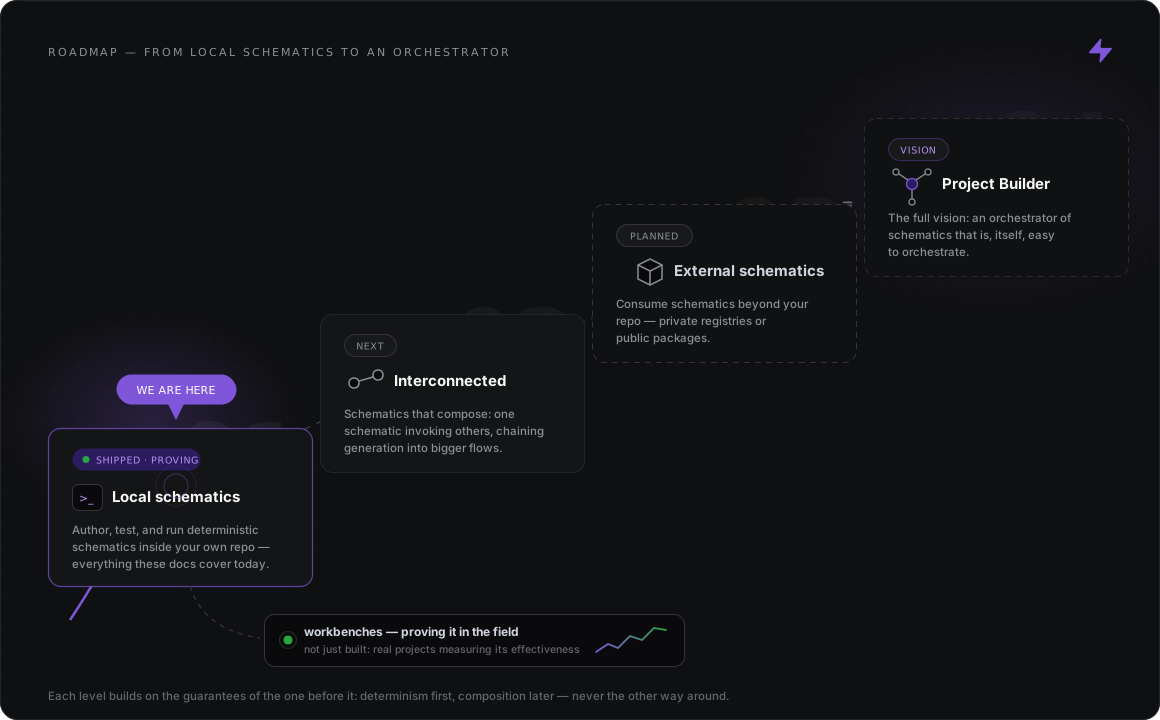
## Level 1 — Local schematics *(we are here)*
[Section titled “Level 1 — Local schematics (we are here)”](#level-1--local-schematics-we-are-here)
Everything these docs cover today: authoring typed, testable, deterministic schematics and running them inside your own repository. That includes the seven mutation verbs, templates, AST-aware dialects, and the in-memory testing harness.
Level 1 is built, and it is now being proven in the field. The [workbenches](https://hyperxq.github.io/Project-Builder-workbenches-/) are real projects running real schematics, and the next level starts only once they show that level 1 is *demonstrably effective*.
## Level 2 — Interconnected schematics
[Section titled “Level 2 — Interconnected schematics”](#level-2--interconnected-schematics)
Schematics that compose: one schematic invoking others, chaining generation into larger flows. The determinism guarantee extends across the chain: a composed run is still all-or-nothing and still reproducible.
## Level 3 — External schematics
[Section titled “Level 3 — External schematics”](#level-3--external-schematics)
Consuming schematics from outside your own repository: private registries for your organization and public packages for the ecosystem. Your team’s proven patterns become installable building blocks.
## Level 4 — Project Builder
[Section titled “Level 4 — Project Builder”](#level-4--project-builder)
The full vision, and the reason for the project’s name: an **orchestrator of schematics that is, itself, easy to orchestrate**. Generation pipelines span projects and teams, with the same guarantee that has held since level 1: the same input produces the same bytes.