
How it works
Mutating files reliably is the complicated part of code generation. Project Builder simplifies it by splitting the work across three parts with clearly separated responsibilities, two of which hold a conversation.
The SDK–engine conversation
Section titled “The SDK–engine conversation”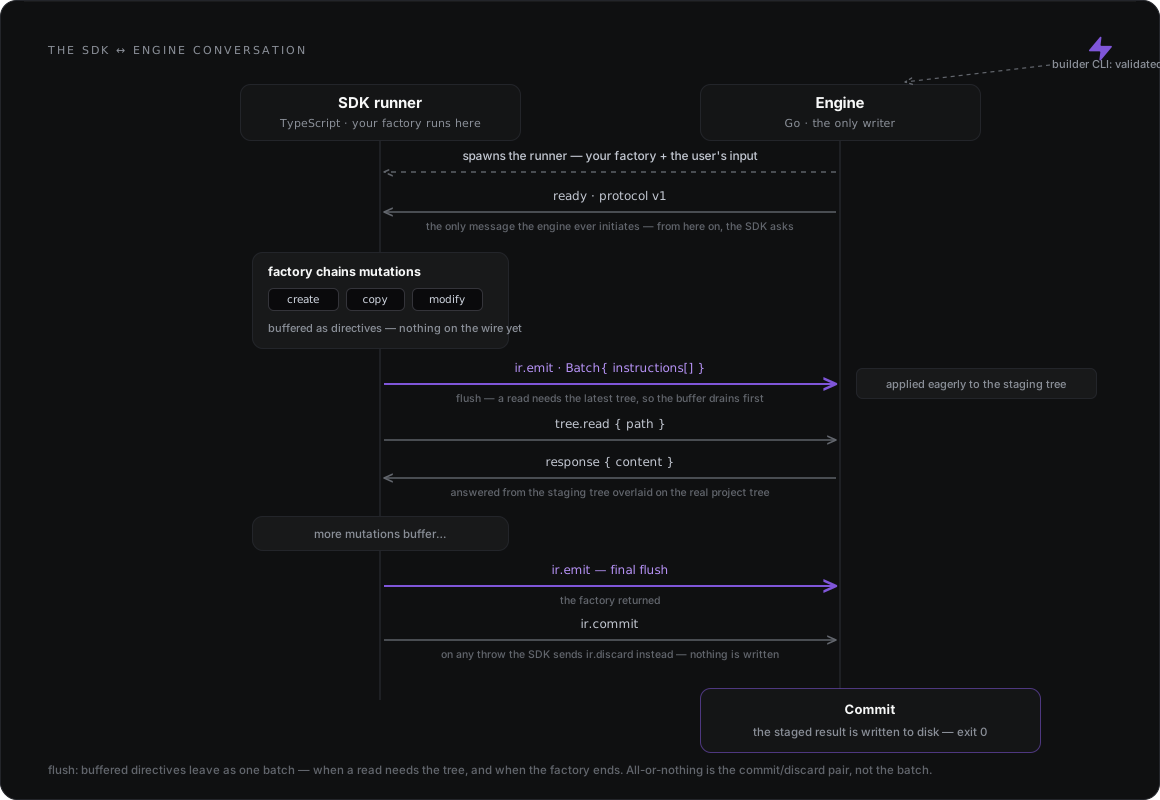
SDK — instruction records and developer experience
Section titled “SDK — instruction records and developer experience”The SDK (@pbuilder/sdk) has two responsibilities. First, it produces IR
(instruction records): JSON directives that describe what should happen (“create this
file with this content”, “move this one there”). Your factory never writes to your
project; it emits intent. Second, it owns the developer experience: typed
mutation verbs, templates,
dialects, and the testing harness. Together they make file mutation,
historically a painful job, feel simple.
The SDK and the engine hold a conversation. Directives don’t cross one by one: as your factory chains mutations they buffer inside the SDK, and the buffer flushes to the engine as a single batch at exactly two moments: when the factory finishes, and the moment you read a file. Flushing on read means a read always sees your own pending writes first.
Engine — applying the records
Section titled “Engine — applying the records”The engine receives those instruction records and applies them, with several mechanisms for doing so safely: everything lands in a staging tree while your factory runs, and only after the factory returns successfully is the staged result written to disk. The engine is the only component that writes, and a failed run writes nothing.
The engine is AST-blind and author-API-blind. It doesn’t know what a verb or a dialect
is; code edits arrive as final file content, ready to apply. Its one authoring job is
rendering {= =} templates against your inputs. Because of that, the
SDK surface can grow richer without the execution contract changing.
CLI — the agent-facing surface
Section titled “CLI — the agent-facing surface”The builder CLI is the front door: init, new, execute. It validates your
input, resolves the schematic, and starts the engine, which owns the run from there. The
CLI is deliberately designed for AI agents to drive: output comes back as structured JSON,
so an agent can run a schematic and parse the result like any other API.
The CLI works with two anchors: the manifest root, which every read (project-builder.json,
collections, factories, schemas, templates) resolves against, and the working directory,
which every write lands in. By default they are the same directory; --manifest separates
them (see External collections).
The AST story
Section titled “The AST story”As an extreme but useful simplification, writing software, day to day, is mutating files. And a file is just text; the extension is what gives that text meaning.
Seen that way, most mutations are simple: create, replace, move, copy treat the file as
text and never need to know what it means. The exception is modify. To change a file
programmatically you first have to understand it, and a program understands a
file through an AST (abstract syntax tree).
Every file type has its own parser library, and the ASTs they produce follow no shared convention. Left alone, every schematic author would have to pick libraries, install them, and learn each one’s tree shape.
The SDK solves this by centralizing the ASTs: it builds on those libraries and exposes
them as ready-to-use dialects: TypeScript, React, JSON, YAML and CSS today, plus NestJS and
Angular on top of TypeScript. HTML and dialects for Vue and Svelte are planned. You install nothing extra;
they’re already part of the SDK. When a custom edit needs the library itself, each dialect
exports it as astLibrary (see AST libraries).
The boundary stays clean: ASTs belong to the SDK. By the time an AST edit reaches the engine, it has already been lowered to a plain, ready-to-apply record; the engine never parses code.
Under the hood: an engine that speaks wire, not language
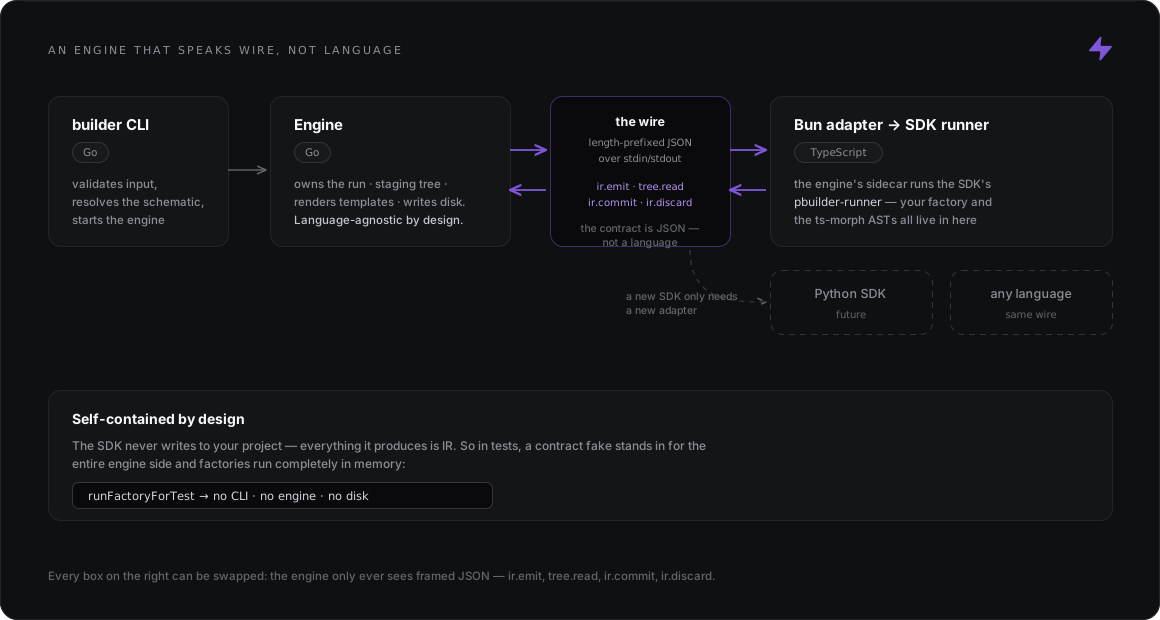
Section titled “Under the hood: an engine that speaks wire, not language”The SDK is TypeScript; the engine is Go. They talk through a deliberately thin bridge: the
engine runs a Bun sidecar through an adapter, and that sidecar starts the SDK’s
runner, the entry point that loads your factory and opens the conversation. From
there, everything that crosses between them is framed JSON on the wire: ir.emit,
tree.read, ir.commit, ir.discard.
Two properties fall out of this design:
- The engine is language-agnostic. It speaks only the wire protocol. An SDK in Python, Rust, or any other language only needs a new adapter; the engine, the staging tree, and the safety guarantees stay exactly the same.
- The SDK is self-contained. Everything a factory produces is IR, so the testing harness can stand in for the entire engine side and run factories completely in memory, with no CLI, engine, or disk. That’s why schematics are testable like any other code.
For integrators: how the runner receives input
Section titled “For integrators: how the runner receives input”This matters only if you build an engine or adapter that spawns the SDK runner yourself.
builder execute handles it for you, and there is no --input-file flag on builder.
The runner takes the schematic’s input from exactly one of --input <json> or
--input-file <path>. An input file must be a readable regular file containing valid JSON,
no larger than 10 MiB (10485760 bytes). Absolute and relative paths both work, and a symbolic
link is followed when its target is a regular file, even one outside the working directory.
The runner checks the input before it expects the host’s greeting and before it imports the
factory. When the input is rejected, the runner exits with code 1 and one line on stderr:
| Input | Diagnostic |
|---|---|
| A directory, named pipe or other non-regular file; a missing file; a broken link | pbuilder-runner: --input-file could not be read — <relative-path> is not a readable file |
| A file over the cap | pbuilder-runner: --input-file exceeds the 10485760-byte cap |
| Invalid JSON | pbuilder-runner: --input-file is not valid JSON (line L, column C) |
Both --input and --input-file |
pbuilder-runner: --input and --input-file are mutually exclusive — pass exactly one |
| Neither | pbuilder-runner: exactly one of --input or --input-file is required |
None of these is a factory or handshake problem: materialize the JSON into a regular file
(not a pipe or a directory) and, for a link, check its target. The runner’s input handling is
defined in the SDK source,
src/transport/runner.ts.
The runner is not a standalone generator: without a host speaking the protocol on stdin/stdout,
it stops at the greeting.